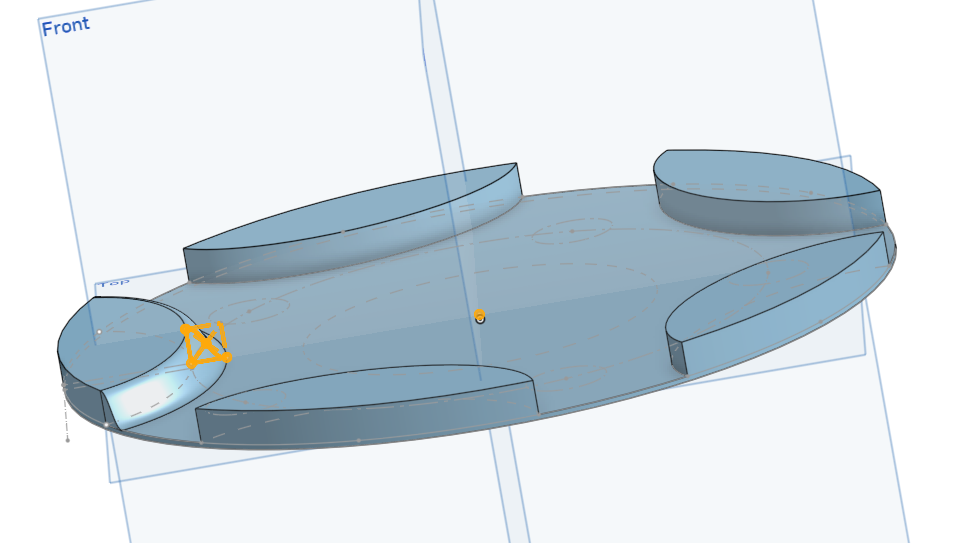
I want to copy this sweep to the other "islands"

I'm trying to copy this sweep to the other "islands in this extrusion but I am at a loss for how to do it.
Best Answer
-
Try a circular pattern with selecting the face. Or otherwise use the loft to create a new part, pattern that part and then boolean all bodies together.
You can always share your (public) document for people to go in and have a closer look at it.
0


Answers
-
Try a circular pattern with selecting the face. Or otherwise use the loft to create a new part, pattern that part and then boolean all bodies together.
You can always share your (public) document for people to go in and have a closer look at it.
0 -
Anytime you have a part or features that repeats, look to make one and use pattern features/part.
0 -
Ultimately I just manually copied the sweep. It was a simple geometry. I used the circle pattern on the islands and several other parts of the project, but I couldn't figure out how to get the sweep to apply to more than one island.
0 -
How about this: https://cad.onshape.com/documents/d08641ab0e713ff5fcf7639d/w/17d20a06505f7061fc9e9c02/e/3889c981aa2e5677397b2941
0 -
A general approach with something like this is make your island as a "new" part, not an "add" when you make its initial extrude. Then any features that belong to the island, such as the ogee edge, or anything else, gets done as an "add" to the island only, not to the base.
When you have the island as far as you can take it, do a circular part pattern of the island, and select the "add" option within the part pattern to union the islands to the base.
1 -
In this case, I would just build a fifth of the circular base with only one island on top, add all the detail and then circular pattern that whole thing 5x using the add option. Easiest approach by far, I believe.
0

