Exported drawing includes an outer box

I want to export a .SVG to use in my laser cutter. My workflow is to create a part, create a drawing of the part and export as .SVG. I am able to use a blank drawing template (remove all the borders and title block etc) but the exported .SVG still contains a box on the page limits. I have tried to remove in Inkscape but I always struggle with using Inkscape.
Is there a way to make Onshape not include the lines around the page extremity in the exported .SVG?
Or, can someone help with a workflow to easily remove this in a post processing step.
Thanks in advance
Answers
-
I think I found a workaround which will work.
- export .SVG
- import to LaserGRBL (or whatever gcode sender)
- save gcode
- edit gcode to remove A4 rectangle
- open modified gcode file and run
Convert this:
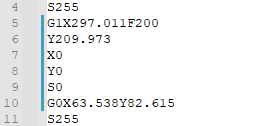
to this:
 0
0 -
Questions to the developers:
- Why is that rectangle present in the first place?
- What is it's intended use?
- Can we just not have it there?
- If it cannot be abandoned, could it be placed on it's own layer so it would be easier to filter out?
I have the impression it creates more trouble than it does good. If it is only about conveying the page border, this could be equally well be written as page properties in the SVG document.
Also, wouldn't it be a good idea to allow export of a single (or multiple selected) drawing views, as opposed to the whole sheet? Who wants to laser cut a a title block after all?
I'd love it. :0)
1
