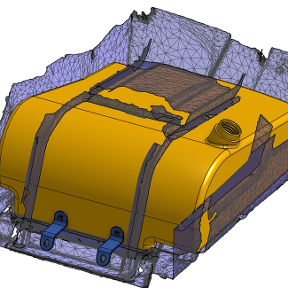
Create a solid part from Surfaces/Composite Parts

Hi all,
I have a surfaces/composite part model that I want to turn into a single solid so I can create cut outs.
Anyone know how I can do this?
File is below.
Thanks in advance
https://cad.onshape.com/documents/21b70d3354c4cef991db9e6f
Answers
-
This looks like something you would just create from scratch. composites don't play nice with boolean.
0 -
Here's a quick model of the hull. I'm not the best surfacer modeller so there is probably a more streamline way of doing this. I used your imported surfaces to create some planes and then created sketches to loft. You can add guides to the lofts to contour the shape better.
If you hide/show the imported surfaces you can compare the shape
https://cad.onshape.com/documents/a5d458376d9f7b4a13290eb5/w/bdefe9940a3fffb1ba76e295/e/acd4c1dd35ea0cd50a150951
There are some great tutorials in the Learning Center
0 -
The "constrained surface" tool might be able to convert the imported "mess" into some usable surfaces…
0