a unique asymmetrical chamfer

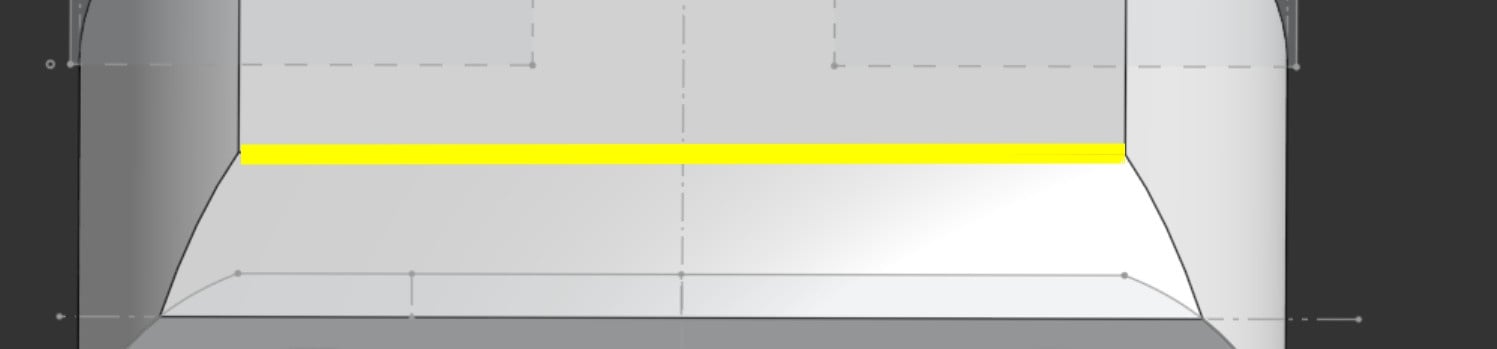
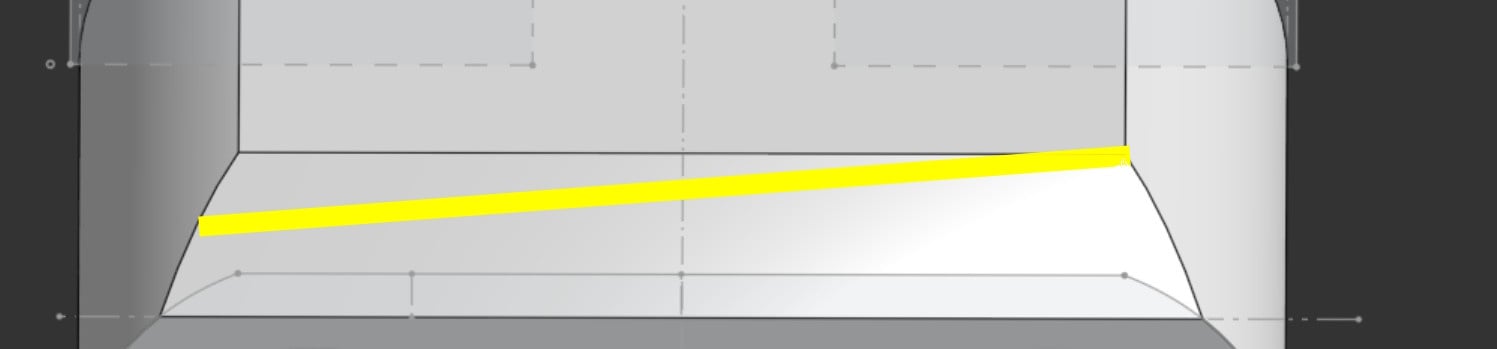
I'm aware of the 2 distances chamfer option, but I think what I want to do is different. I've attached pictures of the current chamfer I was able to create, and the one I want. As pictured, the desired left edge of the chamfer is shorter than the right edge of the chamfer, and the top edge is not parallel to the bottom edge. Suggestions on how to get a shape like this? I realize it may not be considered a chamfer any more; in any case I'm going for that geometry. Would be grateful for your guidance on how to make this happen.
current chamfer, note highlighted top edge.
desired chamfer, note top chamfer edge is not parallel to bottom chamfer edge
Answers
-
.
One way to do this is by creating a sketch profile on the left "Triangle A" and a sketch profile on the right "Triangle B" and using the Loft subtract to remove the lofted space between.Another way would be to draw a sketch line on the top of the part, similar to your yellow line, then loft it to a line representing the end of the current chamfer. Then you can split the part using the lofted surface.
.
▚▞▚▞▚▞▚▞▚1 -
another way would be to use the chamfer as designed like your first image and then use move face with the rotate option and rotate the whole face of that chamfer till you get the desired look that you want.
1 -
Much appreciated, I will try these approaches.
0 -
We need a "Chamfer to boundary" feature.
- Symmetrical chamfer to boundary (specify edge, 1 boundary on adjacent surface(s))
- Asymmetrical chamfer to two boundaries (Specify dege, 2 boundaries)
- Angled chamfer to boundary (Specify edge, 1 boundary and angle)
That is not uncommon in CAD. Maybe it's one for an Improvement Request.
The same goes for a fillet to boundary feature.
1