How to make multiple parts into one part?

In my project I have to fasten my Santa clause piece, which is in the super structure folder labeled Santa. However, I made a mistake while trying to color my Santa by making different parts of my Santa separate pieces. Now, when I try to insert my santa into my main assembly and fasten it to my structure, it only fastens different pieces, not the whole santa. How can I make my Santa just one part so I can insert and fasten it all in one? I tried to do a boolean but it did not work either.
https://lgsstudent.onshape.com/documents/0d55fbe1577b9bda9d26f88b/w/5d408885e9df9bd391e34ab9/e/c270ae0182686a4e56d8335a
Answers
-
You can either use a Boolean Union to combine all the parts together, or edit your features so that they are all set to Add instead of New, and check the Merge with All option. Also, I can't seem to access your document since it's on a private domain and requires logging in with school credentials.
1 -
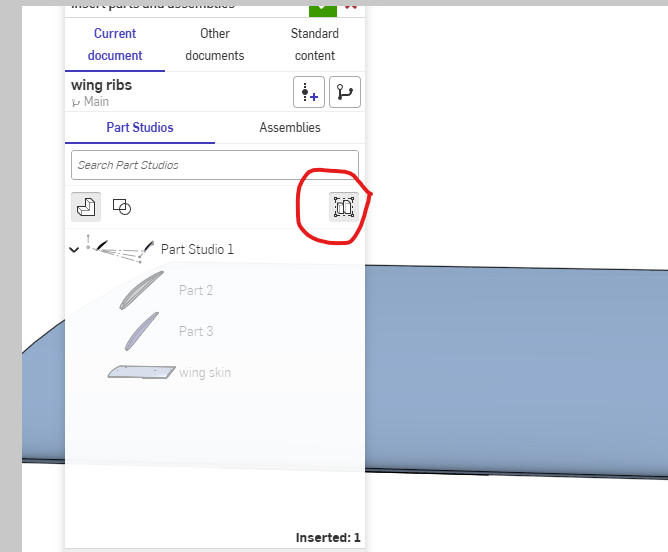
You can make your part into a composite and insert the composite as one part in the assembly. The parts can also be grouped in the assembly to make them behave as one. The composite will show as one part in BOM while the grouped parts in assembly will stay locked together but list individual items in BOM. Grouping can also be done during insert part and choose the group option and select top level part studio. Changes to parts studio within this grouping will auto adjust positions automatically.
BTW your document is not public and can't be viewed.
 0
-
If you want to keep the different colors, don't merge the geometry into a single solid. In Onshape, you can select all the Santa parts in the assembly and group them using a Group feature or create a subassembly containing all the pieces. Then insert that subassembly into your main assembly and fasten it to the structure using a single mate connector. A Boolean union only works when the parts have intersecting or touching geometry, so it may not work if the pieces are separate.
0