Extrude to a varied depth

Hi, Just wondering if this is possible..
so say I sketch a simple rectangle, when I extrude it solid, I get to choose depth of the extrude (default 25)
but I would like 1 end of the extrude to go the 25mm, but the opposite end to only go to say 10mm depth.
I tried the draft option, but it tapers in the edge and not the extrude depth..
so a rectangle 10mm x 50mm select the face and extrude .. it will evenly extrude say 25mm out from each edge, but I want it to extrude 25mm from 1 of the 10mm lines, and only say 15mm from the opposite 10mm line so creating like a wedge shape.. is that possible?
thanks
AJ
Best Answer
-
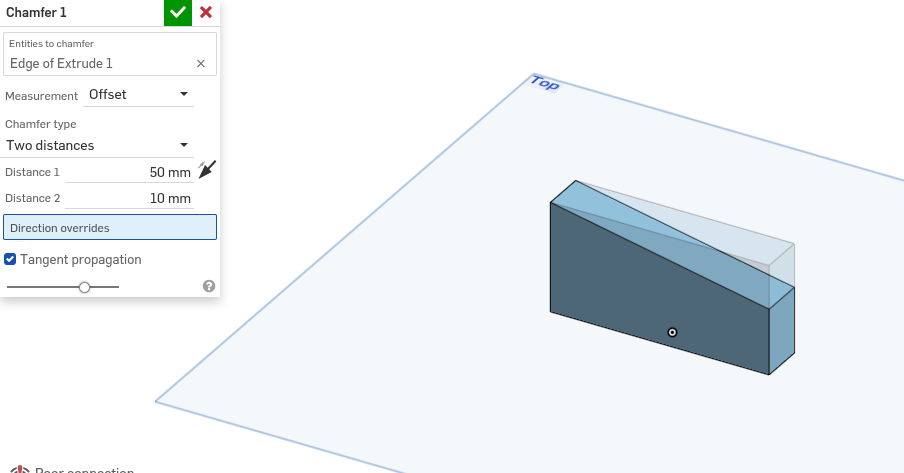
Extrude the rectangle 25 mm, then select chamfer on a 10mm edge. Put the chamfer type on two distances and select distance 1 to be 50mm(length of cuboid) and distance 2 to be 10mm (25-15, not the edge length)
An alternative is to just draw the wonky rectangle in a sketch perpendicular to how you have done it and extrude normally
0
Answers
-
Extrude the rectangle 25 mm, then select chamfer on a 10mm edge. Put the chamfer type on two distances and select distance 1 to be 50mm(length of cuboid) and distance 2 to be 10mm (25-15, not the edge length)
An alternative is to just draw the wonky rectangle in a sketch perpendicular to how you have done it and extrude normally
0 -
Here's a clue. You can sketch on ANY of the main planes - Top/Front/Right it's entirely up to you. Extruding doesn't always need to be UP.
Unemployed Onshaper- Operating on European time - More of me here ➤➤ https://linktr.ee/Liam.G0