Welcome to the Onshape forum! Ask questions and join in the discussions about everything Onshape.
First time visiting? Here are some places to start:- Looking for a certain topic? Check out the categories filter or use Search (upper right).
- Need support? Ask a question to our Community Support category.
- Please submit support tickets for bugs but you can request improvements in the Product Feedback category.
- Be respectful, on topic and if you see a problem, Flag it.
If you would like to contact our Community Manager personally, feel free to send a private message or an email.
Missing holes when printing the exported stl file?

Hi, novice here but getting there..
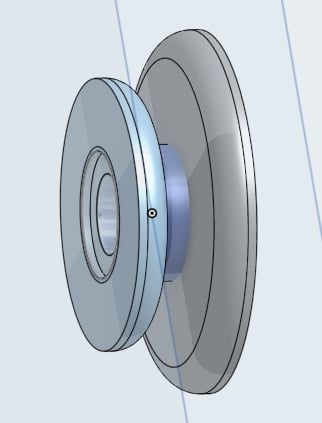
I design a simple pulley.. couple of circles with extrudes, centre and a hole.. also an imbedded washer extrude..
Part looks perfect in Onshape, exported stl good.. looks perfect on the printer preview..
But when I print it, it's a fully formed result, minus the hole and the washer cut-out?? not what the preview shows!
The hole is under the surface of one end (larger) (I poked through!) but other end is solid and the washer cut-out doesn't even crack a look!..
see pics..
What am I doing wrong for this to not print as displayed?
AJ
Answers
-
Sounds like "Exclude invisible parts from Export" isn't activated? I'd try to make ONE solid representing the actual part and export only that.
0 -
Ok, thanks for the reply.. appreciated..
So, found out (trial and error) that if I print the thing flat (either way up) the holes and washer cutout are missing..
BUT if I print the same file standing upright (on edge) or even at a 45 deg angle (with supports) the holes and washer cutout are present and print spot on.. ???
(of course I have to put up with the supports).. but prints as designed..
I'm thinking it's a bug in the printing app and nothing to do with Onshape after all..
I truly appreciate the assist though.. thanks guys.
AJ
0



