Welcome to the Onshape forum! Ask questions and join in the discussions about everything Onshape.
First time visiting? Here are some places to start:- Looking for a certain topic? Check out the categories filter or use Search (upper right).
- Need support? Ask a question to our Community Support category.
- Please submit support tickets for bugs but you can request improvements in the Product Feedback category.
- Be respectful, on topic and if you see a problem, Flag it.
If you would like to contact our Community Manager personally, feel free to send a private message or an email.
Improvements to Onshape - January 30th, 2026
Comments
-
I want Sheel Metal Fill now /s
4 -
I know that on iPad/iPhone we're supposed to use the iOS apps. However it seems like we're getting very close to just being able to use the web version. What I can't seem to get to work in iOS Safari on my iPad (latest iOS on M2 iPad):
- I can't figure out how to manipulate the rollback bar. I've tried tap, double tap, Apple Pencil… ?!?
- I can double tap with a finger to edit/open etc. but I can't figure out how to do get those things to happen with the Pencil.
- Onscreen keyboard entry seems like it needs an extra click to open. (I don't have a iPad physical keyboard, but I can probably set up a BT keyboard to test)
The Pencil is really cool with how you can hover and then click on sketch entities and drag them around (assuming they're not constrained.
I know Onshape doesn't usually comment on long term plans, but getting a full version of Onshape (including drawings and FS editing…) is really amazing.
Do we need different nav settings per platform? FWIW, I have 'Solidworks' as my preferences/mouse controls/view settings.Simon Gatrall | Product Development, Engineering, Design, Onshape | Ex- IDEO, PCH, Unagi, Carbon | LinkedIn
1 -
the great update lofted sheetmetal. 😀
1 -
This makes me so happy! Finally sheet metal lofts
1 -
This is really big update. thank You Team for such a great work! Now let me play with all that new stuff:)
1 -
Getting close. I am able to move the rollback bar using Continuity or a case that has a trackpad for now. It would also be nice to hide the app store banner.
Christian Petty - Mech. Design Engineer, Radian R&D1 -
@S1mon The changes with this release is to allow for graphics manipulation of a part or assembly, mainly set up for computers with a touchscreen. This is why using the feature tree and using a stylus isn't really working. There are future plans to implement full touch support across the software.
4 -
Fantastic. It's getting tantalizingly close already. I'm sure there will be a zillion little things to tweak, but it's great to see stuff moving in that direction.
Simon Gatrall | Product Development, Engineering, Design, Onshape | Ex- IDEO, PCH, Unagi, Carbon | LinkedIn
0 -
So Happy, sheet metal Loft has really rounded out Onshape for me now. Can drop the need for 2nd Cad package.
Now to continually improve on the features now.Awesome work Onshape Team!
1 -
What do you think we will get this time? ⏳️
I'm hoping for a clean way to use release management with configurable parts. 😉
3 -
@wayne_sauder ^high on my list. Want to be able to configure released configured parts in an assembly. We can only reference the released version at this point.
1 -
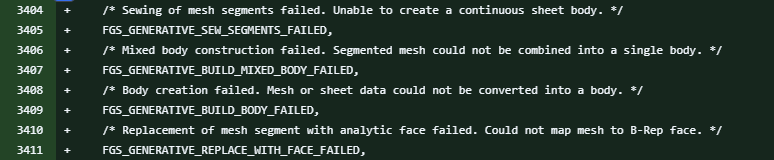
My wishlist is mesh to surfaces but like Fusion or Solidworks where you can select sub-patches of mesh triangles instead of the whole surfaces. Give me a reason not to have either of those softwares installed for .STL reverse engineering.
1 -
Uhmmm. If Derek gets his wishlist…. I don't know what I'll do with my RE process as I don't use SW or Fusion. Wonder if I should be.
1 -
I mean it's kind of a wishlist. Mostly I'm reading tea leaves in the diffs. I know the developers said not to read too much into the tea leaves but how can I resist when they read like this?
 3
3 -
Woah! where do you see that?
0 -
Javawizard Github Mirror version diffs. Click through to see the version by version changes.
2 -
There was a pretty significant bug repair with Move Face and sheet metal pieces that rolled out this update, and I'm really happy that it was fixed. However, minor bug fixes probably aren't showy enough to make the changelog. basketball stars
0