How to use SliderMate?

I am brand new to learning CAD, so please take it easy on me!
I've been messing around with various shapes as I'm learning OnShape, and came up with two separate parts; one with a male and one with a female dovetail extrusion, the idea being I can get the parts to slide past each other along this rail. Problem is, no matter where I click, SliderMate just doesn't seem to work. YouTube hasn't helped; every tutorial is some version of "click here, then click there". It sounds so easy, but I just can't get it to work!
Help! Please!
https://cad.onshape.com/documents/3b43f5650635e9833ffc19be/w/80ea5486fbfff2ceada9acbb/e/a880da4754ac2e7ede9bc2b4?renderMode=0&uiState=69a35c76b8679575b4a34657
Best Answers
-
Hi @dale_gaskill , here comes one possible solution:
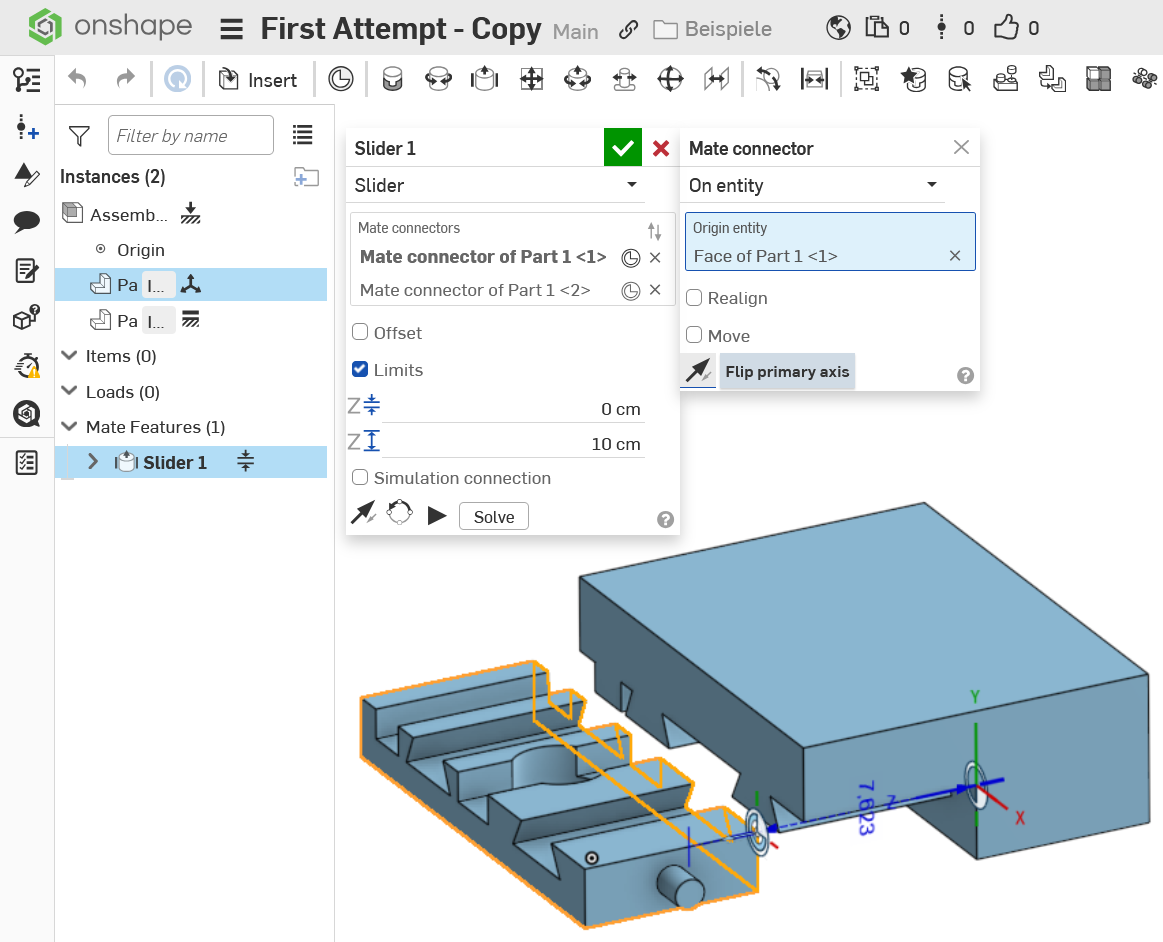
The trick is to figure out in which direction the two mate connectors need to be placed. Intuitively, they typically end up the wrong way around, but the Z-Axis must point away from each other in order to make the limits work. Just hit the reverse arrow for both of them until that happens, before you add limits. It is wise to place them at one end of the slide, not in the middle, to make applying limits (end stops) easier.
0 -
0

Answers
-
Hi @dale_gaskill , here comes one possible solution:
The trick is to figure out in which direction the two mate connectors need to be placed. Intuitively, they typically end up the wrong way around, but the Z-Axis must point away from each other in order to make the limits work. Just hit the reverse arrow for both of them until that happens, before you add limits. It is wise to place them at one end of the slide, not in the middle, to make applying limits (end stops) easier.
0 -
0
-
Thank you! I'I'd been selecting the wrong faces and had ththe Z axis pointing towards each other! I'm going to continue to play around.
Thanks!
0 -
Keep playing around. It is probably the only reliable way to find out how things really work. ;0)
0