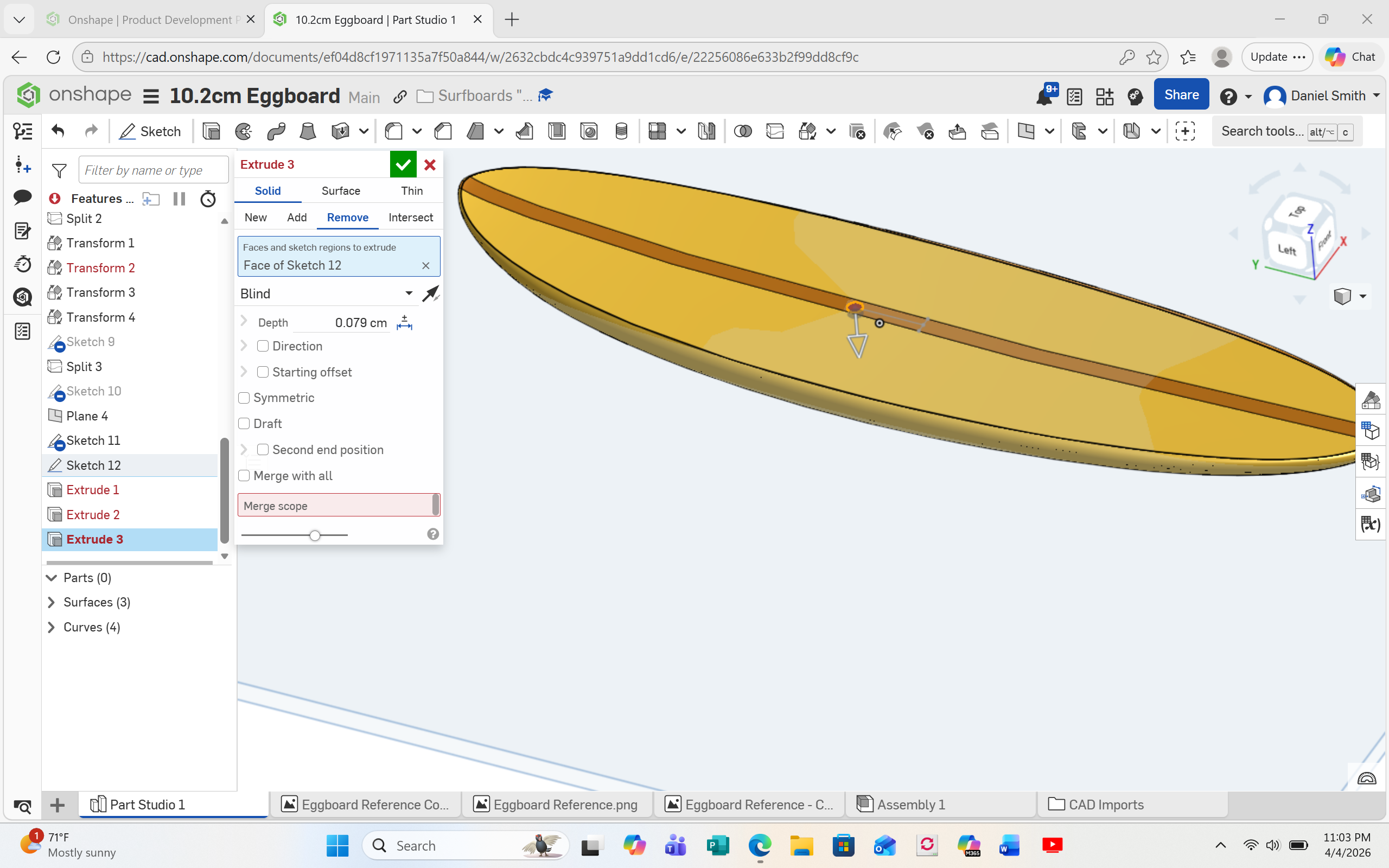
Extrude remove not working on some of my models

I have created 7 model surfboards in three of them i can extrude remove a circle hole to put in a magnet 1 cm forward of the midpoint of the board.. in 4 of the models, I cannot. The extrude turns red.
Best Answer
-
We all missed the fact that your board is not a solid part yet. You cannot extrude cut a surface model.
0

Answers
-
Would help if you shared a problem doc.
Engineering textbook: https://hwh.stephenteacher.com/txtbook.html0 -
Greetings Ste_Wilson
Hey thanks for reading my post. I have successively extrude removed a hole in 3 of the 7 boards I created. The other 4 are giving me this same warning. I think the program just doesn't recognize it in the right way, but I am at a loss as of what to do.
All the best
Daniel
0 -
If you can make your doc public and share a link to that then the clever people here will be able to trouble shoot it better. :)
Though from your screen shot you haven't chosen a merge scope. (red box). The merge scope is just what part do you want to apply this thing to. It doesn't feel like it makes much sense when you only have one part but when you have a multi part model it makes more sense.
Just click on the red box then click on the board.
Engineering textbook: https://hwh.stephenteacher.com/txtbook.html0 -
if it’s not what Ste_Wilson suggested. Then you might be running into non manifold error. Use the starting offset option to move the start of the hole above the board.
1 -
It's because you chose Remove option, but did not tell it what to remove from. At the bottom is Merge Scope, pick the surfbaord.
0 -
The Merge scope box is red, so try selecting the part(s) that this remove extrude should affect.
0 -
Greetings Ste_Wilson and other people helping me
I was away for the week, I just made the Egg Board document public but unsure how to post a link to it here
I tried extrude remove - merge scope however i was unable to select the board and the remove did not happen
same red error
I am a of a caveman here with regards to onshape so, i want to thank you for your time.
All the best , Dan
0 -
We all missed the fact that your board is not a solid part yet. You cannot extrude cut a surface model.
0 -
Do any of you know someone who would be willing to take on this project of 7 surfboards? For hire? I am trying to create prototypes for a game. Like I said 3 of the 7 boards I was successful with. I am in agreement that MDesign hit the nail on the head with the board not being a solid. I can share what I have already.
Thank you for your time everyone
All the best
Daniel
0 -
Make your document public and share the link. Someone here will have the answer.
0