Using configurations in variable studios

I was led to a trap. I kind of assumed I could have a variable studio drive several Part Studios and that I could later make configurations of the variable studio. Then I discovered to make configs I have to disable this Insert into all Part Studio feature.
For example.
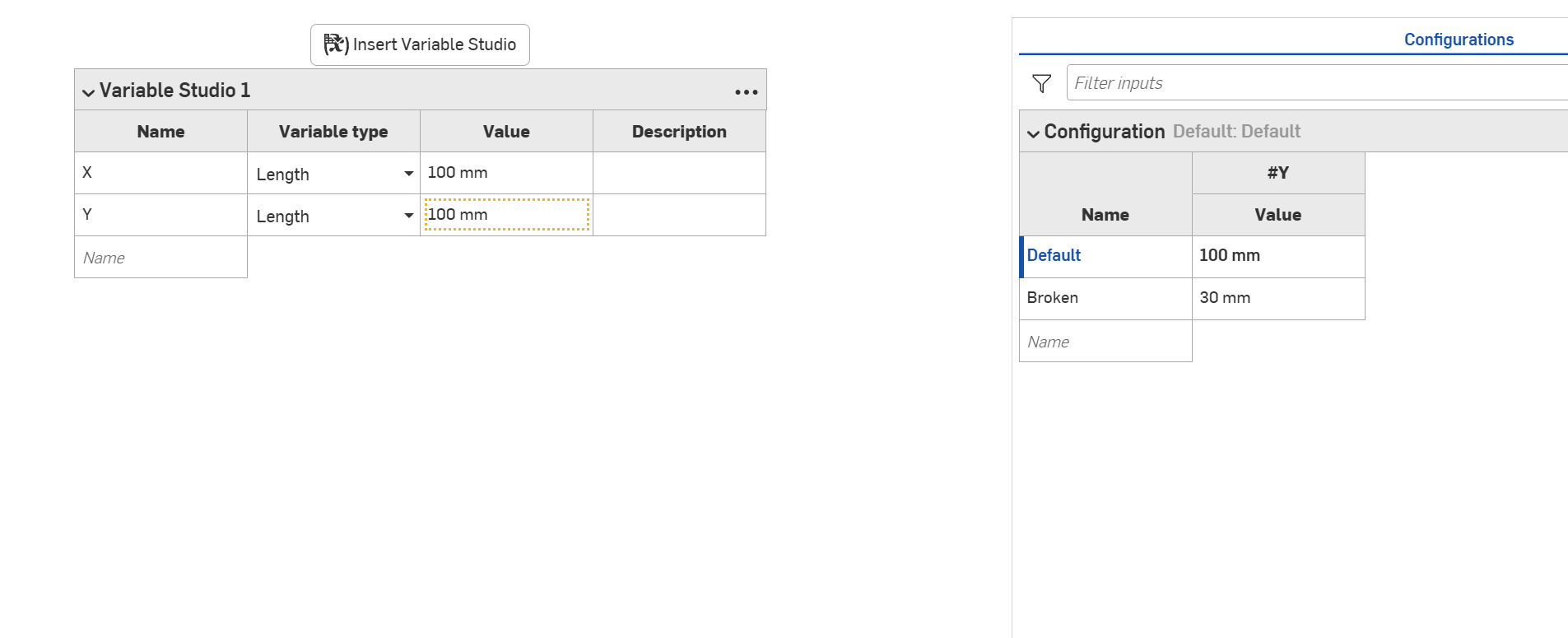
I have document I am trying to show the state between being broken or not.

I have 3 Part Studios that are being driven by this Variable Studio.
For my demonstration purposes I can delete the configuration table and just manually change the 100 to 30.
Is there a reason a configuration can't be inserted into all?
This seemed like an intuitive way of working and yet I'm trapped.
Maybe I'm missing some philosophy part of Onshape here.
Best Answer
-
@romeograham the reason we can't automatically add configured variable studios to all tabs is we don't know which config to add. Adding the default config would be wrong more often than not and we think a manual step is preferable to having the wrong variable values with no warning.
Ilya Baran \ VP, Architecture and FeatureScript \ Onshape Inc3


Answers
-
The only thing that is disabled is the Automatic insertion into ALL tabs in the document (all Part Studios and Assemblies).
Once you have a configured Variable Studio - you can then add it manually to all the places you need to use it (both Part Studios and Assemblies).
I have no idea WHY this is so, but have been able to use this method to drive configured part studios and assemblies - and you can (of course) configure which configuration of the Variable Studio in the Part Studios…
0 -
@romeograham the reason we can't automatically add configured variable studios to all tabs is we don't know which config to add. Adding the default config would be wrong more often than not and we think a manual step is preferable to having the wrong variable values with no warning.
Ilya Baran \ VP, Architecture and FeatureScript \ Onshape Inc3 -
I think @euan_dykes was hoping to be able to just change the variable studio configuration and have all the parts update to use the currently configured values. It's not an unreasonable mis-understanding but not the intended way this has been designed (i.e. you select what configuration is used at the point where you "import" it rather than "push" the configuration information to child tabs).
@euan_dykes, if that's what you wanted to do, the solution is to create two variable studio, one that has the configurations and isn't used directly in the part studios, and then another one that is automatically inserted and just import the configured one. If you edit the imported one to change which configuration gets imported, then you will get all the part studios to update. The downside is that you don't get a configuration input to select from.
1 -
@eric_pesty that's a good idea, to "chain" the Variable Studios that way.
0 -
How I ended up in this dead end. It's an unusual design project to start with. I'm reverse designing an existing product, that is going to be subject to many configurations. Putting the variables in a VS made sense, I assumed I'll make configurations later once I have a model. I kind of wanted a master VS table that pushes the vars to each part studio. It just seemed a Onshape way of doing things. It's a robust modelling exercise too. So the part studios are quite passive to the VS vars changing.
0 -
@euan_dykes I think Eric nailed an implementation that does what you expected to see. Here's a demo of the result.
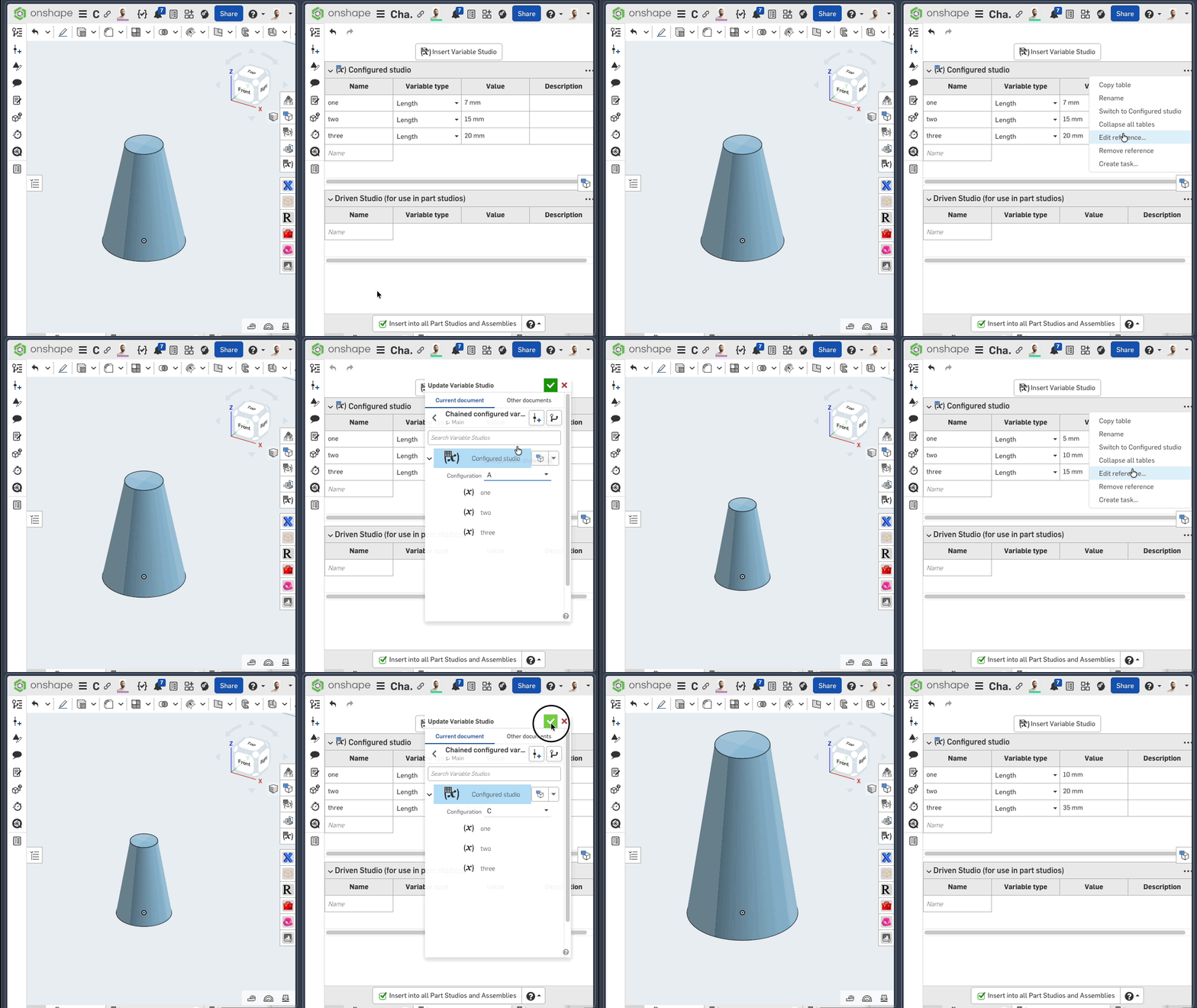
Note though, that a better way for releases would be to configure which variable studio is inserted at the part studio level, which is exactly the intent that Ilya alluded to. Otherwise Onshape can't recognize these three variations as different parts. More legwork to set up, but a preferable outcome.
0 -
@ilya_baran then what would the "proper" way to control configurations across multiple part studios at the same time? I can understand needing to select a configuration when referencing in a different document. But I don't understand why you can use the current configuration of a variable studio within the same document. The chaining work around that @eric_pesty came up with is great but its kinda silly that we need to in the first place. Surly we could just check a "live update" box with a warning pop up explaining the risks.
0 -
I think that depends on what exactly is meant by "control configurations across multiple part studios". If I understand Eric's explanation correctly, you want to have unconfigured part studios referencing variables from the "current" configuration of the variable studio. The problem is there is no persistent concept of "current configuration:" you could have two browser tabs open looking at different configurations of a variable studio (or part studio or assembly for that matter). Eric's workaround deals with that by relying on the import configuration of another variable studio, which is persistent and the same for everyone.
But it also raises the question of what are you trying to design? If you're trying to design one part, why do you need variable studio configurations, or at least, why do you need to vary them? If you are trying to design multiple part variants (think same part studio, different part numbers), you want configurations in the part studio. Then they can control which configuration of the variable studio is used (we're working on something to simplify setting that up).
Ilya Baran \ VP, Architecture and FeatureScript \ Onshape Inc0 -
I think the best workaround is to have a "master" document with a variable studio. Then make documents per design concept, that reference in that "master" variables. This is better because you have a document version per design concept. The "master" could server as a design brief document, because quite often the brief will change slightly during the design process. As long as all these docs are in a project folder, it's all contained anyway.
I think there's still a legacy lag of file-based thinking that leads to the belief that 1 doc many concepts is an easy way forward in Onshape, then you discover these pit falls.0



