Welcome to the Onshape forum! Ask questions and join in the discussions about everything Onshape.
First time visiting? Here are some places to start:- Looking for a certain topic? Check out the categories filter or use Search (upper right).
- Need support? Ask a question to our Community Support category.
- Please submit support tickets for bugs but you can request improvements in the Product Feedback category.
- Be respectful, on topic and if you see a problem, Flag it.
If you would like to contact our Community Manager personally, feel free to send a private message or an email.
How can I add seam allowances in duct designs without collisions?

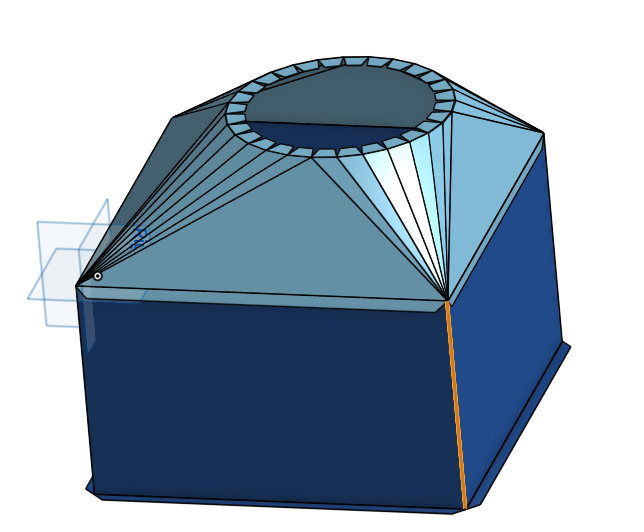
I am designing a bunch of ductwork parts for 24ga sheet metal for hand assembly (not welded), and I can't figure out how to add seam allowances for something like a Pittsburgh seam. In a flat layout, I'd just add 1" on one side of the rip joint for the pitt and 1/4" on the other side of the rip for the flange. But when the duct is designed in 3D, I can't add these allowances because it will cause collisions.
For example, in this model, the seam highlighted in yellow is a rip. They are free ends when flattened and will be joined after folding. I need to add 1/4" 90 deg. flange on one vertex and a 1" allowance for the pittsburgh on the mating vertex. Similar for the slip & drive seam between the light blue lofted taper and the dark blue enclosure faces.
Any suggestions?
Answers
-
Add the allowance as flanges in the 3d but position them so they don't collide with the neighbor by aligning them to the inside face or outside face of the cube.
0 -
That's essentially what I've been doing. It would be nice if there was a way to do it without the extra bends and/or automatically (e.g., a rip joint type for "pittsburgh" that adds the flange and pitts allowances to the sheet metal layoiut automagically), but for now, adding a flange with a bend usually works. Thanks!
0
