Welcome to the Onshape forum! Ask questions and join in the discussions about everything Onshape.
First time visiting? Here are some places to start:- Looking for a certain topic? Check out the categories filter or use Search (upper right).
- Need support? Ask a question to our Community Support category.
- Please submit support tickets for bugs but you can request improvements in the Product Feedback category.
- Be respectful, on topic and if you see a problem, Flag it.
If you would like to contact our Community Manager personally, feel free to send a private message or an email.
Annoying feature.

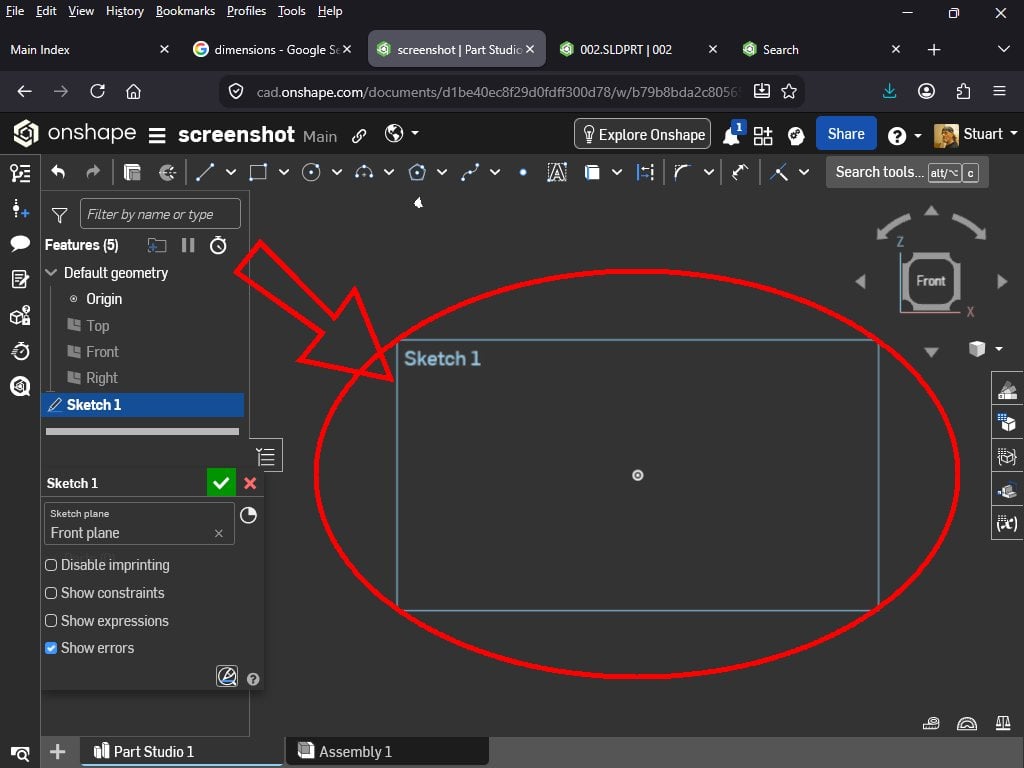
Can somebody PLEASE tell me how to get rid of this damn blue box?
Best Answer
-
There is no way to hide it or resize it. It resizes itself automatically based on how big the sketch is. Its not the normal planes that can be resized or hidden.
1

Answers
-
The damn blue box is your friend. You may resize it, though, in case it is the wrong size, which sometimes happens when doing real small things.
3 -
The blue box is just a visual representation of the plane you are sketching on. It's only visible while you are editing a sketch.
1 -
So you are telling me that there is no way to hide it? I understand its functionality and I can see that it is intended to be helpful, but I find it to be distracting as hell. I'll try the the "resize" option and see what happens…
0 -
There is no way to hide it or resize it. It resizes itself automatically based on how big the sketch is. Its not the normal planes that can be resized or hidden.
1 -
Pretty much what I figured. Thanks for the input.
0

