Should Configurations be only used together with Release Management?

There's a new fantastic video of the great @EvanReese on YouTube > link
1 year into my journey with Onshape.. I have ups-and-downs of loving configurations or wanting to avoid them.
When I save a version of document with a configured Part Studio, only the configuration logic is saved.
If I use the part in different assemblies, the instance is what saves a specific permutation. This state is saved in a version of the document holding the assembly.
If I want to look up how this part looked like in the past, I can't see this by opening the part document. Right? I can only answer the question by opening de version of the assembly it was instanced into.
Is this the only way?
Does someone have a tip for my "traditional file-based CAD mind" so that it feels less counterintuitive. Is the answer "Releases"? (These seemed to formal for me, I'm still avoiding this)
Thanks….
PS: I've consumed a lot of posts and videos about this.. I just can't wrap my mind to it. 😫
Best Answers
-
Release management has a lot of options about what is or isn't required. You don't have to have someone approve a release. You can just release your own thing. If a release has a problem, you just create another one. Revisions are free. Even if I was the only one working on something, I would use it every time anything is 3D printed or somehow leaves Onshape for prototyping or quoting or whatever.
Simon Gatrall | Product Development, Engineering, Design, Onshape | Ex- IDEO, PCH, Unagi, Carbon | LinkedIn
1 -
Couple more thoughts:
Maybe configurations aren't the best tool for what you are doing if you are not creating a "set" of geometry. In your example it would make more sense to use a "regular" variable for the length instead of a configuration. If you need to suppress stuff you can put the related features in a folder and just suppress it, no ambiguity as to what you sent. You can even use "true"/"false" to control the suppression state of a bunch of things at once instead of a configuration check box.
You also mention in context editing and that doesn't mix very well with configurations. It's not that it can't be used but it adds some complexity and potential for errors.
You could make a "policy" that you only send an assembly to the customer. Even if it only has the one part in it. Basically "save" the specific configuration to an assembly in trad CAD speak!
You could also use the super old school method of using a drawing instead of an assembly to "save" the configuration.
Lastly, if you want to keep your revision increment steady, you can obsolete a release and re-release at the same revision if you need to fix the typo you found 5s after hitting release…
0


Answers
-
I am still trying to decide if I am missing something but, I have not found configurations and release management to work together very well. Whenever you release something it locks the configuration.
0 -
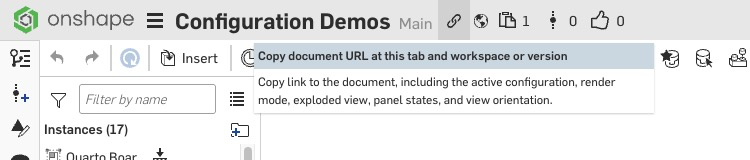
@hoolito Thanks for dropping the video here! Something I should have mentioned, but I think I didn't in the video, is that if you click the link icon to copy the URL, it adds a bunch to the URL. When the person opens it, it takes them to the exact configuration that you were looking at. It even gets camera angle, graphical settings, whether or not you are in context, window mode, etc. If you want to keep track of how it looked in the past, you can copy that URL and put it somewhere, and then always get back to it in that state.
 1
-
Thanks both for the contributions.
Evan, yes I had forgotten the URL trick. But I think “writing that somewhere” is not a workflow many people usually follow or is it?
I’m used to save the status of a part in NX by just making a copy of the component and a date suffix to the name. I can refer to that and compare with the current stat later any way I want.
I learned Onshape does that with Versions.
But it’s just: I can’t use versions with configurations! Versions seems to be saving everything except the configuration.I’m asking how to track the changes over time, specifically for the case of configurations
0 -
Yes, we are starting to dive into configurations and have been confused with this, specially with the Onshape premise that Versions are immutable… I guess it doesn't apply to configuration references
Adrian V. | Onshape Ambassador
CAD Engineering Manager0 -
Oh boy, this is a fun one.
The key thing to think about is that configurations are meant to define the logic for multiple sku's of a single product (part, assembly) moving forward, meaning that if you look through your Onshape versions and history, you'll be able to access each of those configurations at each point in time.
As a result, you're totally correct: versions preserve ALL configurations (and the configuration logic), which is a positive because you aren't losing any of those options over time.
If you want to specifically call out one of the configuration options, then a Release is a great way to do that. Releases in Onshape are configuration-specific: if you release the Tall, Narrow configuration of something, that release package would only contain that permutation of the part. And then it's easy to insert an instance of that specific configuration into other assemblies, because it is the only configuration released.
The confusing part is that the point in time of the release would still have all of the configuration options (because it's both a Release and a Version), but the Release itself calls out the target part/assembly.
So if you're looking to make a single configuration stand out, be more findable (both in history and for other assemblies), then yes, releasing the target configuration would absolutely store that specific config and make it accessible.
If you're just using configurations to handle different design ideas/concepts and want to easily delineate them, you might be better off using branches to handle those iterations. Branches = concept iterations, Configurations = multiple permutations moving forward together.
1 -
It sounds like in this case, OP does want to lock the configuration with the release, to designate it? But I hear you that configurations and release management need to continue working better together. It's an important area for sure moving forward.
0 -
Another way to extract a specific configuration of a part(s) would be to derive the part into a new part studio and use this new part in your assembly.
You can still edit the drive feature to change the configuration of the part but that would be recorded in the versions.
2 -
I think @Kevin_Cowles is onto something here.
@hoolito they key question for me to be able to help you is not how to make configurations work for you, but: What you’re actually trying to achieve?
Can you please expand on the part studio, and why you have configurations in it?
What’s the part for?
And, what changes do you want to look up from the past for the part?Why I’m asking is that to me, your request for a tip; “Does someone have a tip for my "traditional file-based CAD mind" so that it feels less counterintuitive.” does make it seem like the answer to your question is not actually configurations. But getting to the next level of version management using git workflows may help make things click.
0 -
Yes Eric, I tried this a while. But then editing in context becomes limited in the way that you only can edit the configuration, and not with sketches in the configured PS. This trade-off was too big for my case.
0 -
@Kevin_Cowles your post is very clear. I admit I should study Releases soon, but if I'm not mistaken, so far I dug in Onshape training and documentation, Releases is presented as optional to apply. And for me and my clients, it seemed too structured and rigid an implementation, so I was avoiding it.
I'm leaning to understand it might be required for fully exploiting configurations (?)
But you close your post with a second application for configurations (exploring) and the video of @EvanReese proves there are a lot of clever and creative ways to use them.
@wille_j you are probably exactly right I'm looking to "get the next level of version management using git workflows may help make things click." I'm sure this is a question of mindset. I'm sure no one is releasing things all the time just to use configurations.
I'm probably struggling here to formulate a concise question, so thanks for the extra effort in trying to understand :-)If an example makes it clear: https://cad.onshape.com/documents/04d4c7d29d92443694255305/w/b0798bb4ceb4eaaa5d41c324/e/662d0a134e4829558dbbb9b2
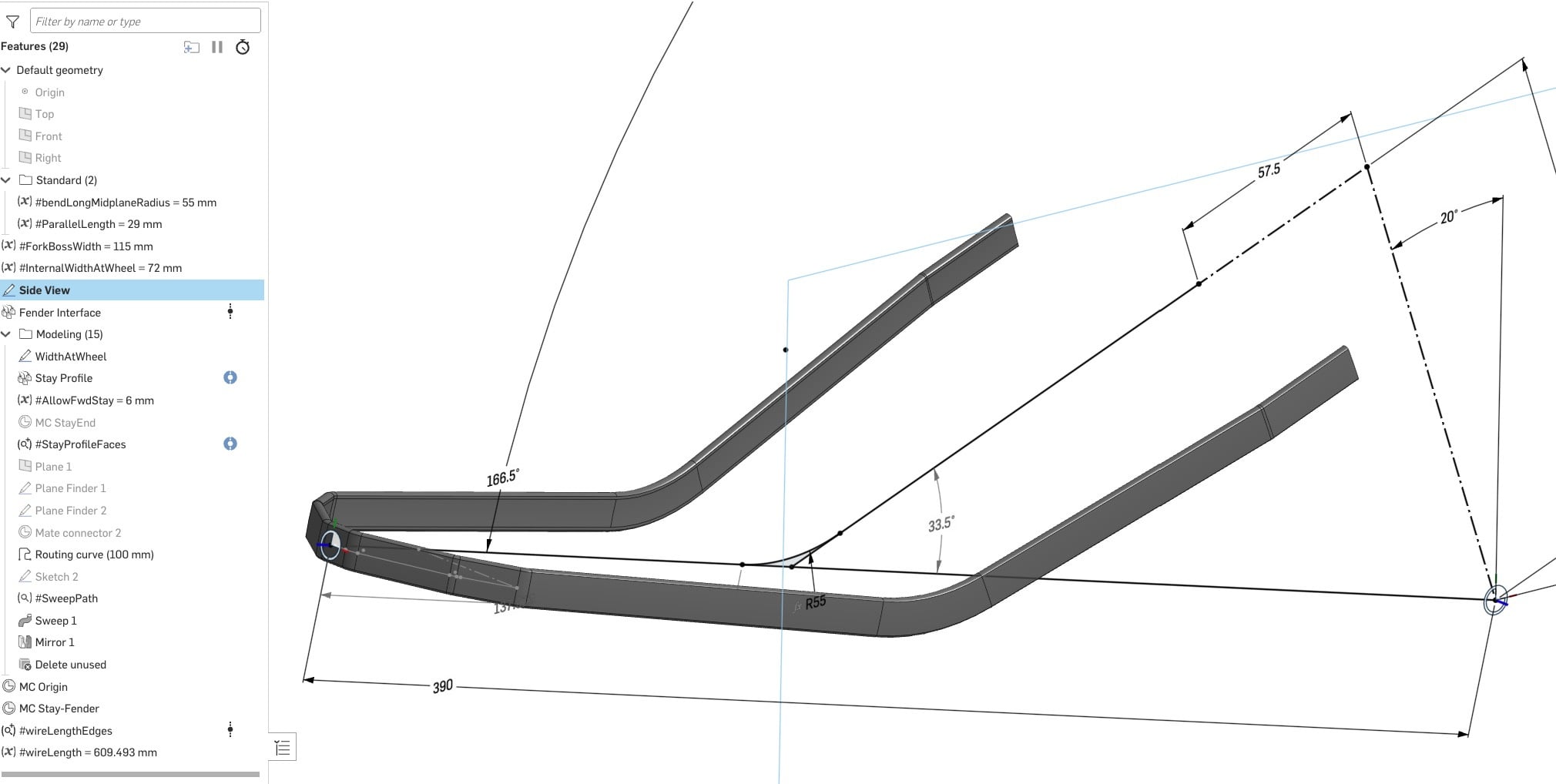
This is a seed file I created for a bicycle fender stay made with flat stock. Imagine 5 to 10 different per week are created of these, for completely unrelated bikes (my client sells custom fenders to bike brands)
So now I "Copy Workspace" to each new project and edit to the specific fender-fork-etc.. The project doc has an assembly with reference geometry, and I insert the stay and adjust it to fit (mostly driving sketches). My idea being that versioning the stay, is enough to keep track of changes throughout the dev cycle (3D approval, fitting sample, changes etc…)
I don't know if this is a best practice. But without configurations, it kinda works.
But: This is not the only topology of stays, and this was what I was trying to use configurations for. You have them with/without holes at the ends, with/without the parallel bend at the end, with opposite direction of the big bend, inside/outside the fender, with welded studs or center holes………..If I add a checkbox "slothole true/not true", where is the history of changes of this toggle saved throughout the development cycle?
PS: Probably using the MCP server to create a "Stay" FS will fix this specific problem, because I would only be changing parameters of a feature, which does get saved in a version.
But I'm sure this thread is helpful anyways.0 -
This is a pretty common workflow to the point where we added a tool into Renaissance to do help do exactly that. It lets you create a new part studio with the current configuration derived into it.
www.smartbenchsoftware.com --- Renaissance --- Kestrel -- SmartLink
Experts in Onshape Automation - Custom Features and Integrated Applications0 -
I would highly recommend using Releases. There's a little bit of work, but it's not that complicated. It makes it explicit which configs are actually a released thing.
Simon Gatrall | Product Development, Engineering, Design, Onshape | Ex- IDEO, PCH, Unagi, Carbon | LinkedIn
0 -
So I had a part that had about 20 configurations. I finished the design and released all configurations at once. Great, everything worked like I thought it would. Later, I went back, modified one part, and released the modified version in the main branch. The whole configuration table disappeared; I almost had heart failure. (Thankfully, there is the version timeline) (Edit: Now, times this by editing and releasing all 20 configs at various times over a period of a couple of months.) This was a couple of years ago, and I have since worked through a couple of similar situations in various ways. Because of this, I really hesitate to go heavy on configurations, especially if I think the parts might fall under release management in the final version. How are others working through this? Is the derived workflow the way to go? (I haven't tried that much) Branches get messy with any large number of configs. Also, with any method, can you keep it clean enough to explain to a future designer, or if you walk away from the project and then 5 years later the client asks for somthing that is back there somewhere, can you find it? I like the idea of configs for exploring, but I struggle to know how to move past that when the pressure is on (hours or, at best, a day or so), and some type of management is needed.
I recently spoke with another industrial designer who runs a different CAD system, and he said he avoids release management workflows. In the file-based system, whenever he presses Ctrl+S, it timestamps his files, and that timestamp appears on his drawings. That is the only "rev" he provides for his clients. I've thought about implementing something similar in Onshape, but I haven't figured out how yet. And I don't think this necessarily fixes the issue.
@hoolito Sorry if I'm hijacking your thread. Based on my experience with configs and release management, and what I understand of your question, I expect your comment, "it seemed too structured and rigid an implementation," is exactly how you would find it. I may not be seeing or understanding everything.
0 -
It's not clear from your example how you are using configurations or contexts. Good point about the context editing not working if you derive the configuration of the part…
I do wonder if in context editing is the right thing to do in this case. You might be able to go "the other way" and derive some geometry into your design part studio created through an intermediate in context studio. But it does add extra steps…
Based on what you are describing, it does seem like custom feature(s) could help your workflows a lot as you seem to be designing the "same thing" over and over. You could really shorten your feature tree with some custom tools.
0 -
We use the workflow that Eric and Caden are talking about:
Design studios are configured, with lots of construction geometry (surfaces, curves etc).
We derive each configuration of those parts into their own Part Studio (not configured!).
THAT is the part that receives part numbers, appears in drawings and assemblies, and is released.
We (almost) NEVER release from a configured Part studio because of the challenge to find the correct part later (and many of the challenges others are highlighting here).
With each Released part in it's own Part Studio - there is a bit of extra work up front - but the documents are WAY more friendly to future you, and to your colleagues. If you have a part with transformations (flat pattern, punched, bent) then you'd have 3 separate part studios, part numbers, and released parts.
For us, this gives us the incredible power of configurations of Onshape, but also the (relative) simplicity of other File-based CAD systems.
0 -
@S1mon thanks.
Though It's not the difficulty but rather the strictness. I don't have "approval chains". A Release doesn't allow even a typo. Onshape made it so for auditing work I guess. I feel you need to go over a QC checklist to avoid forgetting anything. I don't see me using it for anything other than the final-final-final mass production version.
Unless Onshape makes a "Non-strict" toggle in the Release Management settings, where they let me just edit after a change. Please don't kill me!, I know this is Onshape heresy. But in a file-based CAD you would just re-save your not-yet-distributed file.0 -
Thanks for the community engagement for this thread.
I guess I found a concise simple way to ask what I need to know:Take part A with length configured.
Oct 1st it is sent to a client with L=100mm
Oct 5th length is revised to 105mm
Now is 110mm on Main.
How can I recall the length it had on Oct 1st or Oct 5th if Part A was never in an assembly?0 -
Release management has a lot of options about what is or isn't required. You don't have to have someone approve a release. You can just release your own thing. If a release has a problem, you just create another one. Revisions are free. Even if I was the only one working on something, I would use it every time anything is 3D printed or somehow leaves Onshape for prototyping or quoting or whatever.
Simon Gatrall | Product Development, Engineering, Design, Onshape | Ex- IDEO, PCH, Unagi, Carbon | LinkedIn
1 -
While this makes sense it is still a workaround, what would the approach be for Configured assemblies and sub-assemblies?
Adrian V. | Onshape Ambassador
CAD Engineering Manager0 -
Agree Simon. This affirms the title of this thread. I'll need to lose my fear, then.
And worse: accept mass production will be made with Release "41" after all the times I needed to correct oversights 😂.I wanted to confirm ways around Releases didn't exist.
Thanks!
0 -
Couple more thoughts:
Maybe configurations aren't the best tool for what you are doing if you are not creating a "set" of geometry. In your example it would make more sense to use a "regular" variable for the length instead of a configuration. If you need to suppress stuff you can put the related features in a folder and just suppress it, no ambiguity as to what you sent. You can even use "true"/"false" to control the suppression state of a bunch of things at once instead of a configuration check box.
You also mention in context editing and that doesn't mix very well with configurations. It's not that it can't be used but it adds some complexity and potential for errors.
You could make a "policy" that you only send an assembly to the customer. Even if it only has the one part in it. Basically "save" the specific configuration to an assembly in trad CAD speak!
You could also use the super old school method of using a drawing instead of an assembly to "save" the configuration.
Lastly, if you want to keep your revision increment steady, you can obsolete a release and re-release at the same revision if you need to fix the typo you found 5s after hitting release…
0 -
Very useful @eric_pesty. It helps me with this particular part! I like “trad CAD” 🤣
I admit that in NX I never used configurations (wouldn’t know if they exist).
But in Onshape they are so powerful and accessible and the UX is good, that they are tempting.
I’ll give Releases a try as they might end up being a better fit for errors after all, since you can indeed obsolete one (unlike a version)As a final thought: it’s a pity there’s no way to track historic states of a configuration parameter. Maybe this is a case for new functionality.
Cheers!0 -
Configured assemblies - we do the same thing: each Asm or SubAsm that is the result of a different Config would be a separate asm - with each component instanced in the correct configuration.
Not really ideal - but unless a thing is truly reconfigurable (adjust the angle of this door and it's now a new part) it should be tracked as a separate part number. It's definitely more work to set up at the beginning though.
This is for simple, small assemblies.
For larger assemblies (automation etc) it can be a little more work.
One trick could be to set up a configured assembly - set the correct config of all the components - then duplicate that assembly tab as many times as needed. Then set each one to a different configuration - and delete the Configuration tables! This will give you a non-configured assembly in each tab - that you only had to set up once.
For us it makes the documents easier to understand down the road.
0