Custom Feature: GD&T Form Zones

kate_leipold
Member Posts: 17 EDU
GD&T Visualization Feature Scripts
GD&T Form zones | GD&T Zone Visualizers Manual.pdf
Overview
Custom Feature Scripts to visualize GD&T tolerance zones in an Onshape Part Studio.
Purpose:
- support teaching and conceptual understanding
- make very small tolerance zones visible
- show that form controls do not lock the zone's orientation, location or size
Shared Features
Every form control feature has:
- Simple / Custom tabs
- Simple: the zone sits on the ideal geometry (±½ tolerance)
- Custom: adds adjustments that show how the zone can vary with the actual geometry
- Drag handles (arrows) on the model, in addition to the typed values
- Shift and size handles move in steps of 1/10 of the displayed zone width (e.g. 0.010 at 5x → 0.005 steps)
- Tilt handles lift one end of the zone and move in 0.5° steps
- Display Scale (1x, 2x, 5x, 10x): exaggerates the zone only
- an info message appears when the scale is above 1x
- Feature names read like a feature control frame, with the icon as the symbol cell:
|.010| Flatness,|.010| (5x) Flatness,|.010| (5x) Flatness DMP,|⌀.010| Straightness DMA- no units: inch values drop the leading zero (.010), mm values keep it (0.25)
- See-through part (Custom): makes the part 30% opaque so the zone is easier to see
- shown in both modes, and on by default, for a derived median plane or axis
- the part stays see-through while the box is checked, including in assemblies
- alternative: right-click the part → Make transparent (display only)
- Named zone bodies, tooltips on every setting, a GD&T symbol icon, and a description image with a callout shown when hovering in the Custom features menu
- Selection filters so only valid faces or edges can be picked
- Zones only: the features add surfaces, not GD&T callouts (Callouts show below were created with MBD)
Current Capabilities
Flatness
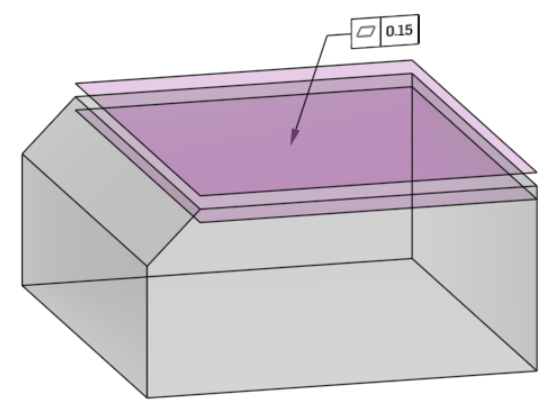
- Planar face → two parallel surfaces (±½ tolerance)
- Derived median plane (DMP): pick both sides of a tab or slot → two parallel surfaces around the plane halfway between them, reaching 10% past the edges
- the ideal median plane is drawn too; Onshape lists it as "Plane 1" (a custom feature can't rename it), so the feature name ends in "DMP"
- Custom: Tilt 1, Tilt 2, Shift
- Color: Purple
Straightness
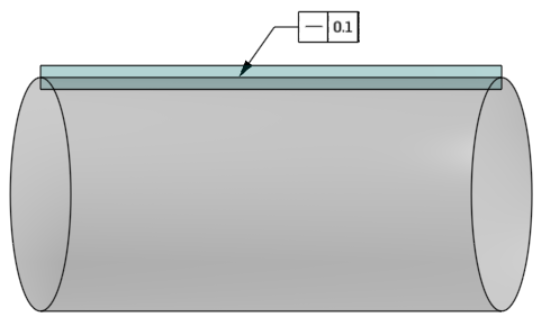
- One see-through band (±½ tolerance), normal to the surface, along a straight line element
- Flat surface: pick the face and a direction edge
- Position (%) slides the zone across the face (0% at the edge, 100% at the far side)
- Revolved surface: pick a cylinder or cone
- Rotation (0–360°) turns the zone around the axis along a line element
- Derived median axis (DMA): Revolved, cylinder only (pin or hole) → a see-through cylinder, as wide as the tolerance, around the axis, reaching 10% past each end
- the name gets a ⌀ and ends in "DMA"; the ideal axis is drawn as a sketch line named "Derived median axis"
- Custom: Tilt, Shift (line elements); Tilt 1, Tilt 2, Center shift 1, Center shift 2 (DMA)
- Color: Teal
Circularity
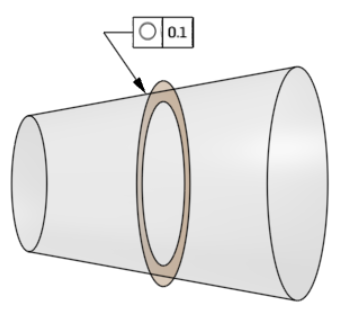
- Cylinder, cone or torus → one flat ring (±½ tolerance) around the circular element
- The section is always cut perpendicular to the surface's axis (no section plane to pick)
- Position (%) slides the zone along the axis
- A torus can be cut in two circles, giving two rings
- Custom: Center shift 1, Center shift 2, Size shift
- Color: Orange
Cylindricity
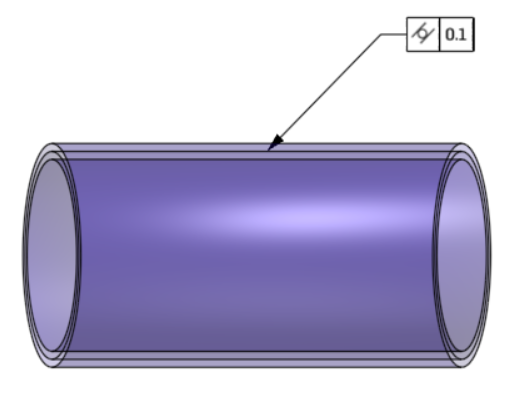
- Cylindrical face (shaft or hole) → inner and outer coaxial cylinders (±½ tolerance)
- Custom: Tilt 1, Tilt 2, Center shift 1, Center shift 2, Size shift
- Color: Blue-violet
Design Approach
- Tolerance = real value
- Display scale = visualization only
- Custom adjustments = possible variations of the zone, not inspection results
All features follow:
- Input
- Validation
- Compute (tolerance, ±½, display scale)
- Generate geometry
- Apply appearance and names
- Custom adjustments and drag handles
Notes
Focus:
- visualizing tolerance zones
- reinforcing correct GD&T interpretation
- Other controls in a separate document
Not intended for:
- inspection
- manufacturing validation
5
Comments
-
I've been working on this since August - and this is my first posted Feature Script! It's absolutely targeted for the educator community.
I'm well along with my follow up version that includes position, orientation and profile, but was hoping to get some feedback on this one before rolling the more in depth one out.
2