Intro to CAD - Basic Features 1 Exercise - Can't Fillet some edges

design_teacher
Member Posts: 2 ✭
I'm working my way through the "Intro to CAD" series in the Learning Center (https://www.onshape.com/learn/introduction-to-cad). I have completed Section 1, "Sketching" and was able to successfully complete the exercises.
In section 2, "Basic Features" I am having some trouble with filleting some the edges of the part as required in the exercise.

Here is my public doc:
https://cad.onshape.com/documents/56fb4904e4b0752611e72995/w/f0b0e92dc6e5cb6cacaf478c/e/7fba1e7473931e18ac8efece
I'm wondering if the way I created the features on the right side may have something to do with the filleting problem. Here is a screen shot that shows my method.

In section 2, "Basic Features" I am having some trouble with filleting some the edges of the part as required in the exercise.
Here is my public doc:
https://cad.onshape.com/documents/56fb4904e4b0752611e72995/w/f0b0e92dc6e5cb6cacaf478c/e/7fba1e7473931e18ac8efece
I'm wondering if the way I created the features on the right side may have something to do with the filleting problem. Here is a screen shot that shows my method.
Daniel Muller - MYP Design Teacher
Hong Kong Academy
Hong Kong Academy
0
Best Answer
-
If anyone has a doc with the part correctly drawn, please send me a link. Maybe, I can reverse engineer the solution. Thanks!Daniel Muller - MYP Design Teacher
Hong Kong Academy0
Answers
-
If anyone has a doc with the part correctly drawn, please send me a link. Maybe, I can reverse engineer the solution. Thanks!Daniel Muller - MYP Design Teacher
Hong Kong Academy0 -
@ design_teacher , Please find the below document
https://cad.onshape.com/documents/56fce8c0e4b0c264c047109e/w/fd38176c1e44a41e0ea0eada/e/cd31a07d90687b48d9734e84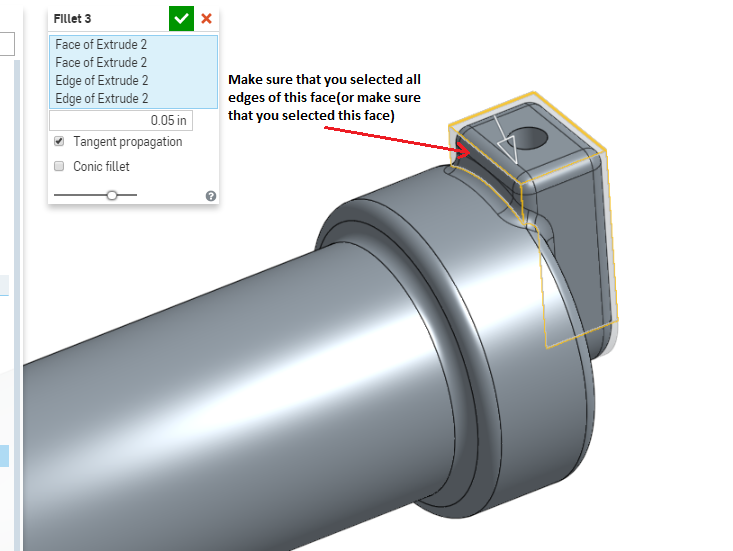
0
