Slot Tutorial Not Working

fastwayjim
Member, OS Professional, Mentor Posts: 220 PRO
I was really hoping to get through a tutorial without asking for help... So much for beginner's luck!
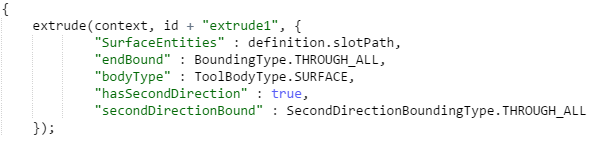
As soon as I add the Extrude feature in FS, the slot feature goes red in the part studio. It's does not want to extrude the surface. Did this happen to anybody else? Here's the screenshot:

Probably some n00b mistake...
As soon as I add the Extrude feature in FS, the slot feature goes red in the part studio. It's does not want to extrude the surface. Did this happen to anybody else? Here's the screenshot:
Probably some n00b mistake...
Tagged:
0
Best Answer
-
The fix is to use "surfaceEntities" instead of "entities" as the extrude parameter name. Sorry about this -- what I am having trouble explaining is how it worked before...Ilya Baran \ VP, Architecture and FeatureScript \ Onshape Inc5


Answers
-
OK, at least it's not an embarrassing typo, since the final code at the bottom of the tutorial is giving me the same result...0
-
The fix is to use "surfaceEntities" instead of "entities" as the extrude parameter name. Sorry about this -- what I am having trouble explaining is how it worked before...Ilya Baran \ VP, Architecture and FeatureScript \ Onshape Inc5
-
-
"surfaceEntities" has to start with a lowercase s -- not an uppercase S like in the code above. FeatureScript is case sensitive.Ilya Baran \ VP, Architecture and FeatureScript \ Onshape Inc0
-