Use a vertex in skRectangle()

Lee_Hesketh
Member, Developers Posts: 148 ✭✭✭
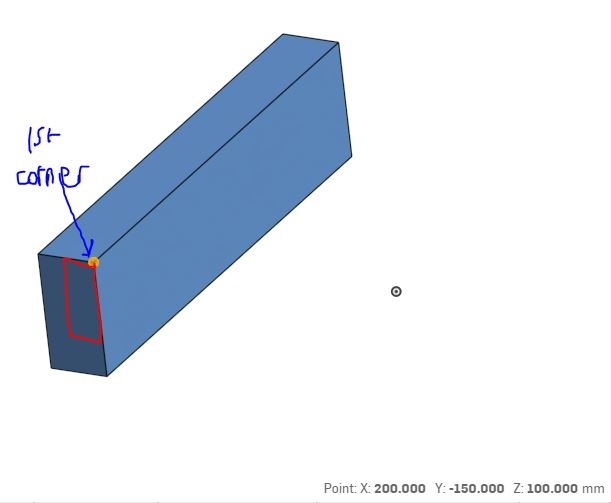
Hi, how could I use a vertex's coordinates as the "firstCorner" coordinates for an skRectangle() function? Am I right by thinking that it must be a 2d vector and I could get it since I am using evVertexPoint, I could use vertexPoint[0] etc., but that only works if the part is in the correct orientation?
Thanks
Lee Hesketh
Thanks
Lee Hesketh
There are 10 types of people in the world. Those who know binary, those who don't and those who didn't expect base 3!
Tagged:
0
Best Answers
-
Assuming you have the sketch plane, you can use worldToPlane https://cad.onshape.com/FsDoc/library.html#worldToPlane-Plane-Vector
to convert the XYZ coordinates of vertex into the 2D coordinates that skRectangle takes. Just make sure you're using newSketchOnPlane rather than newSketch to create the sketch (or you'll have a coordinate system you probably don't want).Ilya Baran \ VP, Architecture and FeatureScript \ Onshape Inc5 -
You can do something like
worldToPlane(sketchplane, vertexPoint) + vector(2 * inch, -3 * inch)Ilya Baran \ VP, Architecture and FeatureScript \ Onshape Inc5


Answers
-
Assuming you have the sketch plane, you can use worldToPlane https://cad.onshape.com/FsDoc/library.html#worldToPlane-Plane-Vector
to convert the XYZ coordinates of vertex into the 2D coordinates that skRectangle takes. Just make sure you're using newSketchOnPlane rather than newSketch to create the sketch (or you'll have a coordinate system you probably don't want).Ilya Baran \ VP, Architecture and FeatureScript \ Onshape Inc5 -
@ilya_baran How would I manipulate these coordinates to translate it horizontally or vertically?There are 10 types of people in the world. Those who know binary, those who don't and those who didn't expect base 3!0
-
Once you're in 2D, you should be able to add to the x coordinate to translate horizontally and to y to translate vertically. Or did I misunderstand your question?Ilya Baran \ VP, Architecture and FeatureScript \ Onshape Inc0
-
Well this is what I've written in the codeskRectangle(sketch1, "rectangle1", {"firstCorner" : vector(width, -height),"secondCorner" : worldToPlane(sketchplane, vertexPoint)});
How could I separate the x and y coordinates of the secondCorner to translate the point?There are 10 types of people in the world. Those who know binary, those who don't and those who didn't expect base 3!0 -
You can do something like
worldToPlane(sketchplane, vertexPoint) + vector(2 * inch, -3 * inch)Ilya Baran \ VP, Architecture and FeatureScript \ Onshape Inc5 -
@ilya_baran Thank you so much!There are 10 types of people in the world. Those who know binary, those who don't and those who didn't expect base 3!0