Welcome to the Onshape forum! Ask questions and join in the discussions about everything Onshape.
First time visiting? Here are some places to start:- Looking for a certain topic? Check out the categories filter or use Search (upper right).
- Need support? Ask a question to our Community Support category.
- Please submit support tickets for bugs but you can request improvements in the Product Feedback category.
- Be respectful, on topic and if you see a problem, Flag it.
If you would like to contact our Community Manager personally, feel free to send a private message or an email.
Is it possible to change the orientation of the default geometry?

matt_schroeder25
Member Posts: 3 PRO
Hi,
I would like to use the below ISO vehicle coordinate system for an OnShape document:
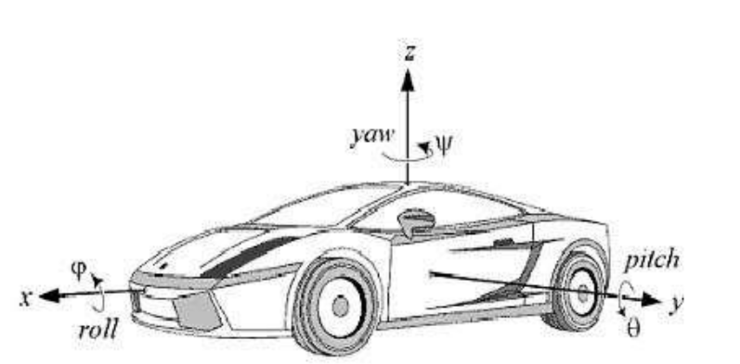
WIth the current default geometry, the front plane is normal to the y-axis, the right plane is normal to the x-axis, and the top plane is normal to the z-axis. I would like the front plane to be normal to the x-axis, and the right plane to be normal to the y-axis. Is it currently possible to make this change?
Thanks,
Matt
I would like to use the below ISO vehicle coordinate system for an OnShape document:
WIth the current default geometry, the front plane is normal to the y-axis, the right plane is normal to the x-axis, and the top plane is normal to the z-axis. I would like the front plane to be normal to the x-axis, and the right plane to be normal to the y-axis. Is it currently possible to make this change?
Thanks,
Matt
Vehicle Dynamics Lead Engineer
Taiga Motors, Inc.
Taiga Motors, Inc.
0
Best Answer
-
Hi Matt,
It is not possible to change the orientation of the default planes. You could create and name your planes at the desired orientation and hide the default planes.
You can also create a view at the orientation you like and save it. This is called a named view, more information here : https://cad.onshape.com/help/#moving.htm?Highlight="named views".6

Answers
-
Hi Matt,
It is not possible to change the orientation of the default planes. You could create and name your planes at the desired orientation and hide the default planes.
You can also create a view at the orientation you like and save it. This is called a named view, more information here : https://cad.onshape.com/help/#moving.htm?Highlight="named views".6