Aerofoil Profile Scripts
Comments
-
@darren_13 thanks for the reply. The 'thicken' command worked wonderfully.
I see a script that would allow one to change the thickness of the ribs, size of the negative spaces, and location of the spanwise lightening holes and their dimensions. Just adding some variables may help a lot.
Another thing that I am having difficulty with is locating items referenced to the profile. For example, let's say that at the 1/4 chord location I want to place a hole at the point 1/2 way between the upper and lower surfaces of the profile. How would this be accomplished? The 1/4 chord isn't hard but the other measurement is.
Again I am relatively new and learning. Thanks for your time.
0 -
Hi @justin_carroll, have you tried the lighten feature script? think that might help you a lot. I feel making a script just for this application might not save much time. I presume you have seen the wing structure script that is in the same document? it kinda does that by defining the number of ribs, thickness etc. but at the moment it is limited.
As for having a kind of centre line, I did play around with this before and I couldn't find an efficient solution for when using aerofoil coordinates (they rarely come in pairs so splitting the difference isn't viable) however I think the NACA 4 digit code comes with a centre line as this is defined by an equation. Maybe I should re-visit this as it was something that annoyed me also.
The solution I suppose at the moment for set positions would be to draw a line at the 1/4 cord length and between the upper and lower splines and use its centre point for the half, this could also be the automatic solution however it becomes fairly time consuming to generate.
Let me know your thoughts, and I really appreciate your feedback.
Darren0 -
@darren_13 thanks again for the response.
Should it be possible to draw a line from the upper to the lower part of the generated profile? I can't even get the profile to show up when I am working on a sketch, let alone get a line to snap to it.
Is it possible to project the profile onto another plane or sketch? then use the projected profile as a reference?
Perhaps this post belongs in another area. This may just be newbie drawing issues.
THIS drawing has a hole for a spar. Positioning the hole is the issue I am working on. Perhaps my workflow needs to be altered.
Thanks again.0 -
Hello
I'm in a situation similar to @justin_carroll
I'm planning to 3d print my directional fin with dihedral ribs, so I can print a single shell perimeter with thin ribs inside to reinforce structure.
I tried to print with honeycomb infill but the result is a bit too heavy..
I was able to create the loft (solid) and I tried to create the ribs structure extruding a line sketch, using Thicken tool and then using a boolean union.
My problem is that I can't perform a cut using the part1 as tool (wing part) and ribs as part to cut.
Here is my project
https://cad.onshape.com/documents/ba918051923408fe2a89e6e6/w/0b26b8b6cddb75e331c24961/e/25db96c7240e98bb254cba51
I'm not an engineer and my cad modeling skills are a bit poor..
Any hint is wellcome.
Thanks
Pietro0 -
Hi @justin_carroll, yes absolutely you should be able, make a sketch on the same plane as your airfoil and 'use' the upper and lower curves, this makes the curves part of a new sketch and allows for you to directly sketch using them as references.
Hi, @piero_portini is this what you want?:
I used the boolean intersect tool.
let me know if you mean something different.
Kind regards,
Darren0 -
Super! That is exactly what I needed, Thanks!
Now I must figure how to add the external surface, may be using loft surface, thicken and boolean union..
Thanks again0 -
I do the loft thickens and works fine for me, not tried adding it back onto the geometry yet.pietro_rossin said:Super! That is exactly what I needed, Thanks!
Now I must figure how to add the external surface, may be using loft surface, thicken and boolean union..
Thanks again
Once it is printed any chance you could post an image?
Many thanks,
Darren0 -
Sure I'll post some images for the new structure. I plan to print in transparent PETG...
here are my previous test with PLA-wood and PETG black - Honeycomb infill 10%
Pla Wood is lighter but delaminated


0 -
@pietro_rossin, that really awesome!! looking forward to your next run

Is there are target weight you are aiming for? or just as low as possible? Also, are you testing its strength?
Really interesting, thanks for sharing!
Darren0 -
I'll like to stay as low as possible, that is a tail piece...
For the strength
I printed half wing of this RC sailplane in PLA.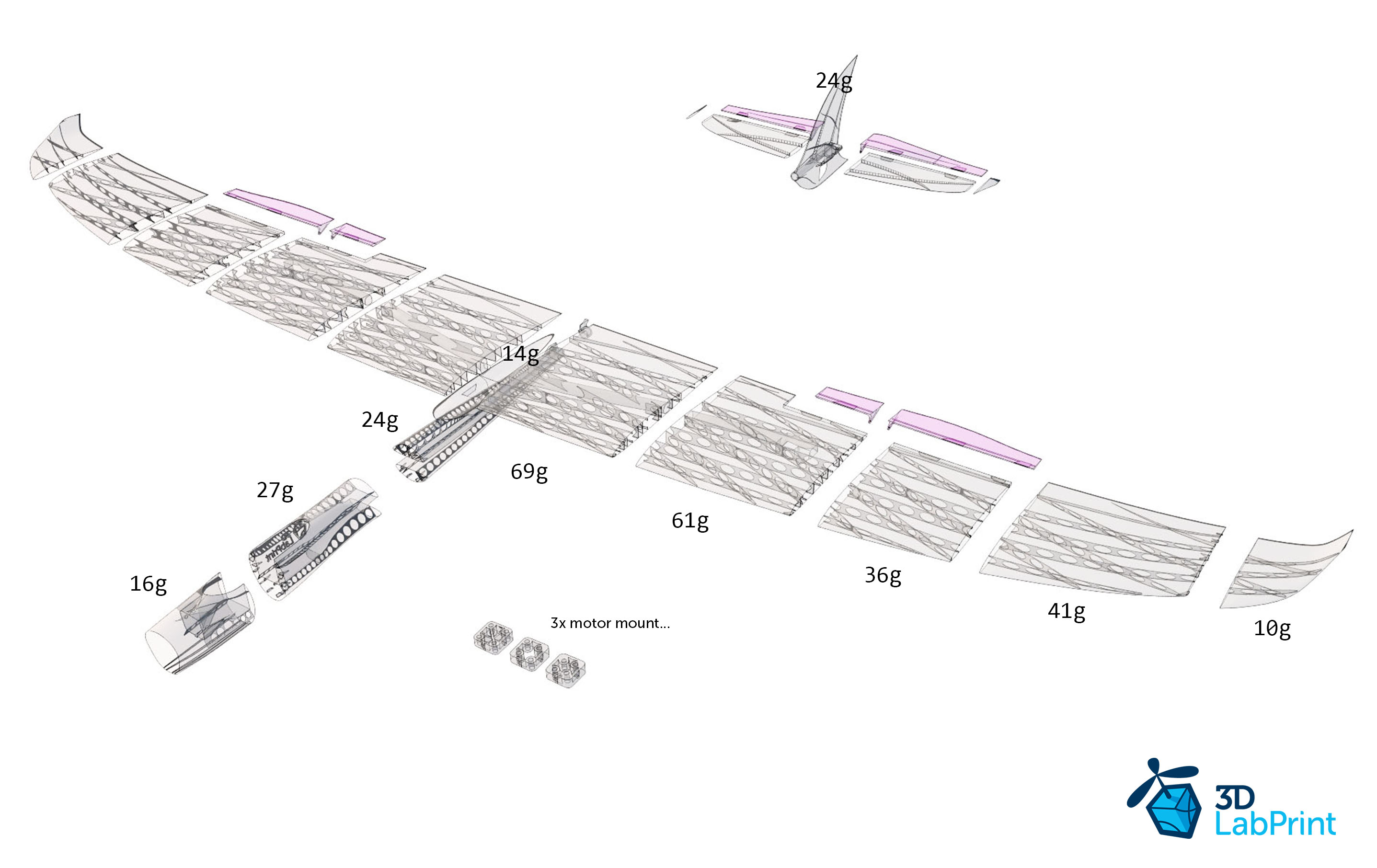
Half wing is 750mm more or less and segments are glued with Cyanoacrilic glue.
I made a test putting a Brick (3,5 Kg more or less) in center with root and tip suspended and it flexes a little and resist..
That is enough for a little RC sailplane i think
PETG is much more strong IMO and laminate a lot better than PLA.
Let's see how it will work
Thanks again1 -
Hi Darren!
Your scripts is simply awesome. I only have the problem that I am using my own airfoils and I don't know how to import them. Does your script have any possibility to import custom ones?
I already know, that you first have to upload them to your project as Onshape doesn't support local files. If nothing is possible, can I send the profiles to you?
Best regards,
Andreas0 -
@darren_13
Adding support for custom files should be pretty easy now. A good example to follow is the FeatureScript Beams feature. You could similarly add a "Custom" option to your feature (alongside DATA and NACA), and for that option, use a CSV reference parameter to allow selecting any CSV data.
This would allow users of the feature to use their own profile data without needing to add that data to the feature itself.
0 -
Hi @Scheny @kevin_o_toole_1, I'll have a look and see what's involved, I haven't actively changed the profile script or the more advanced test script in over a year as they serve everything I needed to do, and I am pretty busy these days. However, I imagine one day I might need this myself, and therefore would like to do this.
I'll keep you posted on any development.
Best,
Darren1 -
Thank you Darren for considering it and thanks Kevin for the hotfix!0
-
Hello Darren. Merry Christmas. New to OnShape and very thankful for your script. I tried to plot NACA 23015 and it would not plot. Basically, just a big, straight line appears. (note: The slightly narrower airfoil, "NACA 23012 12%" plotted just fine). Also, would you be able to add NACA 23009?0
-
Hello Darren. Just following up. Any chance you could add NACA 23015 to the script? Although 23015 is listed in the drop down menu, it does not generate when selected. Would mean the world to me.0
-
Hello Daren!
Is it possible that you can add the HT14 and the AG40d-02 and all the other profiles from Mark Drela?
Many thanks in advance,
Stefan
0 -
Hi Darren. Any chance you could load NACA 23015?0
-
RE: Spar creation in a wing with washout (i.e. a slightly twisting, non-planar spar). This doesn't seem to work with the WingStructures FeatureScript. Has anyone figured out how to trick the WS Feature Script how to follow a slightly twisting face to create a spar?0
-
@darren_13 can you add the GA37A and GA40A series airfoils from Riblett? I can provide the .dat files if that is helpful as I was unable to find them in the UIUC database.0
-
@darren_13
Hi. Any chance you could repair NACA 23015 airfoil section coordinates so that it loads correctly? Something is keeping it from generating an airfoil.
0 -
Hi, I'm new to Onshape and the Feature scripts. The airfoil scripts are fantastic. Can someone direct me to the documentation for using the scripts?Thanks,Tom0
-
Just wanted to say what an incredible tool this is - finding it incredibly helpful and really appreciate all the time and effort you've put into this0
-
Hello @darren_13, I want to start off by saying how great this tool is. It has really helped me a lot while designing a plane in onshape. I have recently been trying to create a winglet, but it isn't quite working. I saw that you have shown an example of a really well designed winglet in your initial post, can you please tell me how you made it or link to the document with that winglet? This would really help me a lot in my project
Thank you so much!
0 -
Hi @darren_13,great work. I need the airfoilsS833,S834,S835for a wind turbine project. Could you please add them to the data base?I added the csv files of that profiles to my copy of the scripts, but didn't get them into the script. Is this even possible?0
-
How do I get the aerofoil/extrusion to follow a curve, similar to the example that you showed0
-
Hi Darren,
what a great script. I imported airfoil coordinates several times by hand, made splines through the point etc... It was quite tedious.
Is there a way to integrate custom airfoils e.g. by defining a path to my local drive or to upload csv files?
If not it would be great to include these airfoils:
HS144: https://aerodesign.de/profile/data/hs144.dat
bb12: https://www.aerodesign.de/modelle/F5F/zeze_bb12.koo
Thanks, Christoph0 -
Hi @christoph_gmelin, I just put together a prototype here:
https://cad.onshape.com/documents/188699231c836d61bbb5e7c1/w/e783a754ffa276b6fc28bd8f/e/15f69bd6e3ad2091e2f64219
I plan on re-doing the whole feature script, I just need to stop procrastinating, but in the meantime, I hope this helps. Input: CSV, Line, normal plane. output: Sketch with a spline joining all points. there is no error correction etc, so if the trailing edge is open for example, you will get a spline but no area.
Best,
Darren0 -
I have been experimenting with the profile generator but I get into a situation where it does not let me the select a plane and two vertices...
The scrip monitor shows this :throw You need to select one plane and two points
205:13 7aa0a49aff137123c4e1ea47/ac5fee979ee43cac1b275d48/59e394dff47a786db337a827 (const profileGen)52:17 onshape/std/feature.fs (defineFeature)Part Studio 1 (Profile Generator 1)Part Studio 1
Any idea why it works sometimes and not other...0 -
Started a new document. create a sketch on front plane. draw two dots. try profile generator but it will not let me select the plane or the points... In another doc it does work but I can not figure out why...any idea ?0



