copying a pattern from one side of an extrusion to others (skyscraper)

nadine_phillips
Member Posts: 2 EDU
I am a new-to-CAD and new to teaching engineering teacher.
I have been working to show my students how to use the tools in Onshape and I think we are at a point where I am going to ask them to create a skyscraper for a project, to utilize many of the tools they have been learning and practicing with.
I would like to know if there is a way to copy the window pattern from one side of the building(s) to the other sides. I have not been able to figure it out using Help documents.
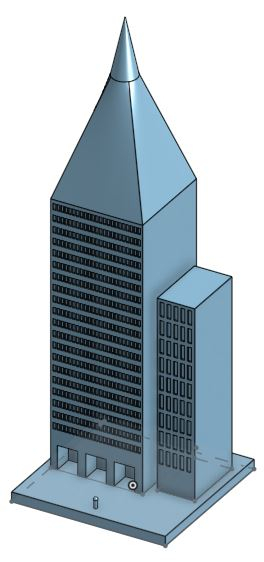
I have attached my attempt for a skyscraper. I would like to see the windows on all 4 sides. This is all contained in one Part/Part Studio at present.
Thank you for the assist!
I have been working to show my students how to use the tools in Onshape and I think we are at a point where I am going to ask them to create a skyscraper for a project, to utilize many of the tools they have been learning and practicing with.
I would like to know if there is a way to copy the window pattern from one side of the building(s) to the other sides. I have not been able to figure it out using Help documents.
I have attached my attempt for a skyscraper. I would like to see the windows on all 4 sides. This is all contained in one Part/Part Studio at present.
Thank you for the assist!
-1
Comments
-
@nadine_phillips
To get the windows from one side of the building to the other, you could use a mirror:
https://cad.onshape.com/help/Content/mirror.htm
You can either use "Face" mode and use the create selection tool to select all the window pockets, or you can use feature mirror selecting whatever features were used to cut the faces into the building. To make the mirror plane, you can use the Plane feature, in "Mid plane" mode, selecting the two opposite sides of the building to create a plane halfway between them:
https://cad.onshape.com/help/Content/cplane.htm
Getting the windows onto all 4 sides is a little trickier. If the building is a perfect square, you can use the same mid plane technique, and sketch a line that goes perfectly down the center of the building. Then you can use a circular pattern to pattern the windows onto all 4 sides of the building:
https://cad.onshape.com/help/Content/circularpattern.htm
In the general case, though, when the building is not a square, you will probably have to do two of the sides individually, and then use two mirrors to copy each of those layouts to the opposite side. It might be a good opportunity to teach the students about variables:
https://cad.onshape.com/help/Content/variable.htm
Variables could be used to ensure that when making both individual sides, the width and height of the windows in both sketches are the same.
Hope this helps!Jake Rosenfeld - Modeling Team0 -
Do a 4x circular pattern about the vertical centerline of each building.
1 -
-
Set up a pattern on one side and use 'mirror feature' to duplicate on other side.
https://cad.onshape.com/documents/d61a6391e00d5b8b7abf67db/w/e5c6b54f0f0c007e9d587b3b/e/bc1926df376366080c6ccc5c
0