Welcome to the Onshape forum! Ask questions and join in the discussions about everything Onshape.
First time visiting? Here are some places to start:- Looking for a certain topic? Check out the categories filter or use Search (upper right).
- Need support? Ask a question to our Community Support category.
- Please submit support tickets for bugs but you can request improvements in the Product Feedback category.
- Be respectful, on topic and if you see a problem, Flag it.
If you would like to contact our Community Manager personally, feel free to send a private message or an email.
dimension key slot in drawing

bikr7549
Member Posts: 24 ✭✭
Hello,
I am working on a part that has a square key slot that will be broached into a hole. When dimensioning the slot I want to have the depth of the slot dimension to be that from the top of the slot flat surface to the opposite side of the hole. For instance in a 3/8" diameter hole and a 1/8" key the slot depth is the shaft dia (.375") + the key protrusion (.0625") which makes the dimension across the hole and slot flat to be .4375". But when adding a dimension to the drawing the dimension tool wants to only reference the center of the hole and the slot flat. Is there a way around this?
Thank you,
Bob
I am working on a part that has a square key slot that will be broached into a hole. When dimensioning the slot I want to have the depth of the slot dimension to be that from the top of the slot flat surface to the opposite side of the hole. For instance in a 3/8" diameter hole and a 1/8" key the slot depth is the shaft dia (.375") + the key protrusion (.0625") which makes the dimension across the hole and slot flat to be .4375". But when adding a dimension to the drawing the dimension tool wants to only reference the center of the hole and the slot flat. Is there a way around this?
Thank you,
Bob
0
Best Answers
-
On drawings dimensions snap to the center of circular edges on creation (unlike in part studio sketches where you can pick the near or far edge directly), however you should be able to grab the "leg" of the dimension from the center and drag it to the edge of the circle after you've created it.
Same process if you wanted to put a dimension showing the min or max difference between two holes, create the dimension on the centers first and drag the endpoints after.
I'm guessing they did this to avoid having to zoom in to make sure you aren't accidentally grabbing the edge of a hole instead of the center...0 -
You can also hit Shift+Q after you select the Dimension tool, but before you pick the far side of the hole - this will wake up the other geometry references for the dimension. If this doesn't work, @eric_pesty suggestion of moving the dimension pick point after it's added should be fine.
0 -
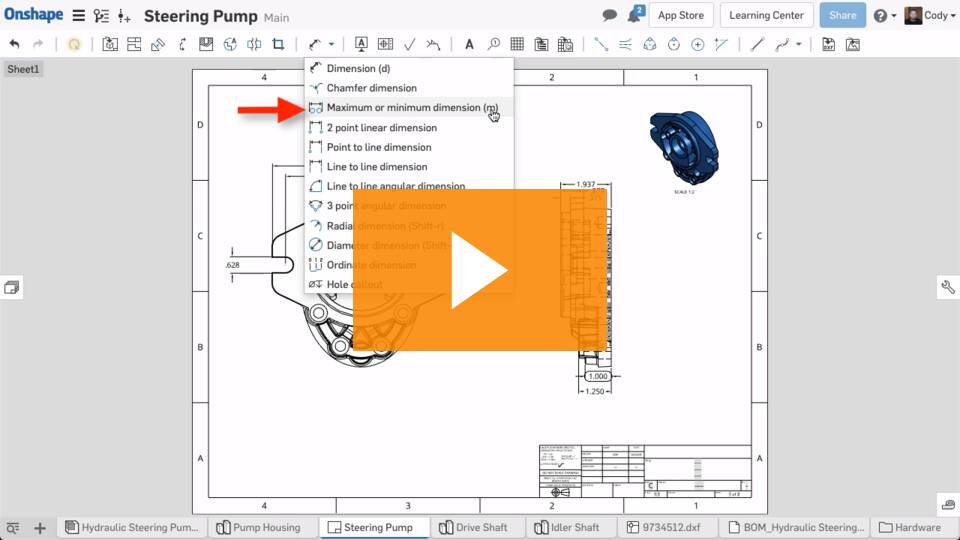
Huh! @pete_yodis I had never noticed the "m" shortcut before!
0 -





Answers
-
On drawings dimensions snap to the center of circular edges on creation (unlike in part studio sketches where you can pick the near or far edge directly), however you should be able to grab the "leg" of the dimension from the center and drag it to the edge of the circle after you've created it.
Same process if you wanted to put a dimension showing the min or max difference between two holes, create the dimension on the centers first and drag the endpoints after.
I'm guessing they did this to avoid having to zoom in to make sure you aren't accidentally grabbing the edge of a hole instead of the center...0 -
You can also hit Shift+Q after you select the Dimension tool, but before you pick the far side of the hole - this will wake up the other geometry references for the dimension. If this doesn't work, @eric_pesty suggestion of moving the dimension pick point after it's added should be fine.
0 -

1 -
Huh! @pete_yodis I had never noticed the "m" shortcut before!
0 -
-
Thank you all, this is great info. All methods worked just fine, and it is amazing how easy it all turned out to be!
Bob1
