Welcome to the Onshape forum! Ask questions and join in the discussions about everything Onshape.
First time visiting? Here are some places to start:- Looking for a certain topic? Check out the categories filter or use Search (upper right).
- Need support? Ask a question to our Community Support category.
- Please submit support tickets for bugs but you can request improvements in the Product Feedback category.
- Be respectful, on topic and if you see a problem, Flag it.
If you would like to contact our Community Manager personally, feel free to send a private message or an email.
Why can't I get Transform Tool To Show on the RIght Click Menu?

alco933
Member Posts: 19 ✭✭
When ever I click my sketch and they right click it, it shows "Edit Sketch" at top of menu but there's no "transform" option. I have seen countless videos of using the transform tool but can't figure out how to get it to show up.
Tagged:
0
Answers
-
sometimes when you switch between different sized screens some buttons are hidden. Nonetheless you can add the button to the task bar by hovering over the top tool bar and right click "customize toolbar". Then configure to your hearts content.0
-
I am referring to the right click context menu. I am not able to get transform option on it like I see other people getting on instructional videos.0
-
You need to be in the sketch to use the sketch transform toolGet in touch: contact@alnis.dev | My personal site: https://alnis.dev
@alnis is my personal account. @alnis_ptc is my official PTC account.2 -
You have to manually select the sketch by highlighting it first, and then the arrows will appear. You can copy and paste a sketch into a plane as well and it's like it's all auto selected. You just have to then re-constrain the sketch probably using the origin as the anchor point as the shared reference.1
-
Ok I think I have enough pieces of information to provide a thorough answer.
The answer is.
1. Put the drawing in sketch mode by selecting the sketch
2. Select the sketch by dragging the mouse with the selector to select the entire sketch.
3. Select Transform toolbar item to transform the sketch.-2 -
I struggle with this same problem- Transform does not appear on the right-click menu. I'm in the sketch and have selected the entire part. Transform doesn't appear. When I try to use the Transform icon on the top menu, I can't select the part.

0 -
Sketch transform is in the toolbar at the top (press Alt C and type transform while in a sketch to see it highlight)
Documentation: https://cad.onshape.com/help/Content/transform-sketch.htmGet in touch: contact@alnis.dev | My personal site: https://alnis.dev
@alnis is my personal account. @alnis_ptc is my official PTC account.0 -
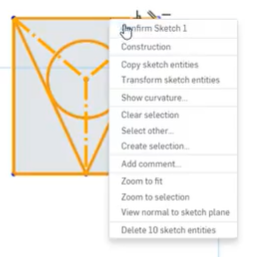
This is a screenshot from a teaching video. It shows Transform Sketch Entities in the right click context menu. I don't get that. How do i get it to show up?
0 -
Try this - While you are editing a sketch, select lines or segments first, then right click, and the "transform sketch entities" will appear in the drop down box. Click this and it should bring up the triad. If you are having trouble using the "transform" command - search the help for "transform sketch"
0


