Welcome to the Onshape forum! Ask questions and join in the discussions about everything Onshape.
First time visiting? Here are some places to start:- Looking for a certain topic? Check out the categories filter or use Search (upper right).
- Need support? Ask a question to our Community Support category.
- Please submit support tickets for bugs but you can request improvements in the Product Feedback category.
- Be respectful, on topic and if you see a problem, Flag it.
If you would like to contact our Community Manager personally, feel free to send a private message or an email.
Best Of
Re: Help designing an open to closed loft with no obvious planes
You are in a situation most find themselves in when starting surface modeling. It usually takes a lot of practise and then quite some helper geometry, if you need precise parameters. In this case, EG for the top end, you might want to try looking into the "projected curves" tool, that's the one that looks like a flying pancake: It will give you things like the upper curve all way around in 3D, and in a straightforward and controllable way, at that:
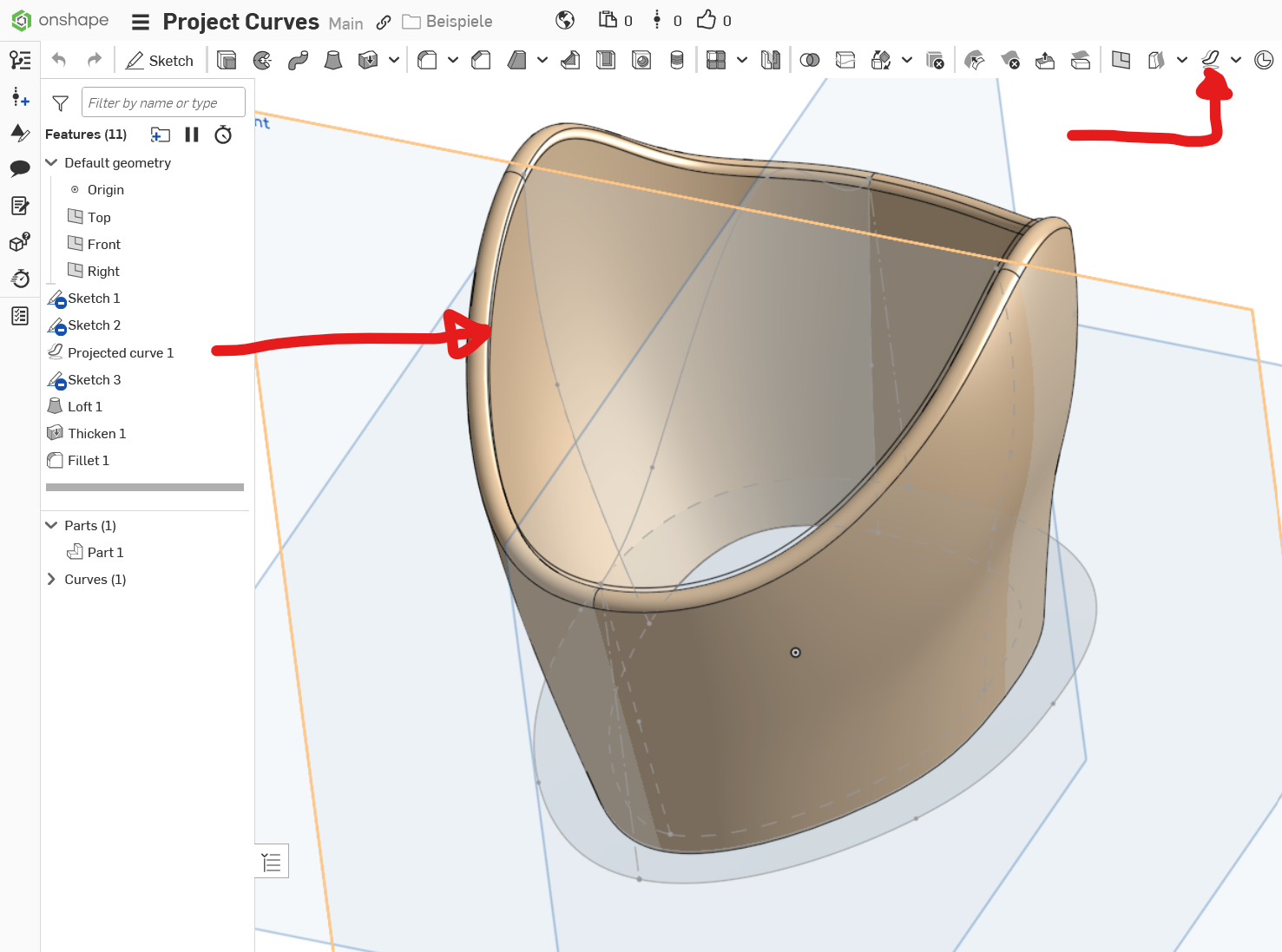
https://cad.onshape.com/documents/ca1999012c8f8157ad62d9c6/w/bfb4e68fbfd9f99849b5b14a/e/058fecc1d6e4413f61ef0e68?renderMode=0&uiState=68ba9cf4867a1f952b42115bThe model is simplified to save a bit time, but you get the idea. Note that curves in the projected sketch planes need to match, and the guide curves need to "pierce" the profile curves by conditions set. Play around with the model to see what happens when you change one thing at a time …

Re: How do I stop tilting of the mouse wheel rotating the view.
Just buy a spacemouse. Worth every penny.
Re: Is Possible to add parametric node with "sheet name" in title block?
I think I am finding the same frustration. Basically, of all the parametric nodes (is that the right term?), i.e. where you click 'insert drawing properties' in a note dialogue box, and can select one of many properties, the "sheet name" is not there? which is odd, because I would have thought its an important one?
This way, it would be possible to use the sheets (ctrl+s) side bar to organise the titles, or sub titles in my case, displayed in the title block.
I thought I put a request in for this years ago, but I can't find it now.

Re: Is Possible to add parametric node with "sheet name" in title block?
oh, I found it ! from 2019 !!! and it wasn't me, I just commented.
Re: Predicates within an array?
interesting idea. I was able to get it to work but there are some quirks you have to work around.
The var name MUST MATCH the map name in the inner predicate. And then if you want to have multiple uses in a single FS then you need to add a string variable otherwise it flags the inner predicate as a duplicate.
annotation { "Feature Type Name" : "test" }

export const test = defineFeature(function(context is Context, id is Id, definition is map)

precondition

{

      annotation { "Name" : "Widgets", "Item name" : "Widget" }
        definition.myWidgets is array;
        for (var widget in definition.myWidgets)
        {
            testPredicate(definition, widget, "0"); // this is the only declaration
        }
annotation { "Name" : "Widgets", "Item name" : "Widget" }
        definition.myWidgets2 is array;
        for (var widget in definition.myWidgets2)
        {
            testPredicate(definition, widget, "1"); // this is the only declaration
        }

export predicate testPredicate(definition is map, widget is map, i is string)

{

  annotation { "Name" : "My Length" }
  isLength(widget["myLength" ~ i], LENGTH_BOUNDS);

}

Re: Improvements to Onshape - August 29th, 2025
Thanks @Konst_Sh
We have been cloning native features as a custom feature, then adding a suppression box within them, then converting this to an expression as we need it. The issue is of course they don't update and develop as Onshape adds and improves functionality. So we end up with the Onshape native versions, and our versions, and then they drift apart slowly.