Welcome to the Onshape forum! Ask questions and join in the discussions about everything Onshape.
First time visiting? Here are some places to start:- Looking for a certain topic? Check out the categories filter or use Search (upper right).
- Need support? Ask a question to our Community Support category.
- Please submit support tickets for bugs but you can request improvements in the Product Feedback category.
- Be respectful, on topic and if you see a problem, Flag it.
If you would like to contact our Community Manager personally, feel free to send a private message or an email.
Best Of
Re: Set Property (New Custom Feature!) 🆕
@MichaelPascoe You are right, No parts were selected ( I was so focused on new stuff, that I overlooked this basic condition). Now it is working fine. Thank you.
Re: Perf patterns in sheet metal?
Currently sheet metal is not suited for handling perforated designs - regeneration performance and memory use are not optimized for it. Two possible sane approaches would be formed feature or sketch in flat. I'm assuming that you want to have the perforation reflected in flat, so you need to have a representation for flat pattern which can be exported with DXF. It seems to me that building the desired piece as a formed tool is the simplest way to to achieve this. You can use Evan's Grid Extrude to build the tool and then use its face to generate the sketch of the form.
 lana
lana
Forum suggestion - Moderated post visibility for poster
It would be nice if a user could somehow see a list of any of their posts/comments that are being held for moderation (for whatever reason).
Currently, if I go and look at my own Profile, I see a "Moderation" menu option that shows me some stats, but nothing about any posts or comments that are currently held for moderation.
It would be nice to either see a list of held posts/comments here, or have them listed under the respective Post/Comment options with appropriate tags next to them to denote they are awaiting moderation.
Of course, viewing this in the users profile would be limited to the account owner (and probably admins). It could be nice too to see why they've been held for moderation (eg: new user, banned word match, suspicious activity, etc), but not absolutely necessary.
This could help stop the occasional double post, or at least allow someone to check before they post a second reply to something they have already replied to a few hours earlier.
Added bonus would be the option to "withdraw" the post before it is moderated (eg: allowing the poster to withdraw a double post for example).

Re: where can I find the setting of quantity holes?
"[…] counting automatically would add unlogical numbers there…"
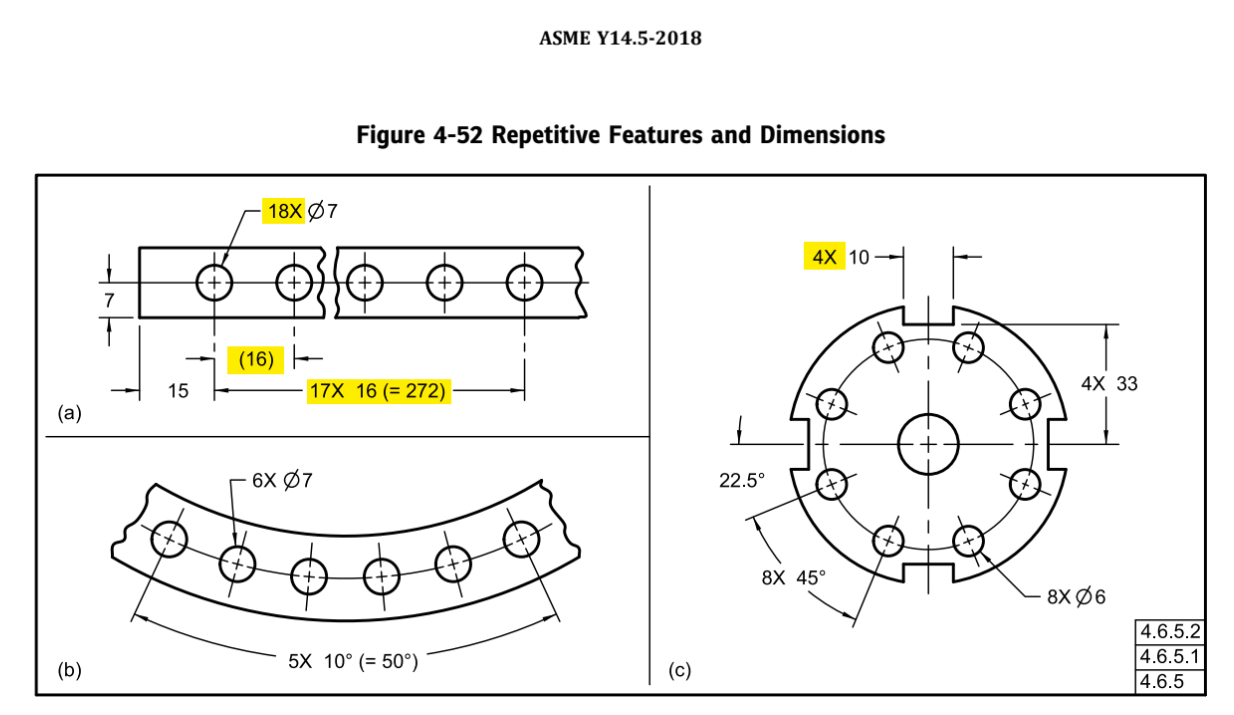
Displaying count for repetitive features is well documented in ASME Y14.5 and widely used.
It's more confusing if the count is not displayed, or worse, if the edit is done manually—-current workaround—and then goes out of sync with model changes.
How come this is not yet available?
 ody
ody
Re: support controlling ratios of sketch dimensions/measures
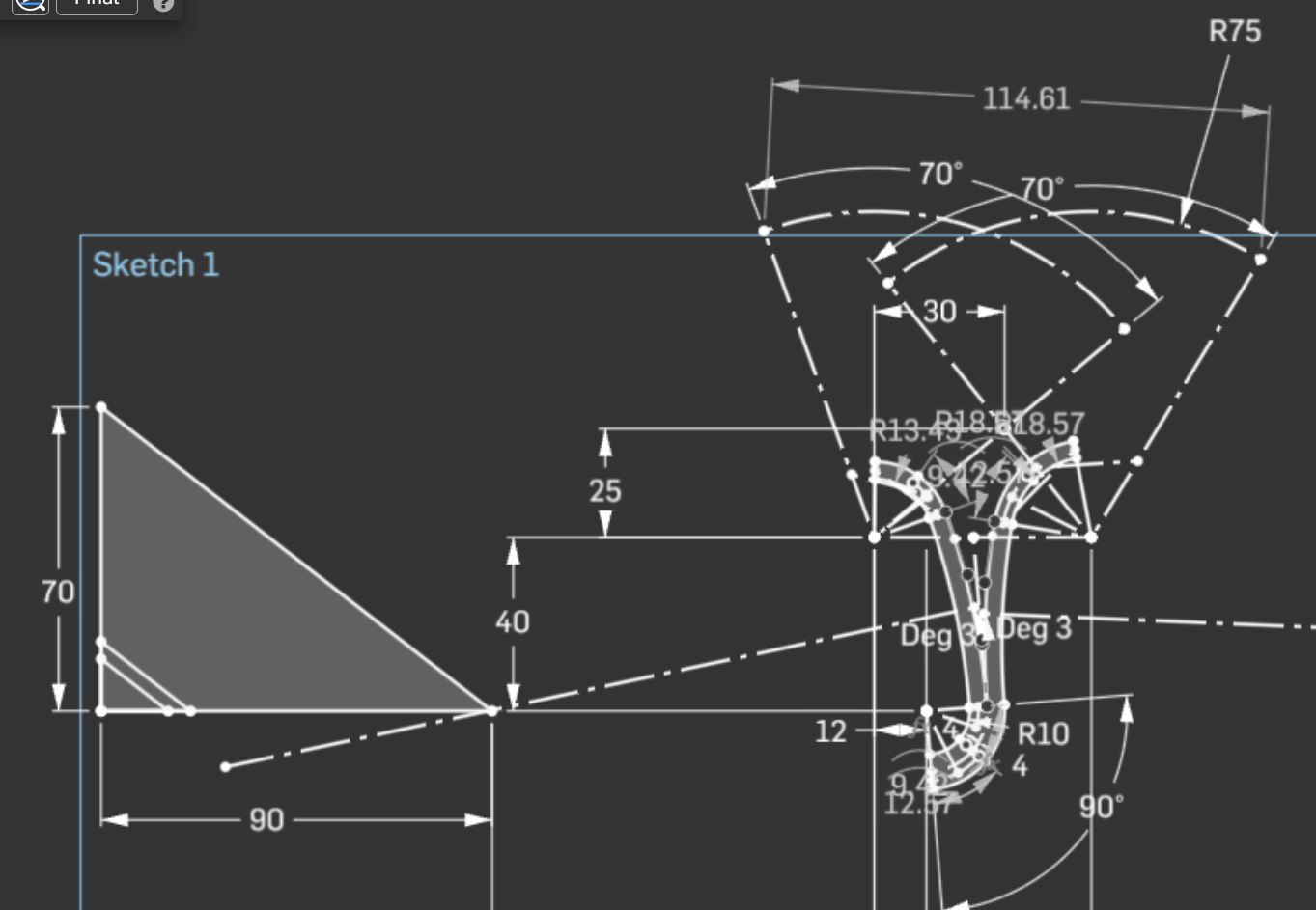
yes, i absolutely have done that equality of 3 segments things. very limited though and that itself can't be parametrized on existing variables or configurations. :]
another workaround that can at least be parametrized is this similar-triangles approach where i can sketch a right triangle with the sides having the ratio i want (7/9) and then make similar triangles (parallel hypotenuse) that can then scale freely in terms of value but their sides retain the desired ratio.
this still only works for ratios rather than the full features of equations.
anyways, i think the request has been made more clear, thanks. i imagine there are various forms this could be implemented in, not necessarily exactly how pro/e was doing it 20 years ago. :]
New Documents UI/Folder Structure
After a few weeks now of using the new UI structure, I can say that it is one of the worst UI experiences I've had in the past 5-10 years. My initial thoughts were negative, and after giving myself some time to adjust, my thoughts haven't changed. All of my coworkers share the same sentiment. I don't aim to be blindly negative, but I will be blunt about my thoughts and experience. I'm really struggling to understand what the change was aimed at to achieve. I think the added column customization was the only thing somewhat useful. I will outline a few of my criticisms below.
- It's completely counterintuitive. It completely goes against the standard hierarchical file structure that almost all file systems use. With something like windows file explorer, each level to the structure is a folder. Everything on that level is located in the same window (folders and files). With Onshape's new UI, the folders and files (documents) are split up into two windows for some reason?
- Navigating the structure is a pain and it feels unnatural. Instead of having a full screen to see all of my files and folders while I am scrolling, I now only have half a screen, and the other half is just dead space. Depending on what I am looking for I end up having to move around the window break point A LOT in order to just see more than a few lines at a time. The window that I am not currently scrolling through is wasted real estate and provides no additional benefit to taking up that space.
- It fights against itself for what it's trying to train you to do. With the split of folders and files/documents, the UI is training you to look at the top of the screen for your folders and the bottom of the screen for everything else. Well, that is all fine except when you reach a level where there are no longer any more folders. The top window where the folders were located will automatically minimize which causes all of the files and documents to now move up to take up the full screen. So the things I was being trained to look for at the bottom of my screen is now at the top. However, this minimization/transition isn't instant, and the documents actually start at the bottom and jump to the top after a second or two. This can sometimes be jarring.
- It just doesn't work very well technically. Navigating folders seems to be slower than before. This is just an anecdotal feeling so I'm not sure whether it is or isn't. In the case mentioned in #3 where you reach the lowest level of the structure and the folder window is auto-minimized, if you go back a level, the "folder" window up top stays minimized. I now have to manually undo something that I didn't want to do in the first place. Something I recently noticed that I think is a bug, is when that auto-minimization happens, it doesn't always show all of the documents on the current level. In order to make the missing ones reappear I have to maximize the empty "folder" window and re-minimize it.
All in all, I feel like it is a step backwards. Now I know that there is probably some case out there where this new UI is beneficial. Like I mentioned at the beginning, the added column customization and sorting/filtering is nice. However, as someone who uses Onshape all day long for work, it has become a real nuisance when trying move around the folder structure. I think some have mentioned it, but being able to choose which version of the UI to use would be great (old or new). This way you can use whichever one benefits you the most. I am just struggling to see what the value added is with this change.
Feature Request - Fully Customisable threaded holes
There's some limitation in the threaded hole feature. For instance on the hole feature for a M36 thread, you can choose a pitch of 4 or 3 but on the external thread feature, there's 1.5 and 2 as additional choices.
I would really appreciate a fully custom feature though where you choose whatever major diameter and pitch regardless of ISO or ANSI standards. This would be helpful for both hole and external thread feature.
This upgrade would solidify our designs and drawings so we're not relying on a static note on our drawings, but on the Hole/Thread callout instead. It would decrease any risks of error of releasing products to manufacture.
 WRegnaud