Welcome to the Onshape forum! Ask questions and join in the discussions about everything Onshape.
First time visiting? Here are some places to start:- Looking for a certain topic? Check out the categories filter or use Search (upper right).
- Need support? Ask a question to our Community Support category.
- Please submit support tickets for bugs but you can request improvements in the Product Feedback category.
- Be respectful, on topic and if you see a problem, Flag it.
If you would like to contact our Community Manager personally, feel free to send a private message or an email.
Best Of
Re: Intro to CAD
I don't know how much help this will be, but you can click the animations in the instructions and they will go full screen. Maybe watch them 2 or 3 times through before moving on.

Re: Pattern on a sphere
Here, I simplified the steps a bit. There were a few redundant things.
Note that Sketch - Profile B, uses an implicit mate connector to control the angle of the sketch plane.
https://cad.onshape.com/documents/70301bdee67da94c01f314aa/w/faadf4a93585be3342174450/e/525c24c…
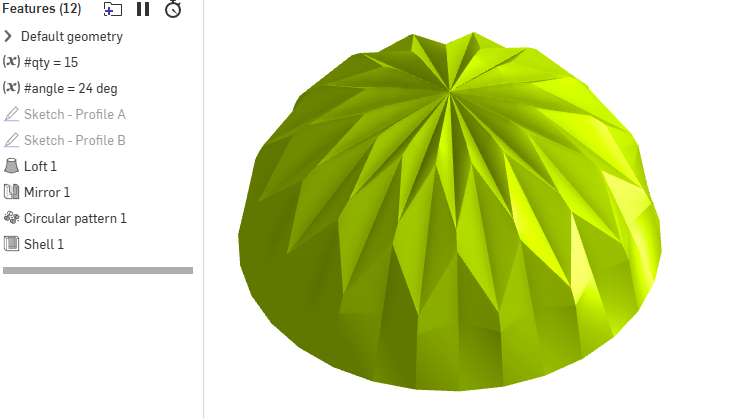

Re: Pattern on a sphere
The point with this kind of shapes is to get the brain to accept that they aren't what they look like at first glance. This, for expamlpe is not a sphere at all. It might not even have the tiniest spherical surface in it. Once that is established, things get a lot easier. ;0)

Importing Object Scan Bug?
I've been testing out the new import scan feature on my iPhone 16 Pro, I may be encountering a bug. I can do an area scan and the mesh shows up after processing but when doing an object scan it fails. After processing completes the scanning UI disappears and no mesh is created in a part studio no are there any scan folder in the document. I've gone through the documentation, am I missing something or is it a bug?
 a_b723