Welcome to the Onshape forum! Ask questions and join in the discussions about everything Onshape.
First time visiting? Here are some places to start:
- Looking for a certain topic? Check out the categories filter or use Search (upper right).
- Need support? Ask a question to our Community Support category.
- Please submit support tickets for bugs but you can request improvements in the Product Feedback category.
- Be respectful, on topic and if you see a problem, Flag it.
If you would like to contact our Community Manager personally, feel free to send a private message or an email.
Master Model course slide correction(s)

stuart_young966
Member Posts: 12 ✭
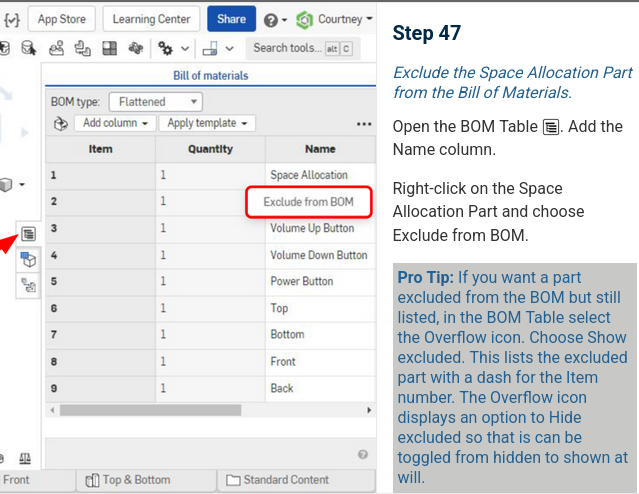
In the Master Model course, section 03. Maximizing Master Model Techniques, slide 47 needs to be updated within Exercise: In-Context Space Allocation.
Specifically, you cannot suppress an item within a BOM in flattened mode any longer. https://cad.onshape.com/help/Content/bill_of_material.htm#exclude_local
The slide should probably be updated to reflect this, since at the moment the screenshot shows being able to do this in Flattened mode.
1