Welcome to the Onshape forum! Ask questions and join in the discussions about everything Onshape.
First time visiting? Here are some places to start:- Looking for a certain topic? Check out the categories filter or use Search (upper right).
- Need support? Ask a question to our Community Support category.
- Please submit support tickets for bugs but you can request improvements in the Product Feedback category.
- Be respectful, on topic and if you see a problem, Flag it.
If you would like to contact our Community Manager personally, feel free to send a private message or an email.
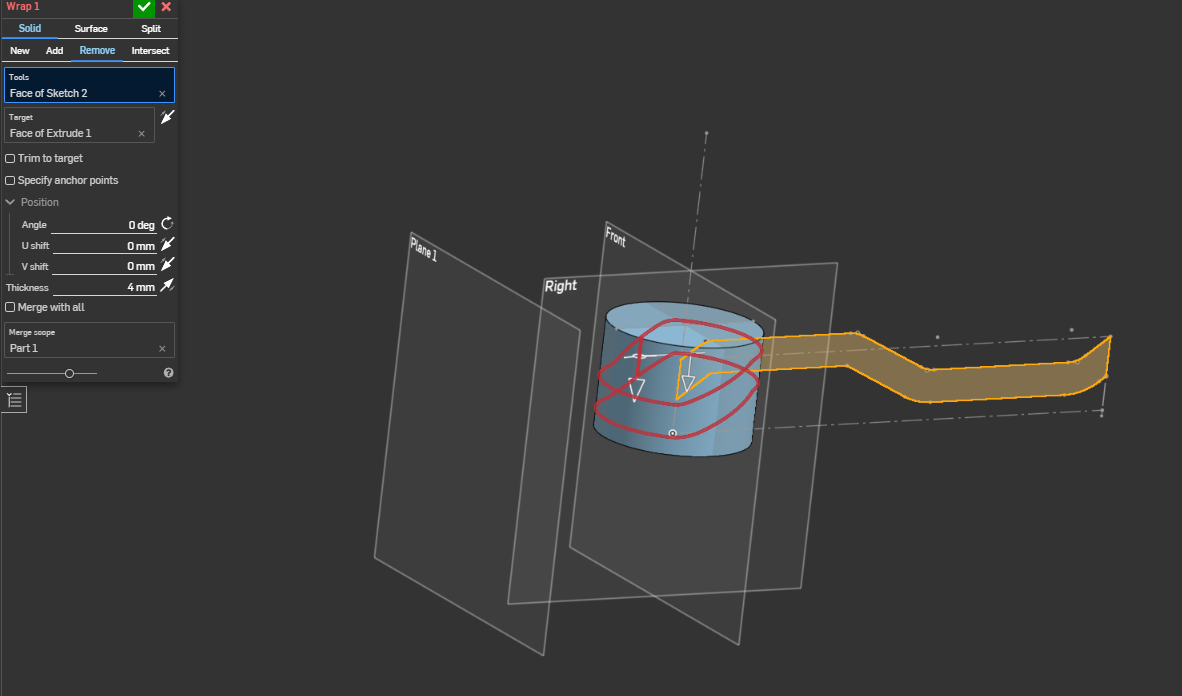
WRAP FEATURE THE WHOLE CYLINDER AROUND

I AM TRYING TO WRAP A SKETCH ALL AROUND THE CYLINDER FACE AND I CANT MAKE IT HAPPEN. THE DIAMETER OF THE CYLINDER IS 70MM AND THE LENGTH OF THE SKETCH IS PI*70. I VE TRIED MULTIPLE PLANES AND IT ONLY WORKS WHEN I CHANGE THE ANGLE TO 5DEG AND UP WHICH I WANT TO LEAVE TO ZERO !
Answers
-
Could you try in two halves?
Onshape, but I think this is fundamental to the parasolid kernel, doesn't like an edge/face that wraps around on itself but is only split with one edge. It's ok if it's split with 2 edges, essentially splitting it into two faces.
Since it seems symmetric: Another simpler strategy could be to wrap the just the middle section of the tool face, project that onto the Right plane, and split the cylinder face with the projected edges. (or just draw the ramp edges on the right plane if that's ok. i understand the slanted edges wouldn't be truly helical though so that may not work for your application, but it's a lot simpler solution.)0 -
splitting the sketch into 2 sections worked fine. somehow it was able to project it into the single cylinder face and wrap around it. Thanks for your help :)
1
