Welcome to the Onshape forum! Ask questions and join in the discussions about everything Onshape.
First time visiting? Here are some places to start:- Looking for a certain topic? Check out the categories filter or use Search (upper right).
- Need support? Ask a question to our Community Support category.
- Please submit support tickets for bugs but you can request improvements in the Product Feedback category.
- Be respectful, on topic and if you see a problem, Flag it.
If you would like to contact our Community Manager personally, feel free to send a private message or an email.
loft issues user with limited knowledge

hello !
for scale modeling a cement bulk trailer especialy the uder taker type of cones . i have limited knowledge on CAD ( 3years sporadicaly on onshape) but I read the forum and made many exercise on the loft feature but i don't understand !! also browswe many videos on LOFT and sweep to try to understand ow it works but soft far now I hit that wall . by the way i know and understand very well this is a very complex project for a les than expert user .
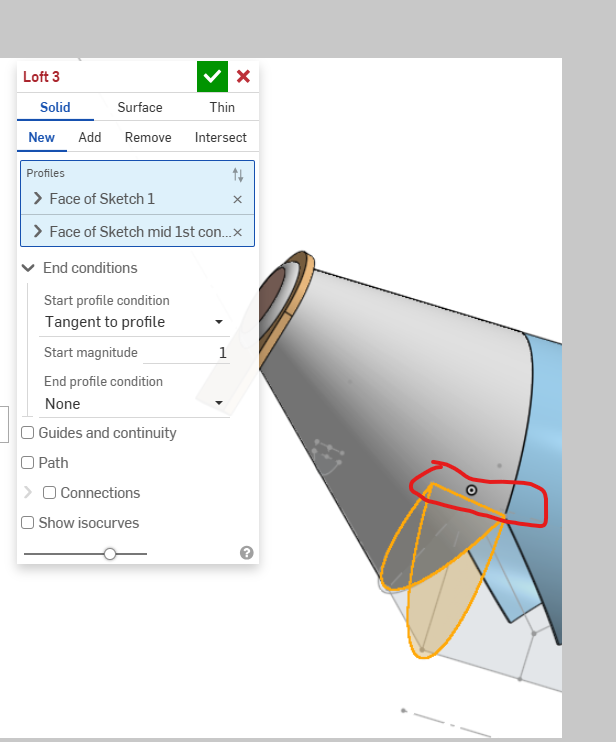
why LOFT #4 does not behave like Loft #3
using :
bulk cement trailer | bulk 53 zizgzag
i tried to create a extrude to have a face to work with nothings work why the red lines are criss cross and not connecting the whole surface to loft ( the loft #3 is working fine ) and I was sure i sketch it properly !
thak you ahead of time to any help that can be provided
regards
Best Answers
-
Hello Andre. Gurus here know why the loft fails. I don't know why but I became curious and found this which gives reasons why a loft might fail. However, another approach is creating a sketch on the surface of the existing part with the Use tool and then lofting one sketch to the other works. - Scotty
0 -
Your selection is trying to make non manifold geometry due to intersecting faces.
Here is a sample sample for ideas.
 0
0



Answers
-
Hello Andre. Gurus here know why the loft fails. I don't know why but I became curious and found this which gives reasons why a loft might fail. However, another approach is creating a sketch on the surface of the existing part with the Use tool and then lofting one sketch to the other works. - Scotty
0 -
thx for replying I will try that again and see how it goes , what threw me of was loft #3 works fine and the same skething was done for #4 and failed , again i will try your approach and see , thx you so much
0 -
nothing works anymore ! so I guess i destroyed something so hold on to try any answers sorry
0 -
Your selection is trying to make non manifold geometry due to intersecting faces.
Here is a sample sample for ideas.
0 -
thank you for all the help ! for sure i will go further and see how the rest goes !
0