Welcome to the Onshape forum! Ask questions and join in the discussions about everything Onshape.
First time visiting? Here are some places to start:- Looking for a certain topic? Check out the categories filter or use Search (upper right).
- Need support? Ask a question to our Community Support category.
- Please submit support tickets for bugs but you can request improvements in the Product Feedback category.
- Be respectful, on topic and if you see a problem, Flag it.
If you would like to contact our Community Manager personally, feel free to send a private message or an email.
New Feature: Edit Curve Plus - BETA

So this is even more experimental than Bridging Curve Plus, but it seems to do some things that I've wanted for a while.
Onshape doesn't have great ways to manipulate multiple points in a feature at once, and the most natural thing to want to do with a control point "circle" is move the points symmetrically. Once again I worked with ChatGPT to whip this up. I'm sure this is not the most efficient way to do this, and it probably has a bunch of bugs, but I wanted to get it out there for people to play with. Expect this to change or break in future versions, but please do try it.
In order for the Mirror options to show up, the input needs to be a circle. I find Approximate with degree 4 or 5 to be best for G3 curves. You may need to tighten the tolerance and play with the max number of control points to get a good number of control points. You'll want to have an even number of visible points for things to work well (this can be an odd number of CPs when the degree is odd, due to the way periodic curves wrap around).
So Degree 4, max points 12/14/16, or degree 5, max points 13/15/17 all work well. You may need to dial the tolerance down to 1e-5 mm to get some of these to work.
(I definitely want to add the ability to work on non-periodic/non-circular curves across a mirror plane, but this was my first step)
When mirroring is on, the manipulators work radial, tangent and normal to the circle. You can also edit the weights and have all the appropriate mirrored weights update as well.
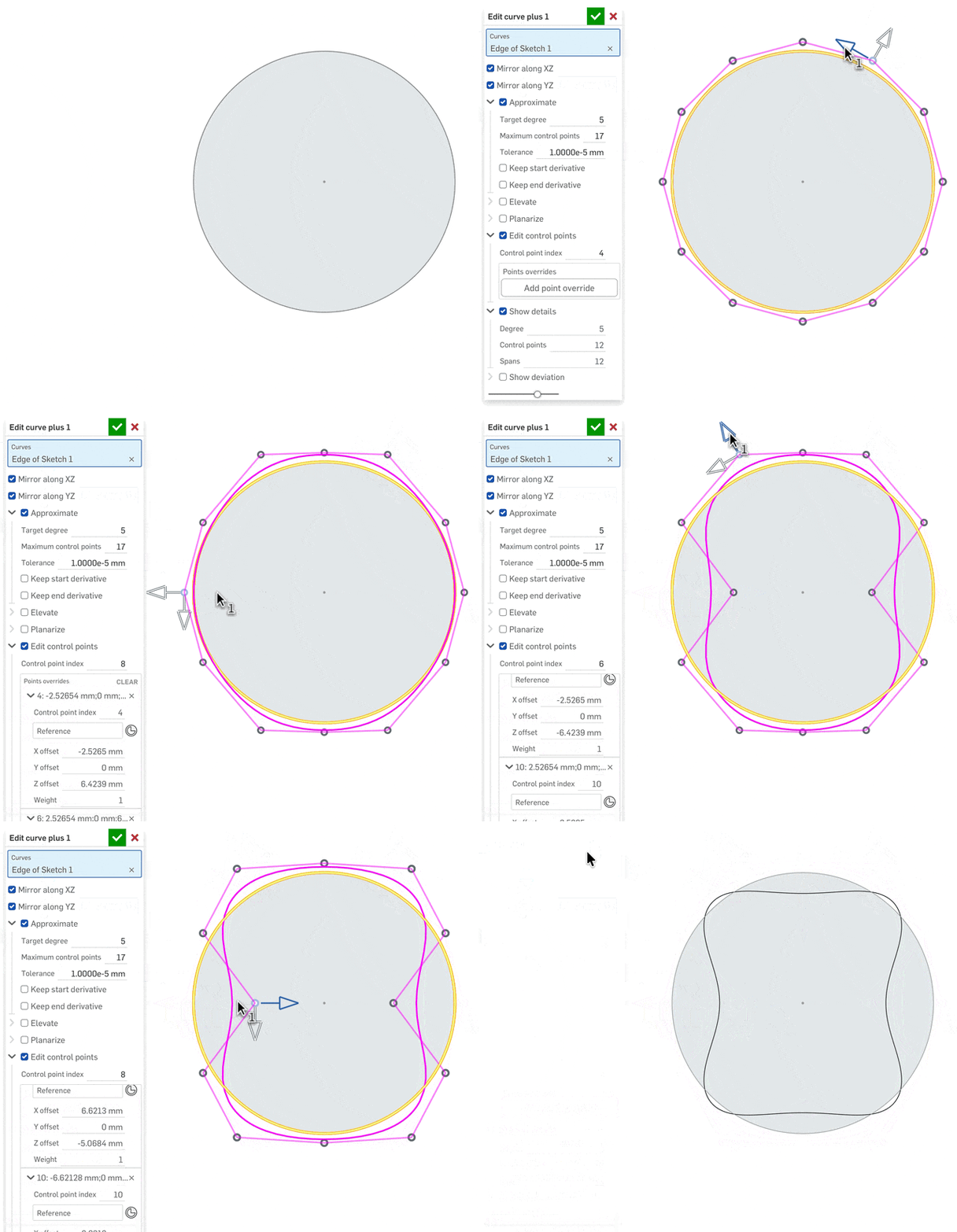
[this feature took a lot more back and forth with ChatGPT, but it is way beyond what I could do by myself]
Simon Gatrall | Product Development, Engineering, Design, Onshape | Ex- IDEO, PCH, Unagi, Carbon | LinkedIn
Comments
-
Getting big Spore energy from the way these manipulators move. I should reinstall that and get some inspiration for Amalgamate. I think it would be cool to manipulate some of the computed properties of a derived studio with arrow manipulators like this.
0 -
Well it's still very much a beta, but this version is working well enough that I'd love some feedback. It has a PDF and it's "published".
https://cad.onshape.com/documents/cbd5b34feb4bb0575a2bb2b4/w/37bf21e38c9e1ebe1fdbda21/e/b7342ce02305ae92f83d7ffa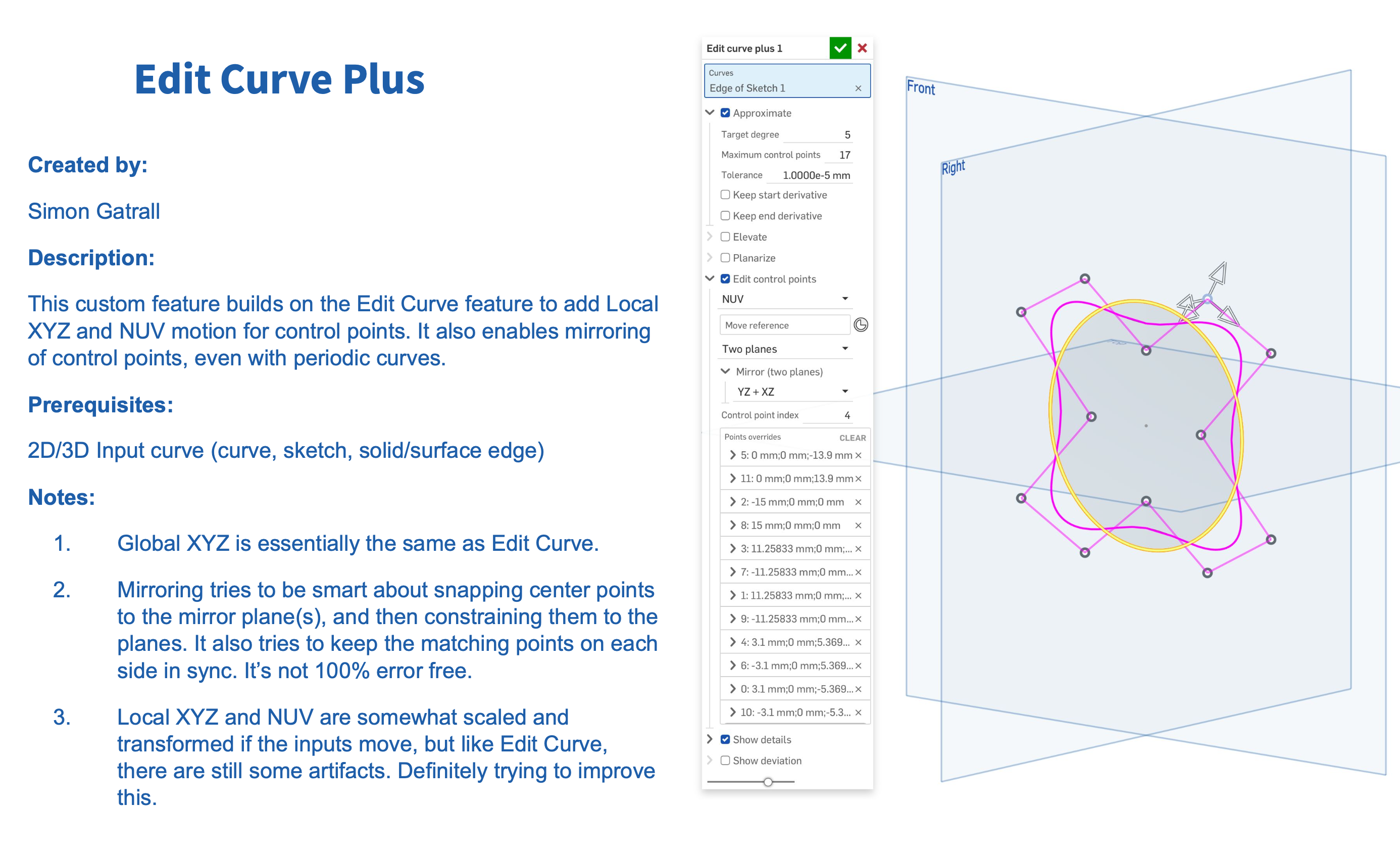
Simon Gatrall | Product Development, Engineering, Design, Onshape | Ex- IDEO, PCH, Unagi, Carbon | LinkedIn
0