Welcome to the Onshape forum! Ask questions and join in the discussions about everything Onshape.
First time visiting? Here are some places to start:
- Looking for a certain topic? Check out the categories filter or use Search (upper right).
- Need support? Ask a question to our Community Support category.
- Please submit support tickets for bugs but you can request improvements in the Product Feedback category.
- Be respectful, on topic and if you see a problem, Flag it.
If you would like to contact our Community Manager personally, feel free to send a private message or an email.
Termination of a Routing Curve

Best Answer
-
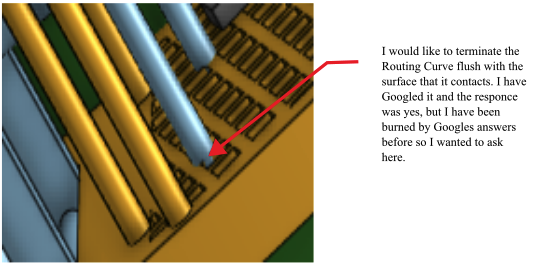
The routing curve can terminate at whatever reference (point or mate connector) that you'd like, but the sweep of that curve to create the solid may still bleed through. Either make the routing curve derivative to that surface at the end (ensuring it will be flush) or use a Split to split the end of the sweep on that face.
0

Answers
-
The routing curve can terminate at whatever reference (point or mate connector) that you'd like, but the sweep of that curve to create the solid may still bleed through. Either make the routing curve derivative to that surface at the end (ensuring it will be flush) or use a Split to split the end of the sweep on that face.
0 -
Thank you Kevin.
0 -
Colin,
Just make the routing curve have short straight (normal) section at the very end. This will create a flush end.
-S
0
