Welcome to the Onshape forum! Ask questions and join in the discussions about everything Onshape.
First time visiting? Here are some places to start:- Looking for a certain topic? Check out the categories filter or use Search (upper right).
- Need support? Ask a question to our Community Support category.
- Please submit support tickets for bugs but you can request improvements in the Product Feedback category.
- Be respectful, on topic and if you see a problem, Flag it.
If you would like to contact our Community Manager personally, feel free to send a private message or an email.
Why isnt the object considered a part?

I made this pin and want to cut a section out to make it 'pinchable'
But I cant cut it out as it throws me the error "No merge scope"
Which is as I asume from the fact that onshape doesn't consider any parts are in the project yet, it only lists one surface.
To me the part is fully closed off.
I used the revolve function and even went back in the drawing to make the end and finish point vertical
I had other timed today where onshape just woundt work with me at some times, and I'm slowly going mad now
https://cad.onshape.com/documents/91aa6a23b58c36afbd23d1f1/w/879436ed5575d58b3354c397/e/432deba854fead828d8081fd?renderMode=0&uiState=69e6e0b678e7c24b1ffefe55
Best Answers
-
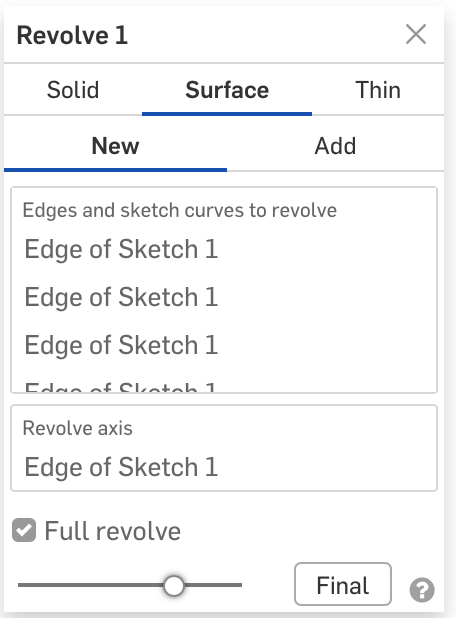
You used Surface instead of Solid for your revolve. Yes, the surface fully encloses a region, but you explicitly selected Surface so Onshape gave you a surface. Use Enclose to turn the surface into a part or use Solid instead of Surface.
2


Answers
-
You used Surface instead of Solid for your revolve. Yes, the surface fully encloses a region, but you explicitly selected Surface so Onshape gave you a surface. Use Enclose to turn the surface into a part or use Solid instead of Surface.
2 -
TYSM @S1mon @Matt_Shields
0