Welcome to the Onshape forum! Ask questions and join in the discussions about everything Onshape.
First time visiting? Here are some places to start:- Looking for a certain topic? Check out the categories filter or use Search (upper right).
- Need support? Ask a question to our Community Support category.
- Please submit support tickets for bugs but you can request improvements in the Product Feedback category.
- Be respectful, on topic and if you see a problem, Flag it.
If you would like to contact our Community Manager personally, feel free to send a private message or an email.
Displaying calculated values in the user interface

Hi
I just finished the featurescript fundamentals tutorial and are trying to make my first feature by myself, which is a gear generator.
I want to display some calculated values in the user interface where the user enters the input parameters to help them select the input parameters.
To be a little more concrete, there's a value for the total profile shift coefficient, x_sum, which is calculated from the most basic input parameters like axle spacing, amount of teeth and pressure angle and I'd like to display the value of x_sum in the user interface near where the user will enter the profile shift coefficient, x1, for gear 1 and then I want to show the calculated value of profile shift coefficient for gear 2, which is just x2=xsum-x1.
I tried to ask the built-in AI advisor but that was unhelpful as it stated that it was definitely possible but suggested that I defined constants in the precondition block which is not allowed.
Do any of you know if this is possible or not?
I know that I can pass information to the user using the println(); function so it is shown in the featurescript notices, but I'd prefer if it is visible directly in the user interface if possible.
Thanks,
Sebastian
Comments
-
To get data back into the user interface, you have to use the editing logic function.
Important things to know about the editing logic function:
- This function is triggered only when the feature is open, and the user makes a manual adjustment to the ui.
- This function runs AFTER the feature tree is re-built (Or something like that) so you can even use getProperties() which usually would not be possible (Until Onshape re-architects the part studio, which there are rumors may happen in the future).
Here is a basic example of how editing logic can work:
https://cad.onshape.com/documents/c4852470bd169918e50d79a…And here is the CADSharp featurescript video course that covers this topic, however, editing logic is within the paid portion of the course since its and advanced topic.
.
RENDERCAD
rendercad.ai - Photorealistic product rendering.
▚▞▚▞▚▞▚▞▚
________________________________________________________________________1 -
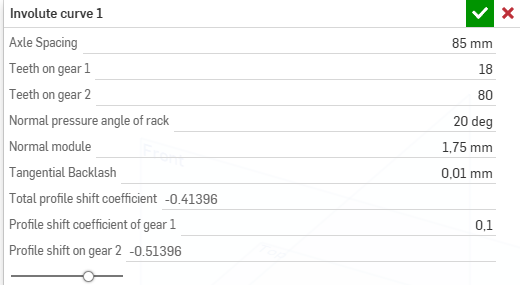
OOooh, great, thanks! This is exactly what I wanted! Or, that is, it seems that I have to calculate several of my calculated gear parameters both in the functions action block and in the editing logic function block as the latter cannot seem to take a value from the former. Anyway, now I got a window where the total profile shift coefficient as calculated form the axle spacing, module and pressure angle is displayed and then the user can enter the value for the profile shift of gear 1 and see the profile shift coefficient on gear 2 immediately.
.. Now I just have to find out the form of annotation to make so that the profile shift coefficient can be any type of number and not either a length, integer or angle as I currently know how to do. :)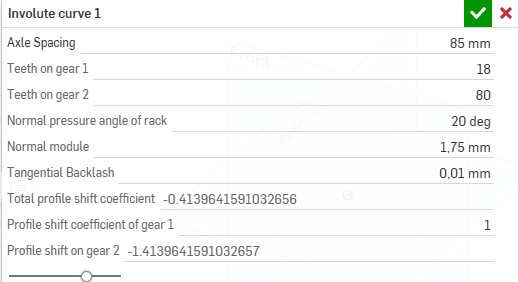 1
1 -
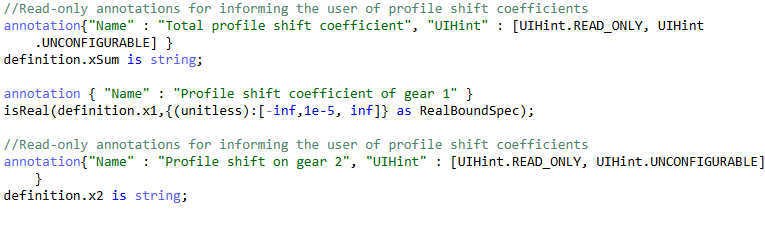
if its a read only value, then just make it a string and then add the units to it in string format. since Onshape doesn't support very many types of units within the ui inputs. You can set the "UIHint" of that parameter to read only, so that user can't edit that value but edit logic can.
Unit conversion tip: Onshape uses meters and radians behind the scenes. so if you go to print your value it will be some long crazy weird number. To get a length to show up as inches for example in a decent string, do this
toString(roundToPrecision(myLengthVariable / in, 3)) ~ "in". This will convert meters to inches, then round the 6 digit floating point so that you get rid of any conversion errors. For angles this would be something like thistoString(roundToPrecision(myAngleVariable / degree, 3)) ~ "deg"
RENDERCAD
rendercad.ai - Photorealistic product rendering.
▚▞▚▞▚▞▚▞▚
________________________________________________________________________0 -
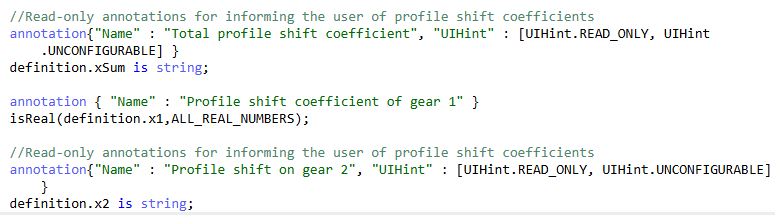
I understand why the read-only value is fine in string format. It was the input "Profile shift on gear 1" that I now have to get to the right format. Initially I had it as an integer, since I know how those works but I need it to be any real number. After searching through the featurescript documentation, I have found isReal() to be the one to use but are now working on defining the bounds for that so the input can be any real number. In the documentation, I have found POSITIVE_REAL_BOUNDS but I have to allow it to be negative as well, so I'm working on defining a bound being ALL_REAL_NUMBERS. :)
 0
0 -