Welcome to the Onshape forum! Ask questions and join in the discussions about everything Onshape.
First time visiting? Here are some places to start:- Looking for a certain topic? Check out the categories filter or use Search (upper right).
- Need support? Ask a question to our Community Support category.
- Please submit support tickets for bugs but you can request improvements in the Product Feedback category.
- Be respectful, on topic and if you see a problem, Flag it.
If you would like to contact our Community Manager personally, feel free to send a private message or an email.
How do I move this feature?

First off, I'm very new to Onshape, so I'm likely missing some key basic function.
The image below is the bottom of a cylinder center finder I'm using from another Onshape user. I'm trying to modify it to add engraved ruler markings on the diagonal to measure diameter. Anyway, I used a "Ruler" FeatureScript by Gustavo Ambrozio to generate the markings. There are two rulers generated - One for the line markings and the other for the number labels.
I think I successfully have the markings engraved in the model, except for the position of the numbers. You can see them highlighted in the screen capture. I'd like to reposition them so that each number is directly above its long line, but can't see a way to do this.
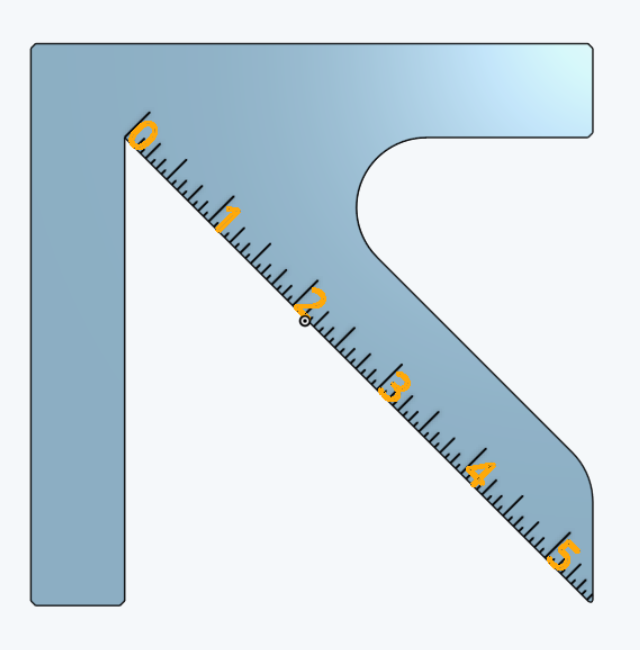
I can select the engraved number outside of Transform, but once I get to Transform, the selection goes away and I can't reselect. What am I missing?
Best Answer
-
Hello Marc. No need to move them. Just draw a line (construction line will do) offset a bit from the line used for the ticks and use that new line for the labels. One Transform tool lives within a sketch edit to move/rotate sketch entities. The other (not while in a sketch) is used to move/rotate a part or parts. - Scotty
2
Answers
-
Hello Marc. No need to move them. Just draw a line (construction line will do) offset a bit from the line used for the ticks and use that new line for the labels. One Transform tool lives within a sketch edit to move/rotate sketch entities. The other (not while in a sketch) is used to move/rotate a part or parts. - Scotty
2 -
Thanks!
0