Welcome to the Onshape forum! Ask questions and join in the discussions about everything Onshape.
First time visiting? Here are some places to start:
- Looking for a certain topic? Check out the categories filter or use Search (upper right).
- Need support? Ask a question to our Community Support category.
- Please submit support tickets for bugs but you can request improvements in the Product Feedback category.
- Be respectful, on topic and if you see a problem, Flag it.
If you would like to contact our Community Manager personally, feel free to send a private message or an email.
Cam design help

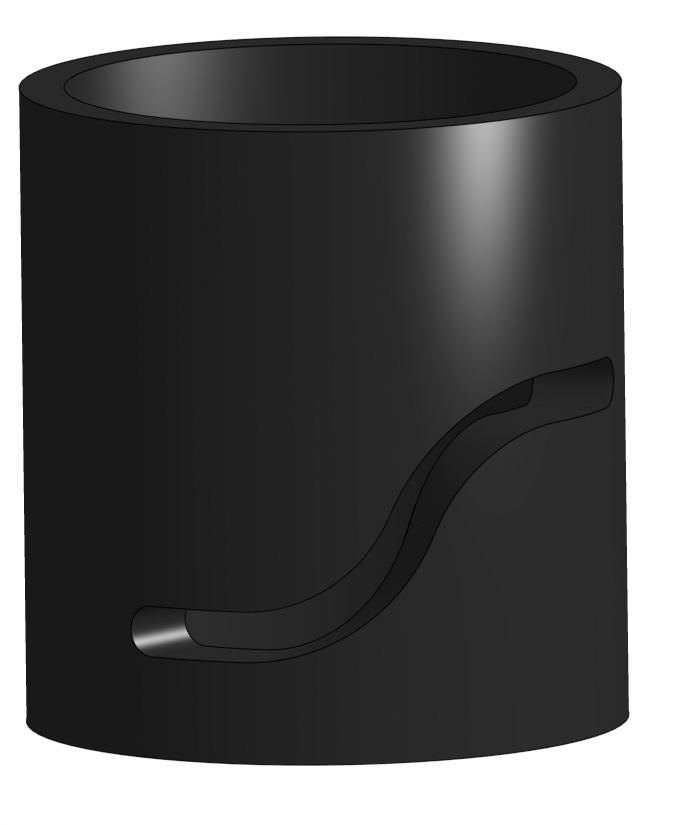
I am trying to make a cylindrical cam track with a cylindrical follower but I cannot figure out how to remove a track where it doesn't warp the path while allowing me to create a tangent mate for the follower.
Here is the link:
https://cad.onshape.com/documents/e98e52b1c7053aa3e9aae2f9/w/20b0ef10a23f1e01faf6df88/e/070994de3d1b7c5b656a0012
Answers
-
For how you want your track to be cut, I can't really help you too much since I don't know enough about the design intent to definitively direct you. However, I can still give you a tip for dealing with CAM slots in assemblies. Try using the "Wrap" tool to project your sketch onto the cylinder's face, then create a "3D Fit Spline" along the path of the wrapped surface. This curve will be mated into your assembly, so you'll also need to create a mate connector on both the curve and the cylinder to fix it in place. Then you can create a simple sketch of a circle that you will attach to the follower pin with a cylindrical mate. Then you can use the Tangent mate between the spline curve and the center vertex of the circle sketch.
This creates the full motion without the wierdness that comes with tangent mating two surfaces together by effectively turning the tangent mate into a path mate.
Good Luck
0 -
Here's a method that produces a slot that's an even width that can actually be cut by an endmill. The Wrap feature will make cuts normal to the surface, which means it tapers in a way that's hard to machine.
https://cad.onshape.com/documents/26aee7b37f37c999c8c5a522/w/b83a064773e1f7f4e00b57eb/e/78d37cfb34efcc5516338053
 0
0 -
I want the slot to go all around the cylinder and for the cylinder to physically fit in the cam for the entire rotation.
0 -
Maybe some more clarity on the goal would be helpful here. Can you make a screenshot markup or something like that? The path that you have is S-shaped, which doesn't repeat itself well. To make the path the right width anyway, you can set it to the diameter of the cylinder times pi. There is a constant built into Onshape already, so if you just type
PI, you will be using that constant.0

