Welcome to the Onshape forum! Ask questions and join in the discussions about everything Onshape.
First time visiting? Here are some places to start:
- Looking for a certain topic? Check out the categories filter or use Search (upper right).
- Need support? Ask a question to our Community Support category.
- Please submit support tickets for bugs but you can request improvements in the Product Feedback category.
- Be respectful, on topic and if you see a problem, Flag it.
If you would like to contact our Community Manager personally, feel free to send a private message or an email.
having trouble getting this flatten part thing to work

with the help of an AI custom feature i was able to create this nice flower shape, but now I want to be able to flatten the part using the back as a reference to be flat, that way I can print it and thermoform it to the desired shape. I've been trying to get Claude to make another custom feature to do this but it keeps not quite working out. any suggestions?
the best I was able to do included post processing to clean it up and its still not right.
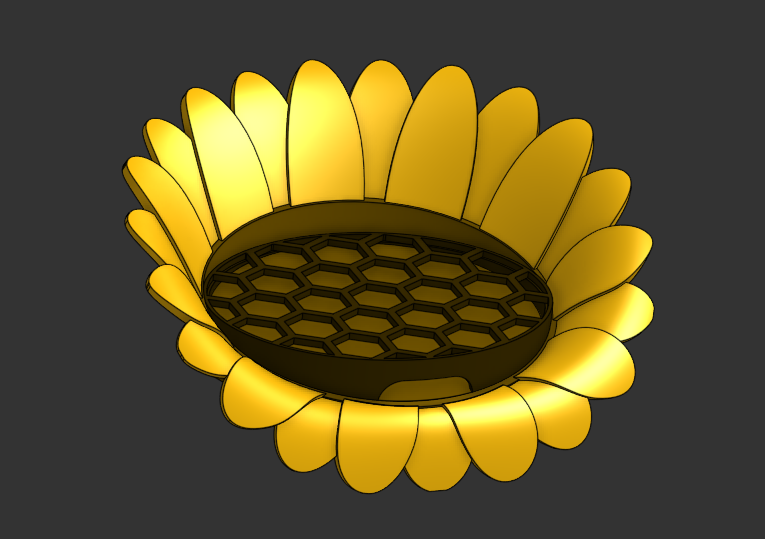
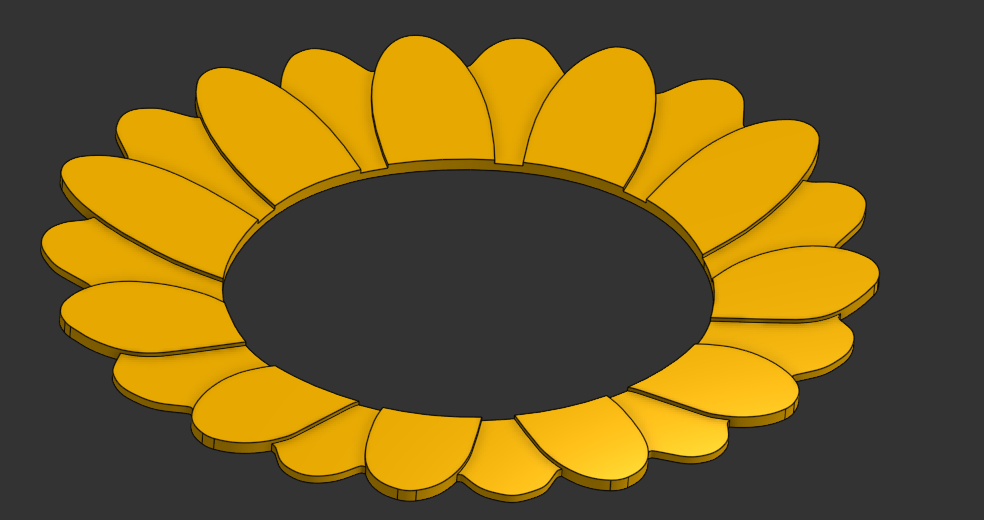
my idea was to have something like flatten surface, but have it be able to map the geometry along with the surface. that didn't seem to work because of what the api exposes to the script, so instead it does its own mapping and then extrudes it out, and since the pedals are at different levels it maps wrong causing some realignment clean up with replace face, also since its a sampled mapping there needs to me an approximated spline causing pedals to blend together instead of having sharp corners. that's at least what I understand form my vibe coding, I'm a drafter, not a programmer.
v6 is the baseline before I started to mess with the flattening idea,
v7 and the branches after that is where I tried to start making something.
https://cad.onshape.com/documents/5194f8f4f1af88d3284b6391/v/eb4d1739937b3afbe71c9cb5/e/ff483d516a3551f8a2a89e9f?renderMode=0&uiState=6ad82f025b5abcf9bbffa43b