Welcome to the Onshape forum! Ask questions and join in the discussions about everything Onshape.
First time visiting? Here are some places to start:
- Looking for a certain topic? Check out the categories filter or use Search (upper right).
- Need support? Ask a question to our Community Support category.
- Please submit support tickets for bugs but you can request improvements in the Product Feedback category.
- Be respectful, on topic and if you see a problem, Flag it.
If you would like to contact our Community Manager personally, feel free to send a private message or an email.
loft command gone wrong...

hey
i have 2 profiles to make loft and for some reason they connect wrong . lost all ideas of how to fix it , any hints what makes them twist at certain point ?
Answers
-
Hello. Here is the problem:
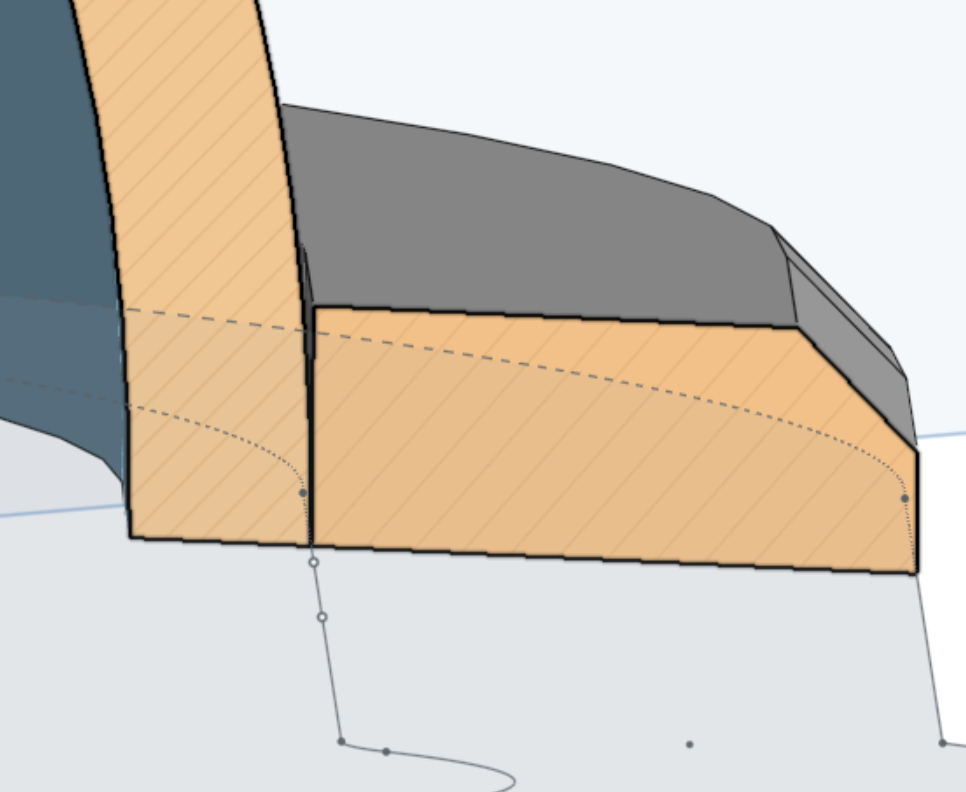
One possibility to fix it is to move the face of the flange towards the shell (.1mm works) and then do a Boolean to make them one part. Another method would be to add an addition inner offset to the shape you created in sketch 2 and include that region in the extrude. - Scotty
0 -
… or you could use the "Replace Face" Feature and replace the inner face of the flange with the outer face of the shell BEFORE you try any booleans. That should be more reliable with later edits than making an offset based on a guess.
0
