Gear Lab - Cylindrical, Bevel, Face Gears

Here is a brief description of the feature set:
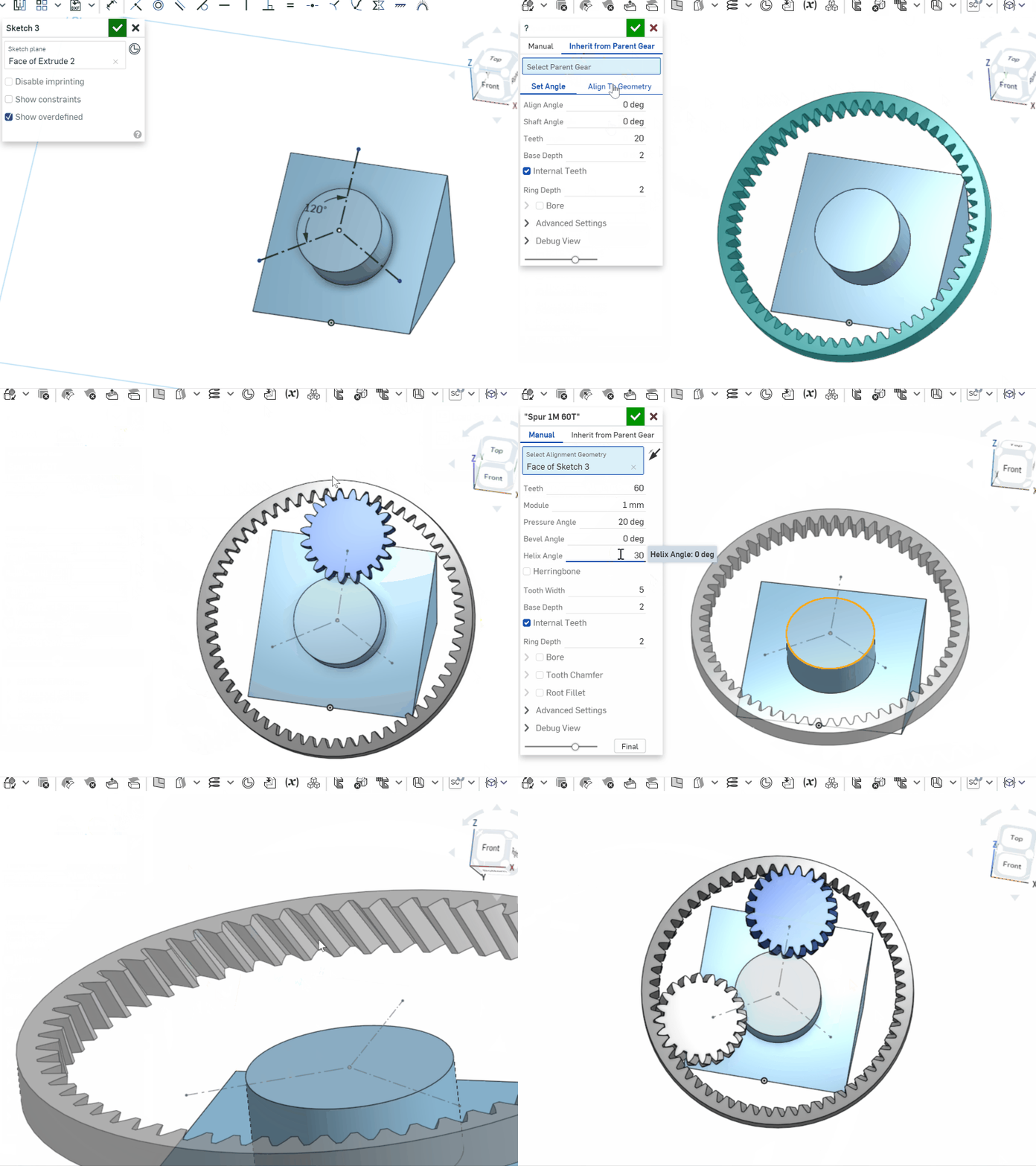
* Generate and position a gear by selecting a 'parent' gear created by this custom feature. The 'child' gear will have parameters and positioning set to fit the parent gear. Can enter an angle offset, or align to other geometry primitives.
- most inputs are unitless and represent multiples of the gear module; consequently, changing the module will scale the entire part (with a few minor exceptions like the bore/keyway options).
- the pressure angle input is specifically for *normal* pressure angle (I believe the 'Spur Gear' feature uses transverse pressure angle for its input).
- the type of gear is determined by the bevel angle 𝛿 (𝛿 = 0 for cylindrical gear, 𝛿 = 90 for face gear); the face gear produced here is for meshing with cylindrical gears; the code can handle creating a face gear for meshing with bevel gears (𝛿 = 90 with spherical involute teeth), but I wasn't sure how to elegantly present that option to the user, so I left it out.
- the helical/spiral teeth are right-handed for positive values, and left-handed for negative values; the spiral bevel and face gear teeth follow a logarithmic spiral; could implement additional spiral patterns if requested, or zerol teeth.
- when using the "Inherit from Parent Gear" mode, valid unselected parent gears are highlighted in cyan; the currently selected parent gear is not highlighted.
- when specifying a Shaft Angle for a bevel gear pair, the resulting shaft angle may be slightly different from your input - this is because gear teeth are restricted to integer values. But for common usage where both bevel gears have the same bevel angle, this won't be an issue.
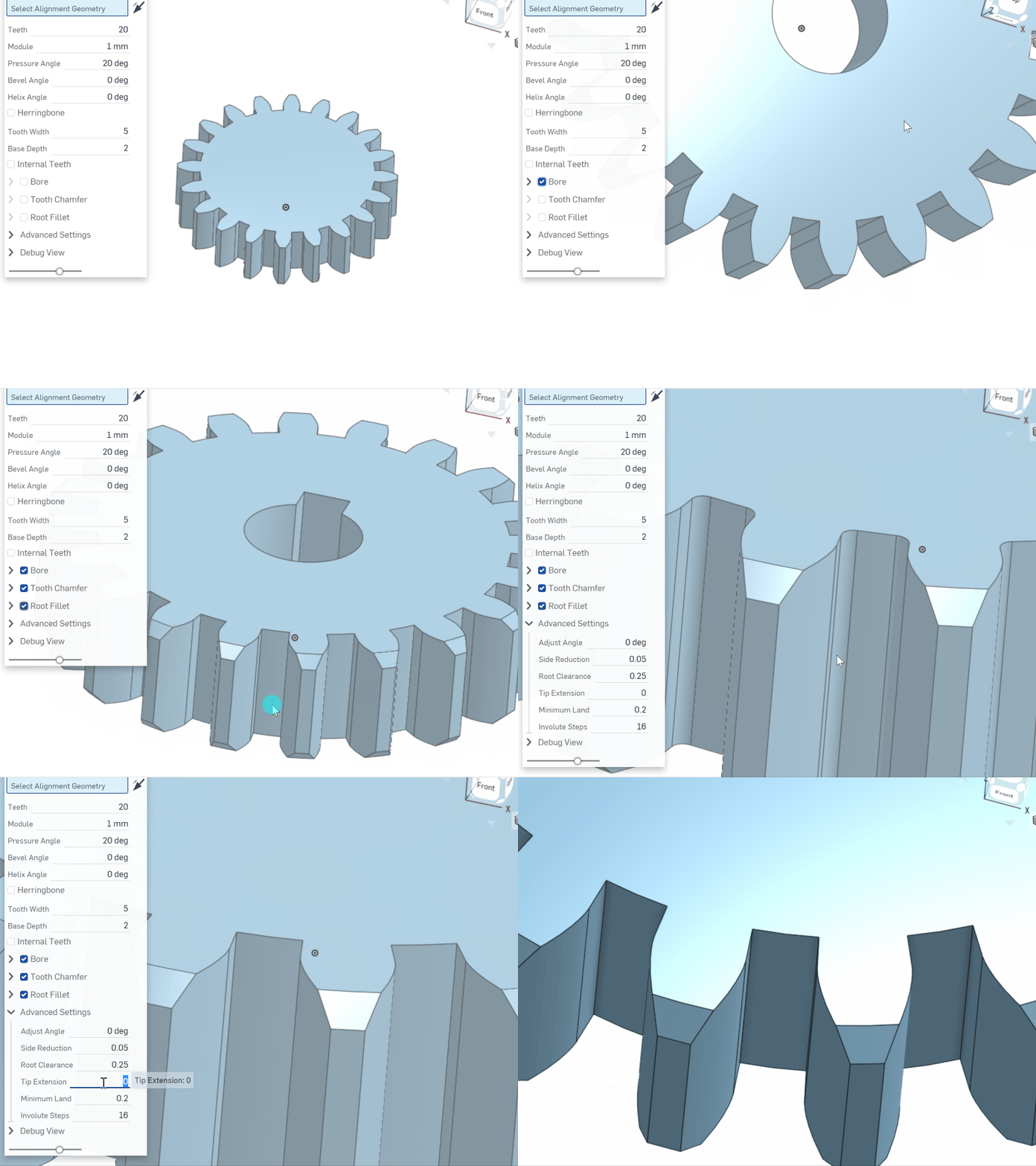
- the "minimum land" input in the Advanced Settings enforces a minimum tooth tip width (top land) to prevent teeth narrowing to a sharp point at high pressure angle.
Gear Lab [Link]:


Comments
-
Nicely done! I really like the granularity of what you can input as a user, and the absolute cartload of gear generation options.
IDK if it's something up with my onshape account, but I can't seem to add it to my toolbar

0 -
oh I realized what it is - you need to make a version in order for other people to be able to reference the tool in other documents
 1
1 -
Oops! I created version V1.2
-
This really looks pretty amazing. It seems like Onshape should be in a position to power some very advanced gear design software. I know from working with several different plastic injection molded gear designers that there are a lot of subtleties to tooth design for those types of systems (designing for shrink in plastic and the deflection characteristics). With the power of FeatureScript, I could see some of these types of esoteric custom software moving to Onshape.
Simon Gatrall | Product Development, Engineering, Design, Onshape | Ex- IDEO, PCH, Unagi, Carbon | LinkedIn
1 -
This looks great. The ability to create different gears in relation to the parent is so useful! Thank you for sharing0
-
Updated to V1.1.2:
* Performance improvements. Patterning the gear teeth using face patterns (instead of patterning bodies and using union) has significantly improved feature regen time. Unfortunately, there is currently an issue applying face patterns to root fillets. I have submitted a support ticket with Onshape Support to hopefully have this addressed.1 -
The issue I'm observing is that applying a face pattern to the root fillet faces works in many cases, but occasionally produces irregular geometry like the following. I may end up using your approach of modeling the space between teeth, instead of the teeth themselves.NeilCooke said:@antlu65 if the face pattern doesn’t work it doesn’t work. That is why my gear feature models the space between the gear teeth.
1 -
@antlu65
Just wanted to say I've been testing this feature out on a side project and I really love it! really good work. If you're interested, I could put together a short list of ideas for improvements that have come to me while using it.1 -
MATH BUG found !
The behavior of helix angle when working with bevel gears is incorrect.try this: create a bevel gear along with it's pair using the inherit from parent option, but make sure the pair is not 1:1 (bevel angles different than 45 degrees)then section view the teeth meshing zone: everything will be finenow add a helix twist to the first bevel gear, the inherited gear will then become twisted as wellbut now if you section view, you get this nonsense: the behavior here is that the INHERIT mode wrongly copies the helix angle over to the second gearas can be seen here, this is the correct behavior: https://www.desmos.com/calculator/jedbgiivqwnote how the smaller gear has a steeper helix angle because it rotates faster compared to the large gearin here, the helix angle must be multiplied by the reduction factor (sin(ba1)/sin(ba2)) where ba1 is the bevel angle of the large gear and ba2 that of the smaller gearbut this if the helix angle represents the amount of twist per unit length along the pitch cone generatorthe helix angle in this feature-script seems to be defined in another way which I must account forand after about 6 hours of trial and error I could not yet deduce exactly what the expression h2=f(h1) should be such that the helix no longer has any interferencewill have to come back to this once I derive the aforementioned expression0
 -
@antlu65, you have my compliments and deepest respect. Your Gear Lab feature script is impressive. Is it possible to add the ability to apply a mate-connector in the Select-Alignment-Geometry field?
0 -
Hello,
This is a tremendous tool, thank you so much for your work. I noticed that the root fillet does not seem to work when using bevel gears, so I wanted to bring this to your attention, @antlu65. Once again, thank you for your impressive contribution.
0 -
Hi all,
I have just played with Gear Lab, works nice!
Question, why is the bore size limited to 20mm? 0
0 -
The meat of the FeatureScript seems to be private, so it's not obvious where/why this is being limited. However, it would be pretty simple to just make the hole bigger after the fact.
Simon Gatrall | Product Development, Engineering, Design, Onshape | Ex- IDEO, PCH, Unagi, Carbon | LinkedIn
0 -
Is it possible to add an option to specify more steps in the spiral for spiral bevel gears in a similar manner to the way the number of steps in the involute profile is specified? I am seeing artefacts like these bumps in the tooth profile when trying to intersect the gear with another shape:

0 -
I figured out that the bevel angle to use for the bigger gear bevel is atan(bigger gear teeth / smaller gear teeth). I think it would be helpful to include this in the documentation somewhere or even incorporate this into the featurescript.1
-
It's cool that I can create bevel gears with this tool, but I am in trouble with internal circle being lower than the teeth:

How can I get the circle in line with the teeth?
0 -
Apologies if this is a very naive question from a novice (which is true as a fact), but I would like to design bevel gears for a DIY project and print them out. However, in my part studio, after having added the Gear Lab feature, I only get spur gears as default. I can hardly find alternatives to switch between different gear types. Please see the attachment. Am I missing something?

0 -
I'm guessing the "Bevel Angle" should not be set to zero... (probably 45 assuming you are doing two gears with shafts at right angle)0
-
Thanks @eric_pesty for the tip. Indeed with that change, one gear takes up the expected form, but still the second gear is missing. I was expecting that with bevel gears, both gears would be generated simultaneously, but perhaps I am wrong. It would be good to hear @antlu65 about this.eric_pesty said:I'm guessing the "Bevel Angle" should not be set to zero... (probably 45 assuming you are doing two gears with shafts at right angle)
0 -
If you just want a 1:1 ratio and 90deg angle, it's just 2 of the same gear so you can place these in an assembly (or just print 2 of them!)
Otherwise you need to create a second "gear" feature and use the "inherit from parent gear" option at the top to create a compatible gear.0 -
I tried to inherit from parent gear in order to create my second compatible gear hoping to get a ratio other than 1:1 (because I need to reduce RPM and increase torque with my gears). However, the second/inherited gear keeps the size of the first gear. I was expecting to be able to set a different "module" value for the second gear leading eventually to a different radius/ratio. But, an inherited gear does not have such a parameter. Playing with other parameters also did not help further. I am sure I am still missing a nitty gritty detail from the gear lab menu.0
-
At first I thought there was a bug as setting the number of teeth in the "child" gear didn't have any effect...
But then realized that it's the bevel angle that is going to set the ratio: 45 deg requires two identical gears, try setting the parent gear to something else (like 30deg) and you will see the number of teeth adjust accordingly (an error message would be helpful here).
A good tip is that you can edit the first gear feature with the "final" button enabled to see how the changes to the first one affects the second.
That said I'm really not an expert on gears so you might want to do some reading on how all of this works if you want to get predictable results. I'm sure there's a formula you can use to figure out the exact bevel angle for the ratio you want (rather than trial and error) but I don't know it off the top of my head.
0 -
Thanks @eric_pesty for the tips. I could get my coupled gears to working.
Cheers0 -
Sectors. I have an application where I need to make a sector to mate with a small(er) pinion. My problem is that I can't do the usual trick of making a full circle internal gear and then just trimming it down to a sector of the gear because I would need 1820 teeth in the full circle internal near and there are no tools that I have found that will let you generate an involute gear with that many gear teeth. I am considering just making a simulated involute using straight lines rather than involutes because the differences are in the rounding error for that high of a tooth count, but I would still like to have a tool to use if it is possible. Can Gear Labs make sectors that are "cut" from gears with theoretically large numbers of teeth?0
-
Thank you for this script. It seems though that the script cannot generate herringbone gears? Whenever I tick the 'herringbone' box it unticks itself instantly, even with the default settings.How can I create a herringbone gear?Also when I click "Go to definition" on "GearLabFeature_Main" I don't get the source code. I am a developer but new to onshape in particular, I take it that this means that the feature is closed source?1
-
Look at the model:
The second gear is at a shaft angle of 90 degrees. If you measure the angle to Plane Right, you will find a deviation of 0.48 degrees. Am I doing something wrong or is this a bug?
https://cad.onshape.com/documents/4c1b2ce320fa110a0ca8f463/w/5e6302cd6c8930343255eeff/e/d4d1e2babd737630f0351ea9?renderMode=0&tangentEdgeStyle=1&uiState=66ace3b8b8a9a71aec60098d

1 -
Yes, this is because the way Bevel hears are defined here is fundamentally flawed. And it is very clear whoever made it failed to account for basic trigonometry, resulting in a deceiving behavior that fools the user into thinking they got what they want, but in fact the result could be catastrophically malformed, failing to be assembled without the most forgiving of geometric tolerances. Depending on your inputs, you can easily get misalignments of multiple whole degrees
The root of the problem lies in the "Bevel angle" input field. That should simply not exist. Whenever two gears mesh, bevel or otherwise, the fact that the number of teeth has to be an integer number imposes a restriction upon the possible gearing ratios as being only fractions that can be written between the numbers of teeth of the 2 gears. (common sense, I know) you can't have a sqrt(2) gear ratio, nor can you have a ratio of pi
The problem is that they let you define both the bevel angle and the number of teeth at the same time for the first gear, which sets an extra constraint upon the other gear. The internal angles of the pitch cones must add up to the shaft angle (so that they can be tangent, otherwise they would wither collide or not touch at all). When you add another gear, you are asked to input a shaft angle, and now the number of teeth field is completely ignored (try it, use inherit on a bevel gear and set the number of teeth to 1000, it will ignore it). Now once you've specified a shaft angle, the script must find a suitable fraction teeth_new/teeth_prev but also make sure the angles shaft_angle = bevel_prev + bevel_new
Now we are unable to satisfy both conditions at once. because bevel_new = shaft - bevel_prev and the ratio between number of teeth and bevel angle must be directly proportional if the gears are to have the same module, but now we need to writeteeth_new/teeth_prev = (shaft - bevel_prev)/bevel_prev
and pull out teeth_new = teeth_prev*(shaft - bevel_prev)/bevel_prev
and now we are screwed, because we are multiplying the number of teeth by an arbitrary ratio of angles, and whenever the angle part of the expression does not divide perfectly and does not yield an integer, the script will approximate with the closest integer number of teeth, compromising the shaft angle because it is no longer allowed to come back and change bevel_prev as it's part of an object that already exists.
The reason why the bevel angle is catastrophically bad is because for any integer gearing ratio, the bevel angle for the gears has the expression
shaft_angle*arctan(teeth_new/teeth_prev)/(2pi) and other than special cases like 1:1 or 1:2, the bevel angle is irrational when expressed in degrees. In order to not compromise the shaft angle, the user must separately calculate and then input an irrational angle up to the highest precision floating point will allow. Because of that, I think it is blindingly obvious that including bevel angle was design mistake.S O L U T I O N:
Get rid of the stupid bevel angle altogether. As an engineer, you never care about the cone angle of 1 gear, as you never want a single gear working in isolation. Remove that option, and have you define the shaft angle on the first gear already, and then input the field teeth and teeth_other
then when generating the child gear, the only remaining option should be the align angle. You could also optionally have a read-only field that displays the current transmission ratio. because that is also important, but it would be bad if we let the user input a ratio because for some ratios that are close together the number of teeth required to write that decimal ratio as an integer fraction can vary wildly.
This problem is so bad that personally I've given up completely on using this featurescript for making bevel gears because it simply cannot be trusted if it can randomly "bend" the shaft angle by a few degrees.
Also the helix angle on bevel gears with different numbers of teeth is wrong as I've stated a few comments above but the developer doesn't seem to care to fix any of these issues. I would be willing to look in the code myself and gladly submit a patch or pull request, but they also chose to make it closed-source. Too Bad !
I'd recommend using this featurescript instead:
https://cad.onshape.com/documents/db73276df7574c7e29b36a0a/v/75ffeaca38e6357b4b1f0b3e/e/8939b2d6675e0257aaa00fdf?jumpToIndex=1529&showReturnToWorkspaceLink=true
It always obeys the shaft angle, doesn't mess up the helix angle, and most important of all, it actually lets me properly align the bevel gears with their common cone point, as opposed to the base of the first gear, which you always need to then move with a transform to get something usable.
(idk if it's necessary to say this but I wasn't in any way endorsed to recommend that add-on over any other as an alternative, it's just the one I found to be the most sane to use and had never given me wrong results)
There is a catch, though, there are such things as internal bevel gears and it cannot generate those. Gear lab can, and this is why I still have it installed because very rarely I've needed such a gear, but I always just open up desmos and calculate the numbers of teeth and bevel angle myself, verifying that the expressions above have integer solutions so that I know it won't mess it up with any rounding.2 -
Honestly, I had completely forgotten about this for the past two years - apologies to everyone who had left comments that went unanswered. I appreciate you being my guinea pigs, and apologize for any frustrations caused by incorrect results produced. This was strictly a learning project - I was learning how to use OnShape, how to write basic FeatureScript, and how to derive basic gear equations. I am not a professional, nor have I ever claimed to be such - I'm just some random scrub on the internet. Use this feature at your own risk . I used this feature to produce some cheap 3d-printed gears for myself - I would not recommend that you use this to design the geartrain for your personal time machine or main battle tank.
@lazar_mihai: your criticisms are valid and appreciated. Were I to create an updated version of these scripts, I would certainly use your posts as references for improvements. But, I would suggest that your tone leaves much to be desired. Please take that into consideration if you continue to post in this thread.
There are certainly many areas that could be improved:
(1) Split the feature into smaller features for each gear type, instead of trying to cram them all into a single, monolithic feature
(2) Do not forcibly adjust the user inputs for bevel angle and tooth count in paired bevel gears, especially without notification - that only results in user confusion and frustration
(3) Math errors in the source
(4) Workflow needs to be improved
(5) There are certainly more…If there is interest in updates, then I would consider investing time in an updated version written from scratch. Thanks to everyone for their input and consideration. I shall try to be more responsive in future.
1 -
I affirm the issue Lazar brought up r.e. the bevel angle. I was able to resolve my issue by going to this calculator:
Importing the number of teeth I want and my desired shaft angle, and then picking any face width. Adjusting the face width didn't seem to affect things. Then, I took the bevel angle output from that calculator and input it into OnShape. Onshape is still reporting shaft angles about five thousandths of a degree off from perfectly level, but I think that the manufacturing processes I'm using are not up to producing this level of precision anyway, so this is good enough for me.
The ideal would be if the featurescript could be updated to automatically calculate the bevel angle. The trigonometry for it does not look that difficult:

The known terms are E, z1_m, and z2_m. We just have to solve for the two smaller angles. I have forgotten the trigonometry that can be used to do this, but OnShape knows how to do it for me!
If you look at the sketch I made, I tried to replicate the diagram shown in the image.

The two driven dimensions are the bevel angles of each gear. You can see that the sketch matches the gears pretty much exactly if you roll to the end of the document. If I input the angle between the vertical line and the the right side of the triangle as the bevel angle of the first gear, then I get a perfect 90 degree angle on the shafts. I don't know how to create driven angles in OnShape, and I can't figure out how to edit gearlab, so I guess doing this by hand is necessary for now. But if someone could update this FS to do this automatically that would be cool.
1