Mate Connector Z direction

kevin_aub
Member Posts: 5 ✭
Hi all.
I'm trying to use mate connectors to determine orientation. So in my case I want the wiring direction to be the Z axis of the MateConnector.
I've tried this so far:
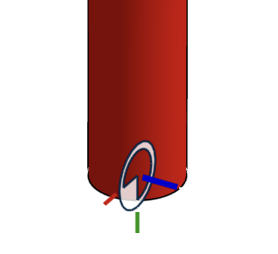
I'm trying to use mate connectors to determine orientation. So in my case I want the wiring direction to be the Z axis of the MateConnector.
I've tried this so far:
var cSys is CoordSystem = evMateConnector(context, {
"mateConnector" : definition.startConnector
});
var startOrigin = cSys.origin;
var primaryAxis = cSys.zAxis;
var plane = plane(startOrigin, perpendicularVector(primaryAxis));
var sketch = newSketchOnPlane(context, id + name, {
"sketchPlane" : plane
});
skLineSegment(sketch, "line" ~ name, {
"start" : vector(0, 5) * millimeter,
"end" : vector(0, 0) * millimeter,
});
0
Comments
-
You are setting your plane to only be perpendicular to the Z axis, but your plane needs to be such that the X axis is also set.
plane(origin,zaxis,xaxis) will ensure that the plane is in a predictable direction so that you can have the X or Y axis of your sketch correspond to the Z direction.
Another option you have is to use opFitSpline. If you only put two points into a fitspline it comes out as a straight line.
That might get you your result more easily than creating a sketch just to create a line, as you can just put two 3d points in, such as your origin and origin+length*direction.
www.smartbenchsoftware.com --- Renaissance --- Kestrel -- SmartLink
Experts in Onshape Automation - Custom Features and Integrated Applications1 -
or just get the direction with this

export function directionTo(fromPoint ,toPoint )
{
    return normalize(toPoint-fromPoint);
}
If you need to make a line, this is by far the fastest method I have created below. The function accepts either 3d Vectors or a 3 dimension array of point values in meters. which is even faster.
function opLine(context is Context, id is Id, startPoint, endPoint)
{
         @opCreateBSplineCurve(context, id, {
                "bSplineCurve" : { "controlPoints" : [startPoint, endPoint], "degree" : 1, "dimension" : 3, "knots" : [0, 0, 1, 1], "isPeriodic" : false, "isRational" : false }
         });
}
sorry for the formatting above.1 -
Thanks @Caden_Armstrong and @Jacob_Corder. Your guidance greatly helped expand my understanding and I managed to do what I needed from this. Since I wanted to use the positive Z direction of the Mate Connector I had to play a bit with fromWorld but I think I got there eventually!
1

