I am using translation to export partStudio to STL but unit millimeter not working ?

This is my payload.
{
formatName: "STL",
storeInDocument: false,
specifyUnits: true,
unit: "millimeter",
resolution: "fine",
chordTolerance: 0.06,
angularTolerance: 0.04,
maximumChordLength: 0.1,
flatten: true,
flattenAssemblies: true,
scale: "1.0",
useYAxisAsUp: true,
excludeHiddenEntities: true,
distanceTolerance: 0.06
}
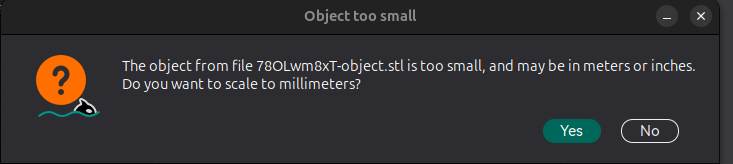
I'm getting an error when opening the stl exported file in Orca Slicer it's not in millimeters.
Best Answer
-
Should be able to, generally anything documented is allowed:
https://cad.onshape.com/glassworks/explorer/#/Document/export2Jsonwww.smartbenchsoftware.com --- Renaissance --- Kestrel -- SmartLink
Experts in Onshape Automation - Custom Features and Integrated Applications0

Answers
-
the field is "units" not "unit"
www.smartbenchsoftware.com --- Renaissance --- Kestrel -- SmartLink
Experts in Onshape Automation - Custom Features and Integrated Applications0 -
@Caden_Armstrong field units also not working in the API explores its unit.
API explorer part studio create translation
In the screenshot, you can see its unit but units also do not work for me.
Thanks 0
-
its not work with units as well.
in API Explorer it's unit, not units.0 -
I was looking at the /api/documents/…/export endpoint.
That endpoint can support "units", and typically I use it over the /translations endpoint.www.smartbenchsoftware.com --- Renaissance --- Kestrel -- SmartLink
Experts in Onshape Automation - Custom Features and Integrated Applications0 -
Caden can we use that end point using the OAuth2 Access token?
0 -
@Caden_Armstrong thank you can we use document export end point with OAuth2 Access token ?
0 -
Should be able to, generally anything documented is allowed:
https://cad.onshape.com/glassworks/explorer/#/Document/export2Jsonwww.smartbenchsoftware.com --- Renaissance --- Kestrel -- SmartLink
Experts in Onshape Automation - Custom Features and Integrated Applications0 -
@Caden_Armstrong thanks works
0