STL Import Translation Failed

simon_powell
Member Posts: 5 ✭

Any idea why this would happen? It's my first time importing a file into Onshape so maybe I'm missing something...
0
Best Answers
-
Onshape does not directly support STL (or any other 'mesh' format for the matter)... not sure why it states that the Type is translatable, maybe something has changed recently that I'm not aware of. You will need to import it in a solid (BRep) format. There is the STLWorkbench application that allows you to do some stuff to the file or alternatively you can download and use InStep (either through the App or directly from the Solveering.com site) to convert to a BRep format, upload and work with it natively in Onshape.
5 -
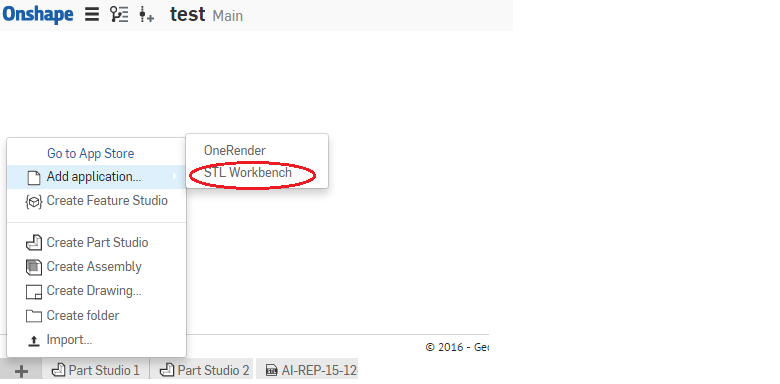
@ simon_powell , You can import STL file to Onshape using a App called "STL Workbench ". Please find the below link for that,
https://appstore.onshape.com/apps/Manufacturing/7HDAPQAKPRCPKY45SCMSMGFJCXYG5AZZIX3IXDI=/description


4 -
We support OBJ and STL imports. However we currently don't allow meshes with self-intersection or zero-area faces. If you open the notification and click show more, you will see if the mesh passed body check.
We're continuing to improve our mesh repairs. Sharing your models with supports could help us track down the problems.5


Answers
-
Onshape does not directly support STL (or any other 'mesh' format for the matter)... not sure why it states that the Type is translatable, maybe something has changed recently that I'm not aware of. You will need to import it in a solid (BRep) format. There is the STLWorkbench application that allows you to do some stuff to the file or alternatively you can download and use InStep (either through the App or directly from the Solveering.com site) to convert to a BRep format, upload and work with it natively in Onshape.
5 -
@ simon_powell , You can import STL file to Onshape using a App called "STL Workbench ". Please find the below link for that,
https://appstore.onshape.com/apps/Manufacturing/7HDAPQAKPRCPKY45SCMSMGFJCXYG5AZZIX3IXDI=/description
4 -
We support OBJ and STL imports. However we currently don't allow meshes with self-intersection or zero-area faces. If you open the notification and click show more, you will see if the mesh passed body check.
We're continuing to improve our mesh repairs. Sharing your models with supports could help us track down the problems.5 -
Thanks for all your help! It seems like STL Workbench is the best option so I'll give it a try.0
-
Im not seeing STL Workbench in the app store at all. I've tried every combination of search query.
 0
-
It was discontinued years ago, unfortunately.
Senior Director, Technical Services, EMEA0
