Welcome to the Onshape forum! Ask questions and join in the discussions about everything Onshape.
First time visiting? Here are some places to start:- Looking for a certain topic? Check out the categories filter or use Search (upper right).
- Need support? Ask a question to our Community Support category.
- Please submit support tickets for bugs but you can request improvements in the Product Feedback category.
- Be respectful, on topic and if you see a problem, Flag it.
If you would like to contact our Community Manager personally, feel free to send a private message or an email.
How to create angled sketch?

demetris_stavrou
Member Posts: 2 ✭
Let's assume I have cube and I want to create a cylinder hole on that cube. The cylinder needs to have a specific angle with respect to the cube surface. I imagine I have to create a plane with that angle. What is the procedure to achieve this?
Thank you!
Thank you!
Tagged:
0
Best Answer
-
Hi @demetris_stavrou , you need to create a Line Angle plane.
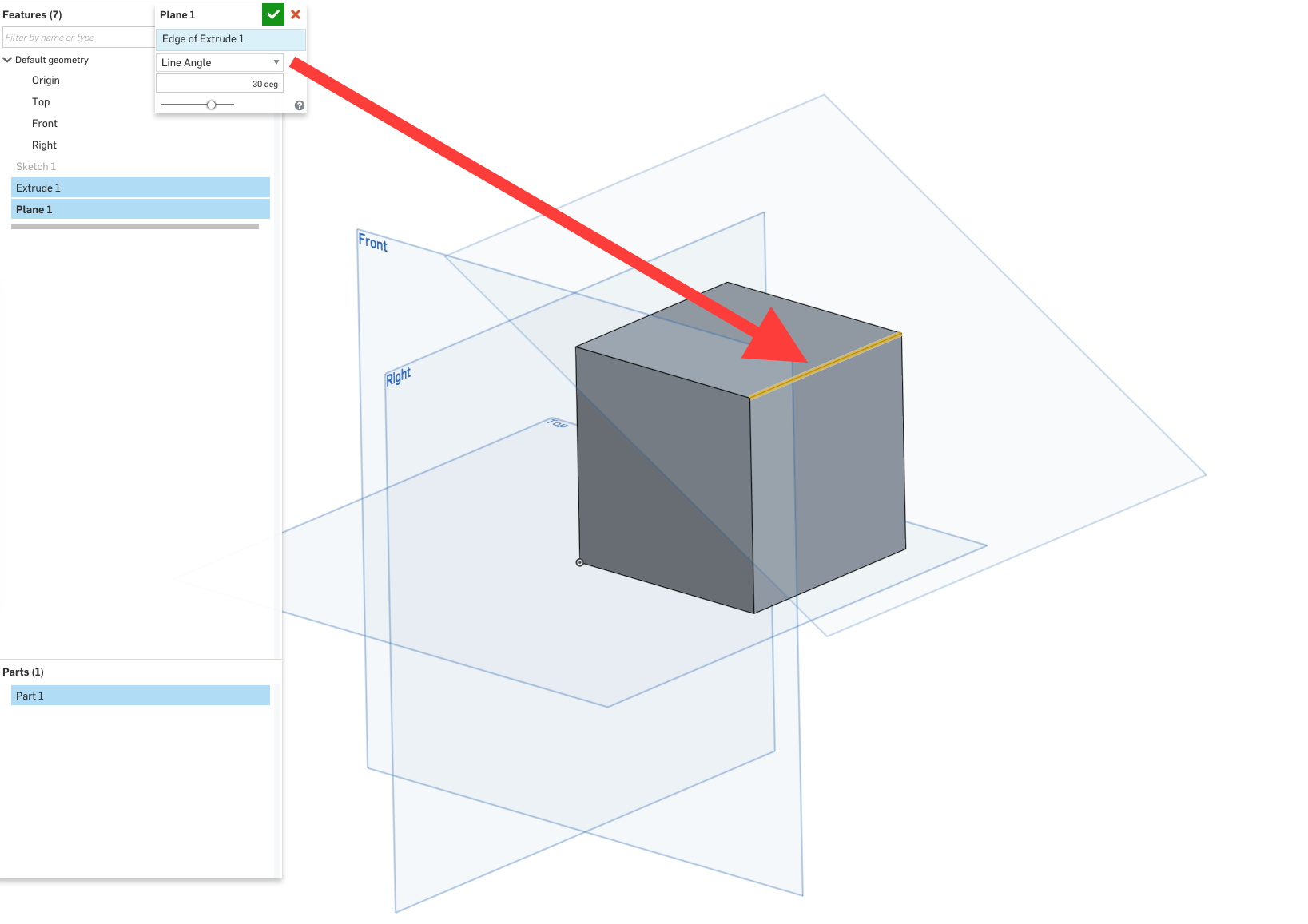
https://cad.onshape.com/help/index.htm#cplane.htm?Highlight=line angle
Nicolas Ariza V.
Indaer -- Aircraft Lifecycle Solutions5

Answers
-
Hi @demetris_stavrou , you need to create a Line Angle plane.
https://cad.onshape.com/help/index.htm#cplane.htm?Highlight=line angle
Nicolas Ariza V.
Indaer -- Aircraft Lifecycle Solutions5 -
This solves my problem. Thank you!
0 -
How would this work if my shape was cylindrical with a 45 degree face, and I needed to have holes at a 36 degree angle?
 0
0 -
-
Yes, that's what I need to do, but I can't get the 45 degree plane. I played with it and can't get it to cooperate. How did you make yours?
0 -
@karen_bogoski
try removing the 2nd direction from extrude. Steve had that because plane at is above and below the angled face so the extrude needs to go both ways to complete. it just has to do with how the plane is positioned.www.accuratepattern.com1 -
0
-
I'm sorry, I just don't get it. Steve's extrude is after the angled plane is created, it's working off the revolve.0
-
When I add the angled construction line my document sees it as part of the front plane and not the edge and vertex of sketch one.0
-
Yes. If you step through his Feature list you should get the logic. Sketch 1 has both the geometry for Revolve and the construction line dimensioned for the Plane creation. Then the hole sketch is made on that plane and remove Extruded from the Part. The angle of the hole is really driven by the dimension to construction line in Sketch 1.karen_bogoski said:I'm sorry, I just don't get it. Steve's extrude is after the angled plane is created, it's working off the revolve.
We may be best able to see what is wrong if you share a public URL - see instructions here.karen_bogoski said:When I add the angled construction line my document sees it as part of the front plane and not the edge and vertex of sketch one.
Also - the Learning Center is very effective for understanding Onshape.www.accuratepattern.com0 -
@karen_bogoskiAS BRUCE SAYS — Sketch 1 has both the geometry for Revolve and the construction line dimensioned for the Plane creation.
 0
0 -
@karen_bogoski
OK, after you make the plane shown in the GIF above, you can use that plane to sketch the circle for your extrude
0 -
https://cad.onshape.com/documents/dbaac5daf3b47938a1fafe86/w/f0ca036a3382a7bc2c27ac9f/e/d7b29cefb328bda3f35efa3b
What kind of circle cursor is that?0 -
0
-
@karen_bogoski
Oops !
You were asking about the CURSOR
Not what circle tool I used
The cursor is on my Onshape iPhone app. You’re not gonna find that kind of a cursor on Onshape’s browser apps — at least not that I know of
I will say this — It is a nice feature of the mobile app 0
0 -
Steve_Shubin, When you do these same steps in the desktop app, do you get the same results? When I open the plane tool and try to select my construction line it shows in the dialogue box as the front plane not the construction line like in yours. I don't understand why mine is different.0
-
I think this is what your looking for.
https://cad.onshape.com/documents/2855ee75a49186358cc8b2f6/w/9e1deac08d01e6fd0d38ed2b/e/408bfc07d847fbec6d0874aa
0 -
@karen_bogoski
make sure you are selecting the line; not the sketch or plane
You may need to use trial and error in the features to understand them. And they all depend on correct selection.www.accuratepattern.com0 -
@karen_bogoski
If an existing plane keeps getting in the way of your selecting something, then hide the plane. In fact you might as well hide all the planes right now, as you don’t need them to show at this time

 0
0

