Export rules does not apply to multiple exported files inside ZIP file

As my title: Export rules does not apply to multiple exported files inside ZIP file.
So I have several drawings I need to export to PDF. its over 20, so it's not impossible to do one and one( but this is not scalable in the long run, if I add 20 more parts and do a new revision its not unlikely I need to do 40 exports)
Any work around or is there a specific export option to make the items inside the zipped file to follow the export rules?
Also any ETA on this feature if its not already available?
Answers
-
Bumping this, as it is really a needed feature.2
-
Yes yes yes, this is SO needed.2
-
Bumping again. I thought this was just a me problem, I can't believe it's actually not supported.
1 -
it’s possible the Onshape team doesn’t know it’s needed. Maybe create an improvement request or vote for an existing one.
0 -
You’re definitely not alone!
0 -
I'm confused. Almost a year ago this improvement happened for things in zip files:
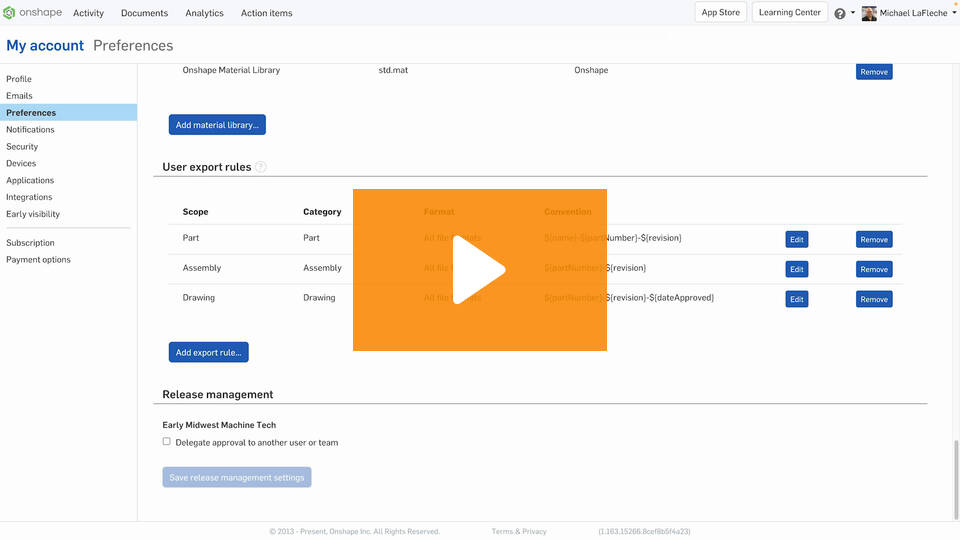
Improvements to Onshape - April 28th, 2023 — Onshape
Yet this thread is active and there are a bunch of improvement requests which haven't been marked complete.
For example:
and/or here:
oh, and here:
and there's also this:
and this:
Can someone who knows this stuff inside and out ( @PeteYodis ? ) take a look at this stuff and help update the status of the improvement requests?
Simon Gatrall | Product Development, Engineering, Design, Onshape | Ex- IDEO, PCH, Unagi, Carbon | LinkedIn
0 -

@marshallwentworth @nick_brown567
Is it possible you don't know about setting Export rules in your account preferences?
 0
0 -
@S1mon I was hopeful I had just missed something, but I checked again. The export rules do not apply they way I want them to. The desired outcome I'm looking for is that I export a part studio or assembly, check the "Export unique parts as individual files" button, and receive a .zip file. That zip should be named whatever the assembly name is, and then the files inside that folder should all have the names as if I had exported each of them individually.
When I do this for STLs at least, I don't get that behavior. It does not apply my export rules at all when exporting multiple parts at once.0 -
It works fine for me. At least for the parts. I haven't tested extensively though
0 -
Just confirmed with PDF's. I added rule… ${document.name}_${name} to my drawing output rules and the files inside the zip take on the name of the document plut the drawing tab name.
0 -
Haven’t stress-tested it yet
0 -
cool
0 -
Someone suggested "create an improvement request or vote for an existing one". How does one do this. I keep having to rename 70 files because onShape doesn't respect the file naming rules from preferences, at least when exporting multiple files. I would love to vote for this getting fixed.
1 -
I have this problem as well. Works fine for single parts but zipped parts do not follow the convention.
1 -
HEY ONSHAPE! YOU NEED TO FIX THIS NOW. Batch export that includes export rules for part files (step or other format), not just drawings (PDF or DXF or whatever). And a simple way to include the most recent released version of all parts in a document.
1 -
Thread bump because it came up with one of my coworkers' export process. Zip files of multi-part exports from a part studio or assembly still forcefully grab the zip file name and append it to the files within the zip. As much as I love Microsoft Powertoys, we'd like this to be fixed so we don't need to use power rename.
3 -
Jumping in here as well as it is important!
Its critical to be able to mass export step files with the part number in the filename when you have 100s of parts.
1 -
Bumping again, this is very frustrating!
1 -
For me it is critiacal that you can export a full assembly and it should include the Part Numbers and Revs from the instance list properties in the names of all the assembly components. (currently it only has the part names and the export rules don't work to sub assemblies or components to add this information) We are not just exporting individual part and drawings or sub assemblies to manufacturing. Sometimes we have to export full top level assemblies to CM's which should maintain all the PDM data that is critical to avoid mistakes of confusion. Otherwise they can not easily reference the assembly data to the part data and the BOM data.
1 -
This is a problem for me as well. We don't just share parts and drawings files with manufacturing. We also share STEP or X_T large Assembly files including top level assemblies with CM's so they can understand how an assembly is built . Those assembly files do not have any of the instance list properties (part number and revisions) critical PDM information of parts in the tree so it make them difficult to match up with BOM's and Individual Part Files. OnShape export rules only apply to the top level of the file you are exporting. I think STEP AP242 should be capable of containing this rich PDM information in the tree.
1 -
I remember the day the "bulk export" option was released. I was so excited to use it and immediately was disappointed to find export rules don't apply. In a release containing 20 parts and drawings, it can burn up 10 soul-crushing minutes clicking export, wait for the popup, save, export, wait, save, etc. We now have a custom Onshape to Dropbox connector developed (thanks CADSharp) to get the job done and have been using it for around 3-4 years. I'm worried though now with Onshape implementing API limits that I will overrun the limits.
0 -
This seems to be a problem still - I do not see the same UI that is shown in the improvements video - if I select multiple parts in a part studio or assembly studio, the first box in the dialog is NOT called "zip file name" it is just called "file name" so that right there says there is something wrong - I do not get an interface that looks like it knows it is creating a zip file.
1