Shadow from point source?

Hey! Does anyone know if there are featurescripts out there that generate a shadow of a part from a point source? I've tried all of the related featurescripts (Shadow, Outline, Project Body), but they all seem to project the edges of a part from a planar light source as opposed to a point source. I can certainly do this manually for each part, but it seems like it could be possible to make a featurescript that could do this for any arbitrary geometry. Any help would be much appreciated.
Comments
-
Feels like a variation on the Solid Sweep problem, except you've got it in loft flavor instead. I've got some whitepapers that handle the swept case waiting for a rainy day to implement but this doesn't seem too far from that.
0 -
Wans't there a ray trace FS published recently? I remember it being discused here on the forum.
0 -
There is a feature that projects the shadow onto the surface.
But the shadow is for an infinite far light source, so its not quite what you're trying to do.
https://forum.onshape.com/discussion/comment/61460www.smartbenchsoftware.com --- Renaissance --- Kestrel -- SmartLink
Experts in Onshape Automation - Custom Features and Integrated Applications0 -
From @EvanReese
https://cad.onshape.com/documents/de8cbd559bd2dcc347c38ff3/w/3603b1286161ccca20f2e841/e/b1db47e3a33d6461f8e732c1Simon Gatrall | Product Development, Engineering, Design, Onshape | Ex- IDEO, PCH, Unagi, Carbon | LinkedIn
0 -
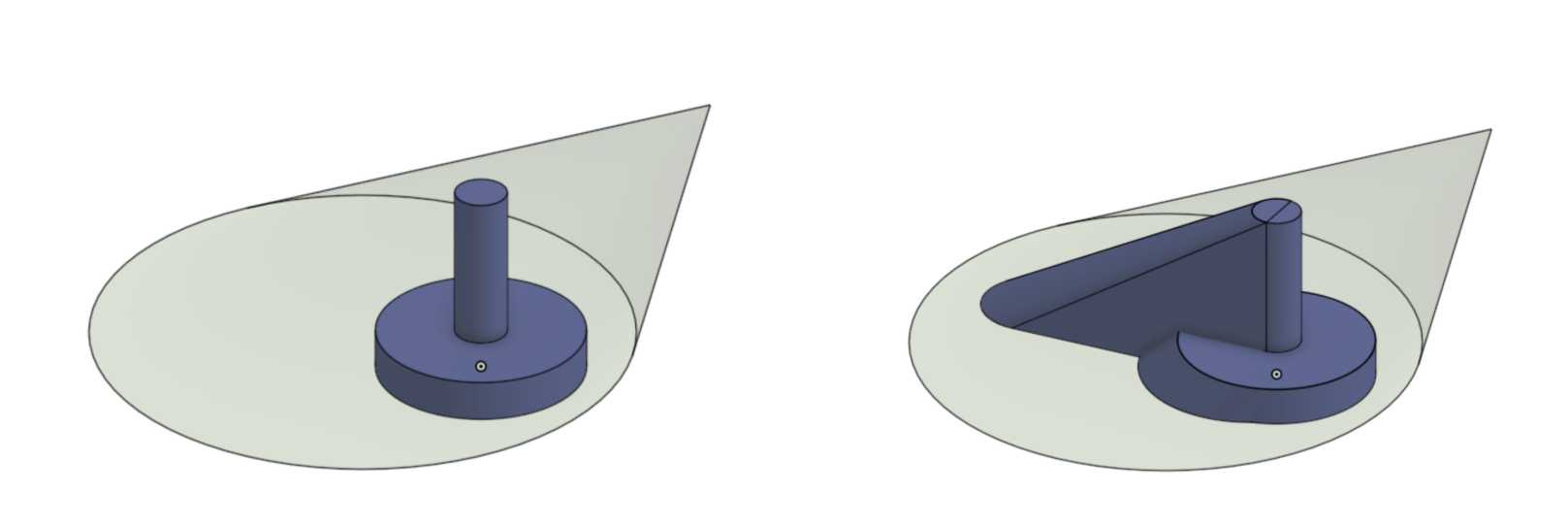
Optics won't be much help in casting shadows from a point source and I'm not aware of a feature that will. This kind of problem seems related to isoclines, but not perfectly so. One idea to force FeatureScript to do something like projection from a point is to scale the input body from the point till it is fully through the plane you're casting onto, then lofting between them somehow (face-by-face, splitting as needed?), which means I agree with @Derek_Van_Allen_BD that it's kind of like a Body Loft operation. For simpler things like your example, you can do this manually the same way, like this. For curvy shapes, i'm not sure yet.

 1
-
Thanks for the help guys. I was also wondering if there was a way to do a swept body - interesting that it's been discussed before. I attempted to recreate that by doing a linear pattern + scale at really small intervals and booleaning them all together. Pretty disgusting brute force strategy, but even that failed to be robust to any complex geometry.
I'll keep exploring..0 -
The classic case for swept bodies it to simulate CNC cutting tools. I imagine something like that will make it to Onshape eventually for that reason.
0 -
I suppose you could export the model, convert it to a format (like .obj) that a actual raytracer can use. But then getting the result back into onshape (if you need that) is another headache
0





