Welcome to the Onshape forum! Ask questions and join in the discussions about everything Onshape.
First time visiting? Here are some places to start:- Looking for a certain topic? Check out the categories filter or use Search (upper right).
- Need support? Ask a question to our Community Support category.
- Please submit support tickets for bugs but you can request improvements in the Product Feedback category.
- Be respectful, on topic and if you see a problem, Flag it.
If you would like to contact our Community Manager personally, feel free to send a private message or an email.
First project challenge — bending irregular geometry in Onshape

Hi, this is my first full project in Onshape. I’m still very much a beginner, and my goal is to turn a vacuum into my favorite droid — R2-D2 from Star Wars.
Right now I’m stuck trying to bend one of R2’s arms and could really use some advice.
At first I tried using projected curves, but I found that both the top and front profiles weren’t simple enough to just project — I had to sketch them out manually. From those sketches I built a 3D part, and now all that’s left is to bend it.
The problem is, I can’t figure out how to do the bend properly because the part doesn’t have a single straight face to work from.
Here are a couple images of what I’ve got so far:
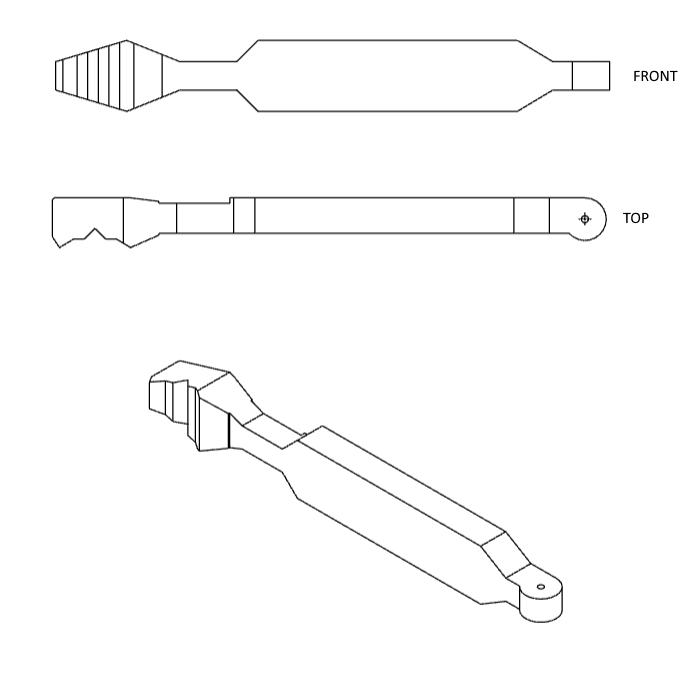
And here’s the link to my Onshape document if anyone wants to take a closer look:
Has anyone run into this before or know a good way to approach it?
I am open to any ideas, even if that means starting over
Answers
-
@rico_nijeboer …. your answer is here:
0 -
your other answer is you can’t bend it. You have to model it bent.
0 -
@MDesign thanks for the direction, I am having a little trouble in doing so.
You see, at first I just had the front face, I used 2 curves and projected that face to two planes connecting them into one face or maybe even with lofts (I am not entirely sure about which one, I think I tried both)
Then i found out that the top sketch had to be made, which lead me on a tangent that i now have the current top sketch, which is the exact one that broke my brain.
As for your comment @john_lopez363 ; I have indeed been working through the learning center and will continue doing so, but I really just wanted to work on the first part which I thought should be doable, seeing I personally learn better by just trying out until I get to the point of finishing it (I know that might be wierd, but as a Software Engineer by trade I love just bashing my head against a wall until a feature works). If you have any recommendation as to which learning center item would actually help me complete this part, that'd be very helpful as I see you've linked just the overview page I would honestly have no clue where to find my answer as fast as possible so I can continue with the rest of my learning journey.
That said, if anyone else might have an idea/little more thought out perspective of target steps, please do share them. All help is appreciated!
0 -
You're link to your document doesn't seem to be working. If you can get that to work maybe myself or others can see what your trying to do.
0 -
Ah you are right, the link to the version I think was best effort is: https://cad.onshape.com/documents/2b69383e752cebbf3da693b9/v/d594719a7b1cd5dbe606cccb/e/8b1bbebb210eac9fc9dc9390?showReturnToWorkspaceLink=true
0 -
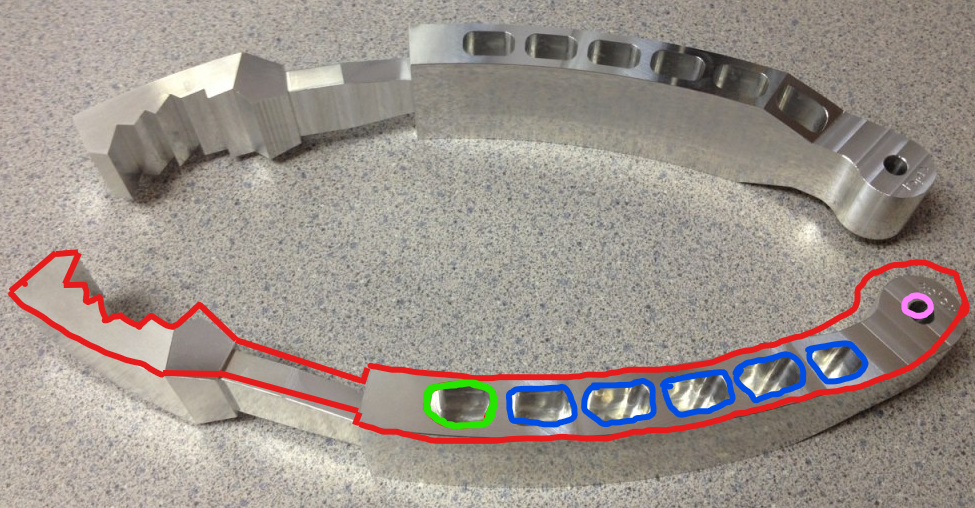
Based on this image in your document…It looks like a simple extrude will capture most all of the curved features. Then you'd just need to work out the opposing cuts/angles to get the rest of it. Red represents what might be the first extrude feature., pink a hole feature. and blue a circular pattern feature.
1 -
That thing is sure milled as is. Why design it straight and virtually bend it, when it is not even manufactured by postforming?
0

