Pattern (fill) across adjacent faces vs. merge adjacent faces.

I am interested in recreating this pattern of a lattice across multiple adjacent faces. My difficulty is in duplicating the way the lattice conforms to the bends/fillets.
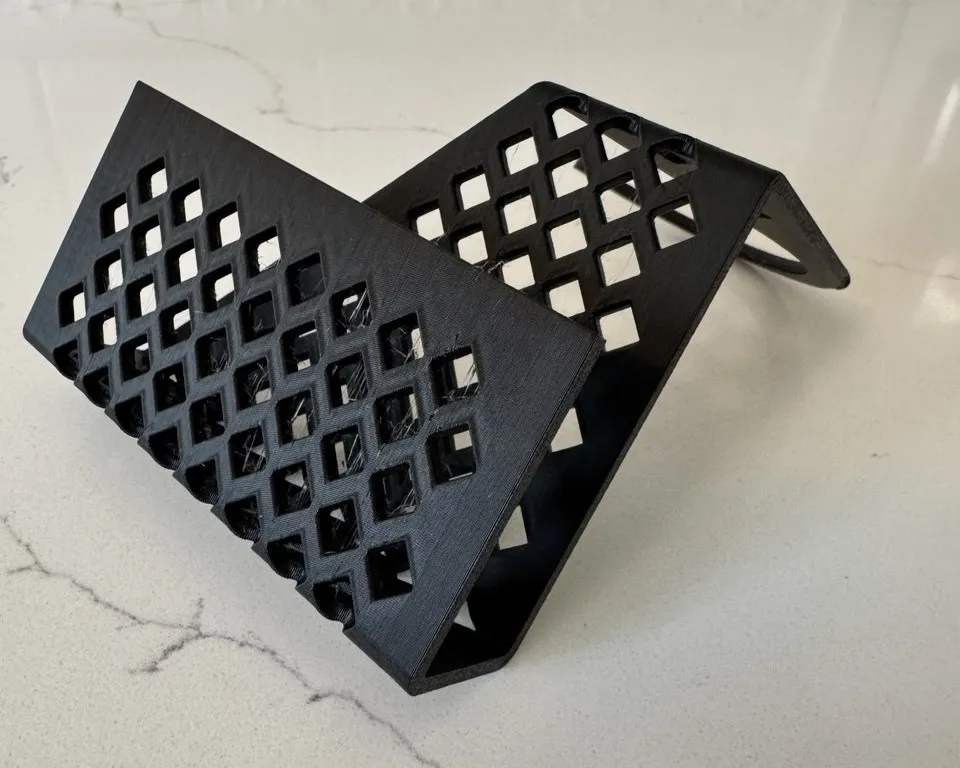
Performing the straightforward sketch-extrude-fillet sequence results in multiple adjacent faces and presumably I need to build this as one surface (I think surface and face are synonymous) or figure out how to merge adjacent faces into one. There doesn't seem to be a Boolean for this however. I'm sure I'm not the first person with this situation but everything I find about patterning or filling assumes one is working with a single surface. Any advice is appreciated.
Answers
-
Hey @ronald_sokoloff,
Have a look if one of these two custom features would work for you:
- https://cad.onshape.com/documents/573f7d70e4b0fddafb52148c/v/0edea0fa2707e715d040e74f/e/2dc22a6a95896a5243812d07
- https://cad.onshape.com/documents/d1489499c6bfdc52ce5cf32a/v/c8434e78be6e712bab86bd1d/e/9b854258e733b074421b705a
Cheers
0 -
You can achieve geometry like this by modeling it as sheet metal and then applying your sketch and cuts to the flat pattern view. Onshape will take care of wrapping the corner geometry for you with this method, but unfortunately there are way fewer features custom or otherwise that operate in the 2d sheet metal domain.
0


