Welcome to the Onshape forum! Ask questions and join in the discussions about everything Onshape.
First time visiting? Here are some places to start:- Looking for a certain topic? Check out the categories filter or use Search (upper right).
- Need support? Ask a question to our Community Support category.
- Please submit support tickets for bugs but you can request improvements in the Product Feedback category.
- Be respectful, on topic and if you see a problem, Flag it.
If you would like to contact our Community Manager personally, feel free to send a private message or an email.
Help With PCB Tutorial - Instructions Not Producing Same Results

I'm trying to do "Exercise: Creating a PCB Board" from section 3 of the tutorial. I am not getting results that match what is shown.
I've gone through each step multiple times and tried to verify every tiny detail, but I can't find what is different.
I continue to end up with a PCB Studio that reports 0 components and 2 keep-out areas, but then only shows the green outline of the PCB and no visual for either of the keep-out areas.
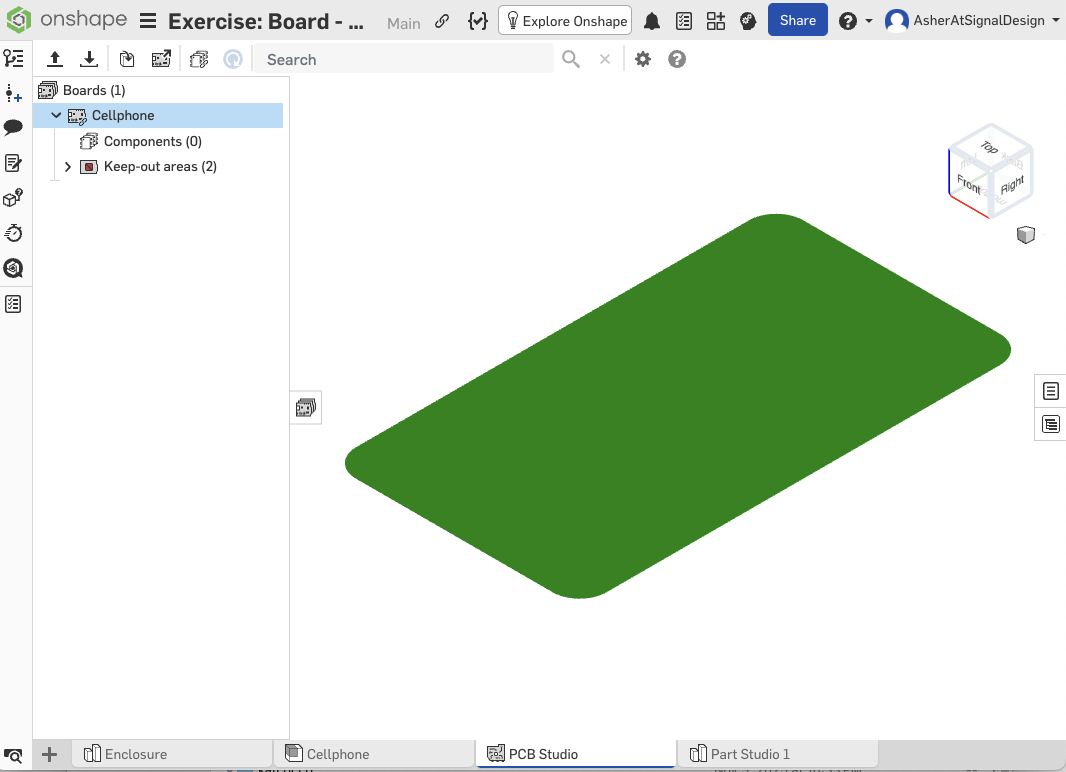
Not surprisingly, the export contents also do not correspond, so it's not just a display issue.
I imagine it's something simple, but I'm at a loss for the moment. Any help would be much appreciated!
Answers
-
I've tried verifying the link from a private session and it tells me no permission. Unclear why, as I have both enabled link sharing and also made the document public. I'm on a teams trial. Please let me know if it's also not working for you and you know how to fix it.
0 -
When you paste the link and hit enter there may be a little spinning wheel next to the link. Wait for the wheel to stop spinning before posting comments.
0 -
