Somehow filter out default planes when using qEverything()

I have a little customized delete feature that lets me delete from the part studio the inverse of what is selected. Sometimes I will import data and there will be alot of stuff in the part studio. So, I derive the studio into other ones and I use this inverses delete feature to select the parts I want to keep and delete everything else. Then I can sort of divide and conquer the large studio into smaller chunks for precise editing. I cannot figure out how to remove the default planes from the selection of qEverything.
Best Answers
-
Figured I might as well post my own answer here. Just found that this works
var allParts = qEverything(EntityType.BODY);
const sheetParts = qBodyType(allParts, BodyType.SHEET && ConstructionObject.NO);
The "ConstructionObject.NO" was my missing condition.
0 -
Ends up this works(for real)
var allParts = qEverything(EntityType.BODY);
const defaultPlanes = qUnion(
  [qCreatedBy(makeId("Right"), EntityType.BODY),
  qCreatedBy(makeId("Front"), EntityType.BODY),
  qCreatedBy(makeId("Top"), EntityType.BODY)]
);
allParts = qSubtraction(allParts, defaultPlanes);
0
Answers
-
Figured I might as well post my own answer here. Just found that this works
var allParts = qEverything(EntityType.BODY);
const sheetParts = qBodyType(allParts, BodyType.SHEET && ConstructionObject.NO);
The "ConstructionObject.NO" was my missing condition.
0 -
I jumped the gun. 😂. That actually does not work.
0 -
Ends up this works(for real)
var allParts = qEverything(EntityType.BODY);
const defaultPlanes = qUnion(
  [qCreatedBy(makeId("Right"), EntityType.BODY),
  qCreatedBy(makeId("Front"), EntityType.BODY),
  qCreatedBy(makeId("Top"), EntityType.BODY)]
);
allParts = qSubtraction(allParts, defaultPlanes);
0 -
You might like my Keep Part custom feature, which I am realizing I never made a forum post about despite it being my first published feature. I'm gonna go do that real quick.
There we go. Posted and published.0 -
Also see: defaultFeatures.fs for
qDefaultBodiesandqFrontPlaneetc.1 -
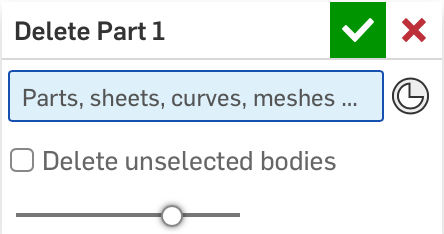
@MBartlett21 created his own "Delete part" feature a long time ago which has a "delete unselected bodies" toggle. I've used this for a while to do the same thing.
Simon Gatrall | Product Development, Engineering, Design, Onshape | Ex- IDEO, PCH, Unagi, Carbon | LinkedIn
1 -
Thanks, I will test those functions
0