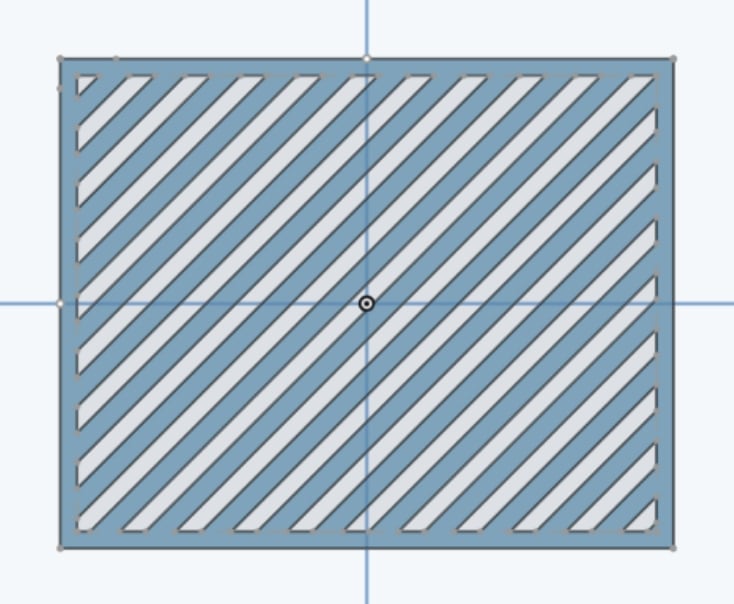
How do I pattern this diagonal rectangle with margin?

I'm trying to make slotted vents, but I want a margin.
Here is example document: https://cad.onshape.com/documents/9bf0605c7ae6be7e39bdbfc0/w/14b32d86eb49e455462613b6/e/f9c6da32b90cd363423a8d65?renderMode=0&uiState=6971e60c92c54096fa6e5d86
I fear I may need to do a large pattern that extends beyond the margins and then some complicated boolean operations but I am not competent enough to put all the pieces together.
Any assistance would be greatly appreciated. Thank you.
Best Answer
-
Hello. If squared ends to the slots is not essential, it's not too difficult. A sketch linear pattern of slots across a rectangle that is the size of your 'object' and then wiping the trim tool across unwanted elements will leave sketch faces to extrude into a single part. Having not tried it, I can only imagine keeping squared ends being a good bit complicated.
If your simply after ventilation, there is a custom feature script available called Fill Pattern that includes a 'margin' option.
- Scotty
0
Answers
-
Hello. If squared ends to the slots is not essential, it's not too difficult. A sketch linear pattern of slots across a rectangle that is the size of your 'object' and then wiping the trim tool across unwanted elements will leave sketch faces to extrude into a single part. Having not tried it, I can only imagine keeping squared ends being a good bit complicated.
If your simply after ventilation, there is a custom feature script available called Fill Pattern that includes a 'margin' option.
- Scotty
0 -
Ah, Extrude Thin results in square corners. - Scotty
0 -
Oh huh, there's a trim tool? That seems like a good option. Also I didn't know about the feature script. Thank you for great options. Greatly appreciated.
0