Welcome to the Onshape forum! Ask questions and join in the discussions about everything Onshape.
First time visiting? Here are some places to start:
- Looking for a certain topic? Check out the categories filter or use Search (upper right).
- Need support? Ask a question to our Community Support category.
- Please submit support tickets for bugs but you can request improvements in the Product Feedback category.
- Be respectful, on topic and if you see a problem, Flag it.
If you would like to contact our Community Manager personally, feel free to send a private message or an email.
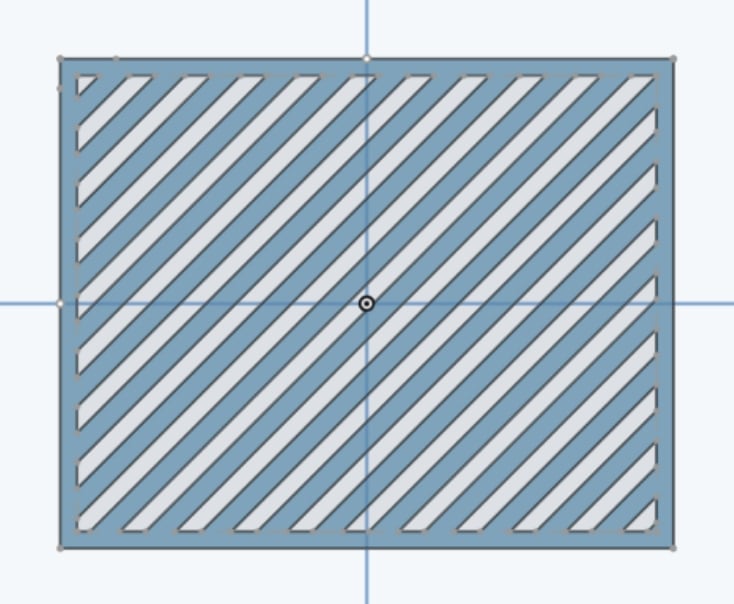
How do I pattern this diagonal rectangle with margin?

I'm trying to make slotted vents, but I want a margin.
Here is example document: https://cad.onshape.com/documents/9bf0605c7ae6be7e39bdbfc0/w/14b32d86eb49e455462613b6/e/f9c6da32b90cd363423a8d65?renderMode=0&uiState=6971e60c92c54096fa6e5d86
I fear I may need to do a large pattern that extends beyond the margins and then some complicated boolean operations but I am not competent enough to put all the pieces together.
Any assistance would be greatly appreciated. Thank you.
Best Answer
-
Hello. If squared ends to the slots is not essential, it's not too difficult. A sketch linear pattern of slots across a rectangle that is the size of your 'object' and then wiping the trim tool across unwanted elements will leave sketch faces to extrude into a single part. Having not tried it, I can only imagine keeping squared ends being a good bit complicated.
If your simply after ventilation, there is a custom feature script available called Fill Pattern that includes a 'margin' option.
- Scotty
0
Answers
-
Hello. If squared ends to the slots is not essential, it's not too difficult. A sketch linear pattern of slots across a rectangle that is the size of your 'object' and then wiping the trim tool across unwanted elements will leave sketch faces to extrude into a single part. Having not tried it, I can only imagine keeping squared ends being a good bit complicated.
If your simply after ventilation, there is a custom feature script available called Fill Pattern that includes a 'margin' option.
- Scotty
0 -
Ah, Extrude Thin results in square corners. - Scotty
0 -
Oh huh, there's a trim tool? That seems like a good option. Also I didn't know about the feature script. Thank you for great options. Greatly appreciated.
0